Building a Minimal Document
Introduction
Welcome back to Your First LaTeX Document! In the previous lesson, we explored what LaTeX is and walked through the write-compile-view workflow that turns plain text into a polished PDF. Now, in this second lesson of the course, we will roll up our sleeves and build a working LaTeX document from scratch.
By the end of this lesson, you will understand the three structural pieces that every LaTeX file requires, and you will be ready to write, compile, and view your own documents independently.
Every Document Needs a Blueprint
Before we look at any code, let's build a mental picture. Imagine you are setting up a small event. First, you decide what kind of event it is — a dinner, a meeting, a party. Then you handle the behind-the-scenes setup: decorations, seating, equipment. Finally, the event itself takes place with the actual guests and activities.
A LaTeX document follows a similar pattern with three distinct layers:
- A declaration that states what kind of document we are creating.
- A preamble area where we configure settings before any content appears.
- A body that holds all the visible content.
Every valid LaTeX file, whether it is four lines or four hundred pages, contains these three parts in this exact order. The annotated skeleton below shows where each zone lives:
Let's explore each zone step by step.
The Document Class Declaration
The very first line of any LaTeX file tells the compiler what type of document we want. This is called the document class declaration, and it looks like this:
The command \documentclass is followed by a class name inside curly braces. The class article is the most common choice for short documents, homework, and papers, and it is what we will use throughout this course. Other classes exist (such as report for longer works or book for full-length books), but article covers everything we need right now.
This single line acts as a set of default instructions. It tells LaTeX what page size to use, how to handle headings, what font sizes are available, and more. You just pick the class and LaTeX takes care of the details.
The Document Body
Next, we need to tell LaTeX where our actual content begins and ends. We do this with a pair of commands that wrap around our text:
Everything between \begin{document} and \end{document} is the document body. This is where your text, paragraphs, and eventually formulas will live. Any content placed outside this pair will not show up as visible text in the final PDF.
Think of \begin{document} as opening a door and \end{document} as closing it. The compiler only typesets what is inside.
Our First Complete Document
Let's combine these two pieces. The smallest valid LaTeX document looks like this:
Just four lines. When you compile this file, LaTeX produces a PDF containing the text "Hello, world!" with default article formatting: a standard font, comfortable margins, and automatic page numbering. Remember, the PDF will not appear until you run the compiler — the source file is plain text, and the formatted output is created during compilation.
You may notice we skipped the preamble entirely here. That is perfectly valid. If you have nothing to configure, the preamble can simply be empty. Let's look at what the preamble does when we do want to configure something.
The Preamble
The region between \documentclass{article} and \begin{document} is called the preamble. It is where you place configuration settings and document-level information before any visible content begins.
A common use of the preamble is to declare a title, author, and date for the document. These commands store information but do not display anything on their own:
Notice the command \maketitle inside the body. It tells LaTeX to generate a formatted title block using the information stored in \title, \author, and \date. Without \maketitle, the title, author, and date would be defined but never shown. In short: those commands configure; \maketitle displays.
Technically, \title, \author, and \date can be placed anywhere before \maketitle — including inside the body itself. In practice, writers put them in the preamble because it keeps all document-level settings in one predictable place, making the file easier to read and edit.
The flow looks like this:
- In the preamble:
\title{My First Document},\author{Jane Doe}, and\date{April 2026}store the document's title information — nothing is displayed yet. - In the body:
\maketitlereads all three values and renders them together as a formatted title block.
Here is a quick summary of the three structural parts:
| Part | Location | Purpose |
|---|---|---|
\documentclass{...} | Very first line | Sets the document type |
| Preamble | Between \documentclass and \begin{document} | Configuration and setup |
| Body | Between \begin{document} and \end{document} | All visible content |
Writing Paragraphs
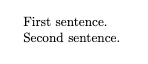
In most word processors, pressing Enter starts a new paragraph. LaTeX handles this differently. To create a new paragraph, you leave a blank line between blocks of text in the source file:
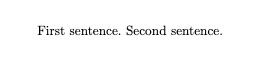
Simply pressing Enter once (without leaving a blank line) does not start a new paragraph — LaTeX treats a single line break as a continuation of the same paragraph. This small detail catches many beginners by surprise, so it is worth remembering early.
The difference is easy to see when the two cases are placed side by side:
Single line break — one paragraph in the output:
Blank line — two paragraphs in the output:
A Personal Note Document
Let's see everything working together in one file: a document class, preamble settings, and a multi-paragraph body.
When compiled, this produces a page with a centered title block showing the title, author, and date, followed by three clearly separated paragraphs, as shown below:
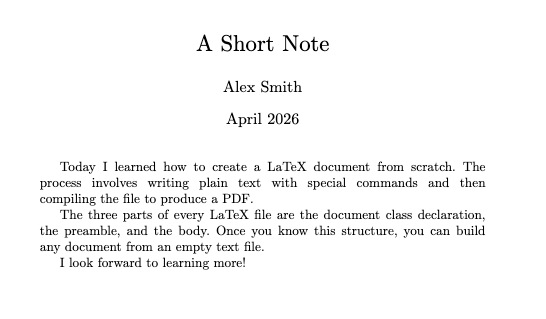
The first lines of the second and third paragraphs are automatically indented. All of this formatting comes from the same plain-text source, handled entirely by LaTeX during compilation.
Conclusion and Next Steps
In this lesson, we covered the three essential parts of every LaTeX document: the document class declaration (\documentclass{article}), the preamble (for configuration like \title, \author, and \date), and the body (everything between \begin{document} and \end{document}). We also learned that blank lines create paragraph breaks and that \maketitle turns preamble information into a visible title block.
These three structural pieces form the foundation for every document you will write going forward. Head to the practice exercises now and build your own LaTeX documents from the ground up — starting with the simplest possible file, then adding a title block, and finally writing a multi-paragraph note of your own.
