Commands Arguments and Environments
Introduction
Welcome back to Your First LaTeX Document! You are now on lesson three of six, so you are officially halfway through the course. In the first two lessons, we learned what LaTeX is, walked through the write-compile-view workflow, and built a complete document with a preamble, title block, and multi-paragraph body. Today, we shift our focus from document structure to syntax — the repeating patterns that make up nearly every LaTeX instruction you will ever write.
By the end of this lesson, you will be able to recognize and use the three core syntax patterns in LaTeX: backslash commands, arguments (both required and optional), and environments. These patterns form a small grammar that powers everything from bold text to formulas like .
The Grammar of LaTeX
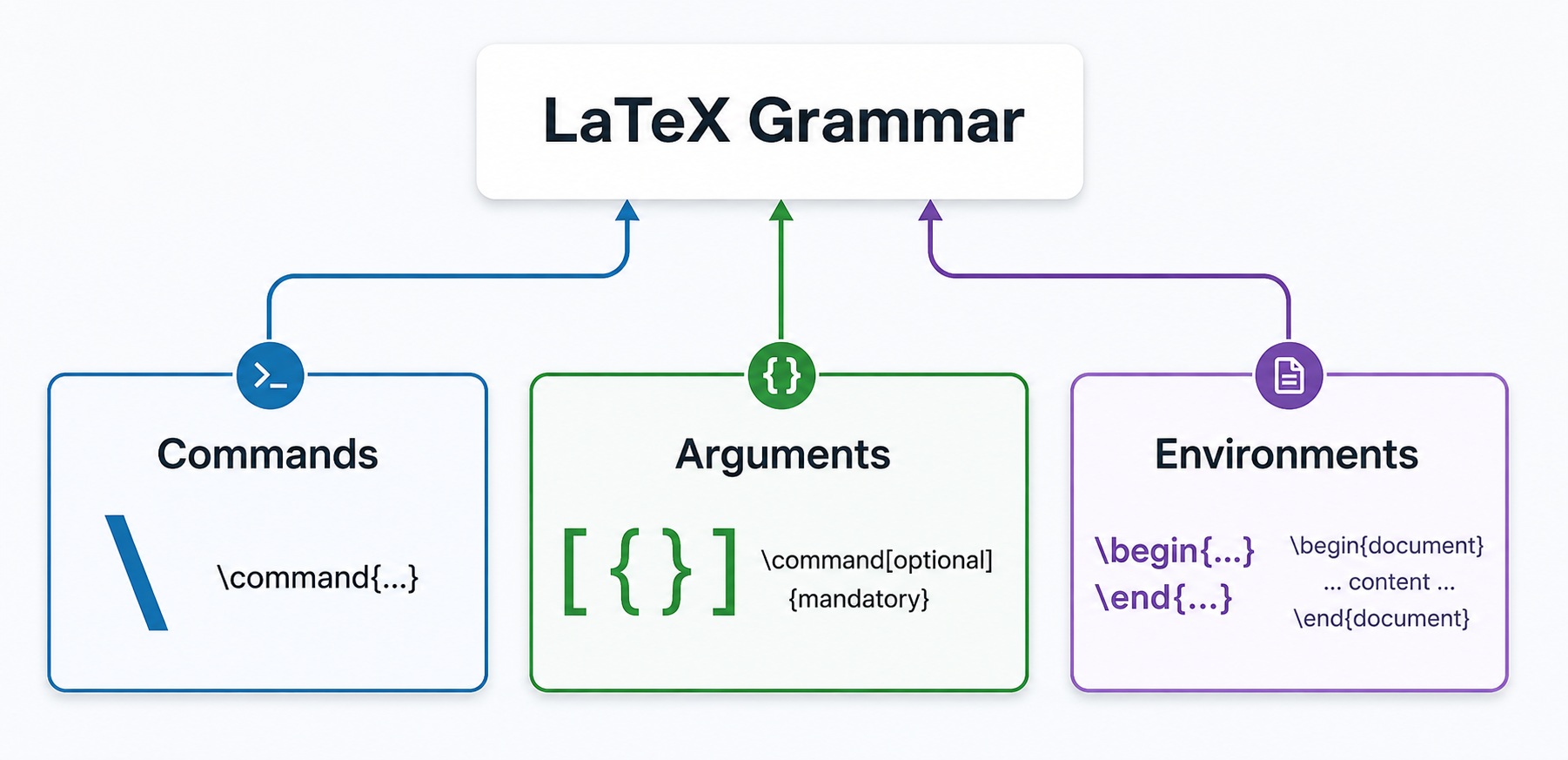
Every spoken language has grammar rules that tell us how to arrange words into sentences. LaTeX has its own grammar, and the good news is that it is remarkably small. Almost everything we do in LaTeX boils down to three building blocks:
- Commands — instructions that start with a backslash (
\). - Arguments — pieces of information we hand to a command, wrapped in braces or brackets.
- Environments — regions of the document where special formatting rules apply, marked by a
\beginand\endpair.
Once you learn to spot these three patterns, new LaTeX features will feel familiar right away because they all follow the same rules. Let's look at each one in turn.
Backslash Commands
A command in LaTeX always starts with a backslash (\) followed by a name made up of letters. You have already used several commands in previous lessons — \documentclass, \title, \author, \date, and \maketitle — and every one of them follows this same backslash-then-name pattern.
Some commands work entirely on their own. For example, \maketitle needs no extra information; it simply generates a title block from whatever was configured in the preamble. Other commands need additional input to do their job, and that input is provided through arguments.
Required Arguments: Curly Braces
When a command needs a piece of information to function, we supply it as a required argument inside curly braces {}. You have already seen this pattern at work:
In each case, the text inside the braces tells the command what to act on. Without the braces and their content, these commands would be incomplete and LaTeX would report an error.
Here is another useful example. The command \textbf makes text bold:
When compiled, this produces: "LaTeX is a powerful tool." Only the word inside the braces becomes bold; everything outside stays in the normal font. This is the pattern you will use most often: \commandname{content}.
| Component | Value | Role |
|---|---|---|
| Backslash | \ | Signals the start of every LaTeX command |
| Command name | textbf | Defines the action to perform (here: make bold) |
| Required argument delimiters | { } | Mark the scope — everything inside is affected |
| Content | powerful | The text the command acts on |
Optional Arguments: Square Brackets
Some commands also accept an optional argument in square brackets [], placed before the required argument. Optional arguments let you adjust a command's behavior without being strictly necessary.
A practical example involves our familiar \documentclass command. By default, the article class uses a 10-point base font. If we want a larger font, we can pass an optional size:
The 12pt inside the square brackets tells LaTeX to set the base font size to 12 points instead of the default 10. If you leave the brackets out entirely, the command still works — it just uses its default setting. That is exactly what makes the argument optional.
Here is the general pattern for a command that accepts both argument types:
Not every command has an optional argument, but when one does, the square brackets always come before the curly braces. The table below summarizes the three syntax elements we have covered so far:
| Syntax Element | Symbol | Role | Example |
|---|---|---|---|
| Command | \ | Starts every instruction | \textbf |
| Required argument | { } | Provides necessary input | {bold text} |
| Optional argument | [ ] | Adjusts default behavior | [12pt] |
Environments: Begin and End
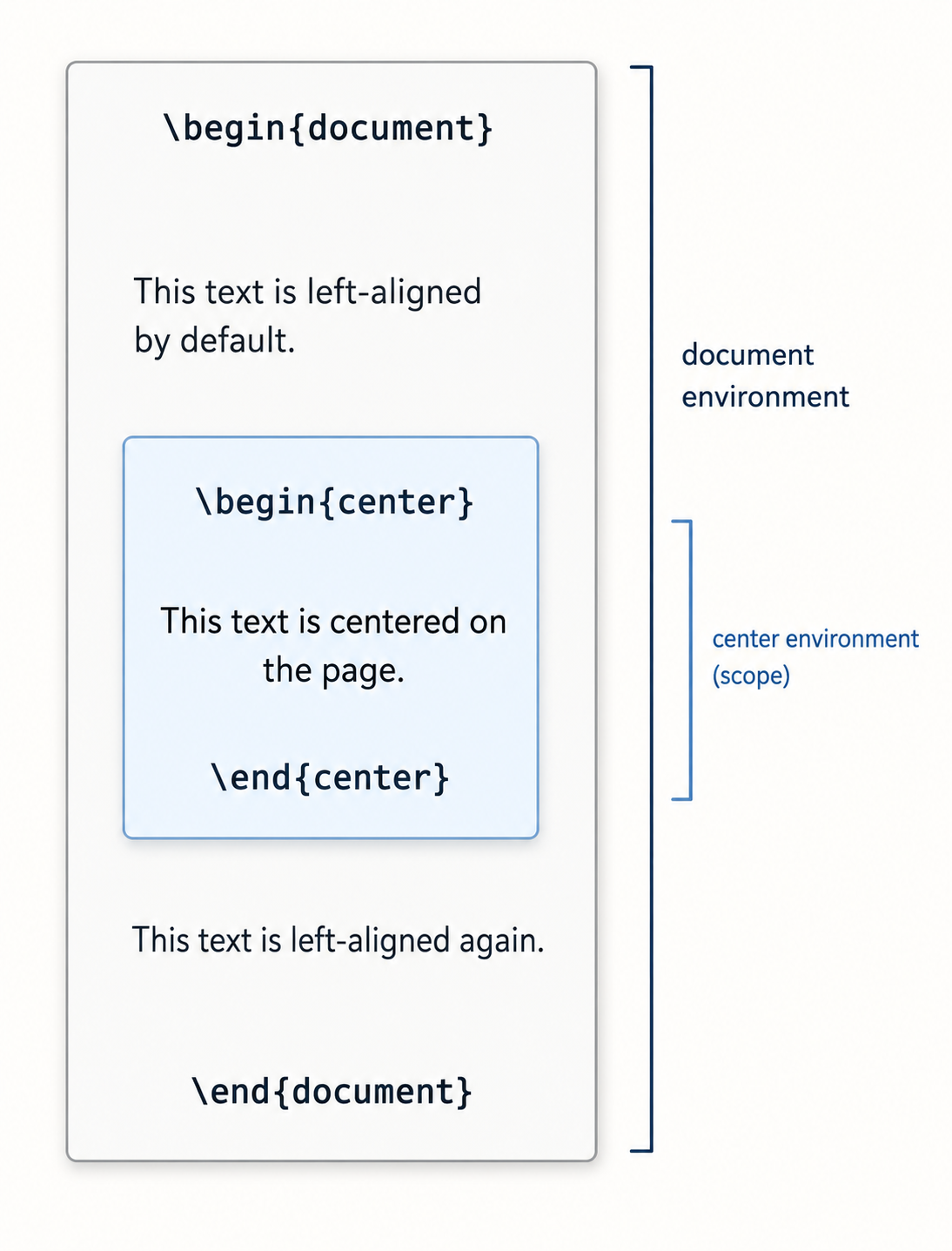
An environment is a region of the document where a specific formatting rule applies. You mark the start with \begin{name} and the end with \end{name}, where name identifies which environment you want.
You have already met one environment without necessarily thinking of it that way: the document environment. Every LaTeX file wraps its visible content between \begin{document} and \end{document}. The same begin/end idea extends to many other formatting tasks.
For example, the center environment centers all text placed inside it:
When compiled, only the middle line appears centered. The text before and after the center environment stays in its default justified alignment. This illustrates an important concept: environments have scope. Whatever formatting an environment applies stays contained within its \begin and \end boundaries and does not leak into the surrounding content.
All Three Patterns in One Document
In practice, commands, arguments, and environments appear side by side in nearly every LaTeX file. Here is a short document that uses all three syntax patterns together:
Let's trace the syntax patterns in this file:
\documentclass[11pt]{article}— a command with an optional argument (11pt) and a required argument (article).\title{...}and\author{...}— commands with required arguments.\begin{document}...\end{document}— the document environment.\maketitle— a command with no arguments.\textbf{consistent}— a command with a required argument that bolds one word.\begin{center}...\end{center}— a center environment that scopes its formatting.
Every instruction in the file is built from the same three building blocks. Recognizing this will make it much easier to pick up new features later, because they always follow one of these familiar patterns. The same holds for math: commands like \sqrt{16} and \frac{1}{2} use the exact same backslash-command-with-braces syntax you practiced here — though they only render correctly inside math mode, a special context we will cover in detail in a later lesson.
Conclusion and Next Steps
In this lesson, we explored the three core syntax patterns of LaTeX: backslash commands that begin with \, arguments in curly braces {} or square brackets [], and environments bounded by \begin{name} and \end{name}. Together, these form a small, consistent grammar that underlies every formatting and math instruction you will encounter throughout the rest of this learning path.
Now it is your turn to put these patterns to work. Head over to the practice exercises, where you will bold a word with \textbf{}, change a font size with an optional argument, center a paragraph inside an environment, and translate plain-English formatting requests into real LaTeX code — all by applying the three building blocks you just learned.
