The SR Latch
From Feedback to Control
In our previous lesson, we learned that connecting an output back to an input creates a feedback loop. This loop allows a circuit to "remember" a state. However, a simple loop isn't very useful if we can't change the value it is holding. To build a real computer, we need a way to "write" a new value into memory and "erase" it when we are done.
The SR Latch is one of the most basic types of digital memory. The S stands for Set (making the value 1), and the R stands for Reset (making the value 0). By using two logic gates together, we can create a circuit that stays in a specific state until we tell it to change.
Brief Recall: The NOR Gate
Before we look at the whole circuit, let's quickly remember how a NOR gate works. A NOR gate is essentially an OR gate with an inverter at the end.
The rule for a NOR gate is simple: it outputs a 1 only if both inputs are 0. If even one input is a 1, the output immediately becomes 0.
| Input A | Input B | Output |
|---|---|---|
0 | 0 | 1 |
0 | 1 | 0 |
1 | 0 | 0 |
1 | 1 | 0 |
We will use two of these gates to build our memory cell.
The Cross-Coupled Design
To make an SR Latch, we connect two NOR gates in a cross-coupled pattern. This means the output of the top gate is wired to one of the inputs of the bottom gate. Similarly, the output of the bottom gate is wired back to one of the inputs of the top gate.
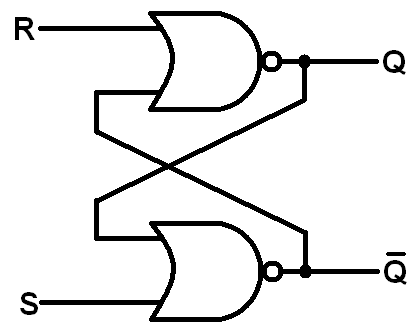
This creates a criss-cross shape in the middle of the circuit. In a standard setup:
- The top
gateprovides the mainoutput, which we call Q. - The bottom
gateprovides the oppositeoutput, called Not-Q. - In a healthy
circuit, these twooutputsshould always be opposites. IfQis1,Not-Qshould be0.
Set and Reset Actions
The "magic" happens when we use the two remaining inputs to control the circuit. Let's look at how we change the stored bit.
The Reset Action (R=1, S=0)
When you turn the Reset input to 1, the top NOR gate sees a 1. Because of how NOR gates work, any 1 input forces the output to 0. Therefore, Q becomes 0. This 0 travels down to the bottom gate. Since the Set input is 0 and the feedback from Q is now 0, the bottom gate sees two 0s and outputs a 1. So, Not-Q becomes 1.
The Set Action (S=1, R=0)
When you turn the Set input to 1, the bottom gate sees a 1 and forces its output (Not-Q) to 0. This 0 travels up to the top gate. If the Reset input is 0, the top gate now sees two 0s and outputs a 1. Therefore, Q becomes 1. You have successfully "set" the memory to 1.
The Hold State
The most important feature of the SR Latch is the Hold State. This happens when both the Set and Reset inputs are 0.
Imagine you just used the Set input to make . If you now turn the Set input back to 0, what happens?
- The bottom
gatestill receives a1from the topgate(Q). - Because it sees a
1, the bottomgatekeeps outputting a0. - This
0feeds back into the topgate. - The top
gatenow sees two0s (Resetis0andfeedbackis0), so it keeps outputting a1.
The circuit is "latched." It remembers the value even after you stop "pressing the button." This is how digital systems store information indefinitely using only power and logic.
The Forbidden State and Race Conditions
There is one combination of inputs that we must avoid: turning both Set and Reset to 1 at the same time ().
In this state, both NOR gates see a 1. This forces both Q and Not-Q to become 0. This is called an Invalid State because Q and Not-Q are supposed to be opposites.
The real problem occurs if you try to go from this Forbidden State back to the Hold State () simultaneously. Both gates will see two 0s at the exact same time and try to switch to 1. But as soon as one gate becomes 1, it tries to force the other gate back to 0.
This is called a Race Condition. Because no two gates are perfectly identical in the real world, one gate will "win" the race, but we can't predict which one it will be. This makes the circuit's behavior unreliable.
Summary and Practice
You have now learned how to build a basic memory cell using two NOR gates. Here is a summary of the SR Latch behavior:
| S (Set) | R (Reset) | Q (Output) | State Description |
|---|---|---|---|
0 | 0 | No Change | Hold: Remembers the last value. |
1 | 0 | 1 | Set: Stores a 1. |
0 | 1 | 0 | Reset: Stores a 0. |
1 | 1 | 0 | Invalid: Both outputs become 0; avoid this! |
Now it is your turn to practice. In the following exercises, you will use the CodeSignal IDE to build this circuit yourself, observe the feedback loop in action, and see how the Hold state maintains information.
