Storing a Bit
Introduction to Digital Memory
Welcome! So far in your journey with digital logic, you have seen how gates like AND, OR, and NOT can take inputs and produce an output. These gates are excellent at "calculating." If you give them a set of values, they give you an answer immediately.
However, a computer that can only calculate is like a calculator that forgets numbers as soon as you stop pressing the buttons. For a computer to be useful, it needs to do more than just calculate; it needs to remember. In this lesson, we are going to explore how we move from simple logic that reacts to the present moment to circuits that can store information for the future. This is the foundation of all digital memory.
What is "State"?
Before we look at wires and gates, let's define what it means to "remember" something in electronics. We call this "state." To understand state, think about the difference between a doorbell and a light switch.
- A Doorbell (No State): When you press the button, the bell rings. When you let go, the bell stops. The doorbell does not "remember" that you pressed it. It only cares about what is happening right now.
- A Light Switch (State): You flip the switch up, and the light turns on. You can walk away, take your hand off the switch, and the light stays on. The switch "remembers" its position.
In digital logic, a circuit has state if it can hold a value (either a 1 or a 0) even after you stop providing the original input. Our goal is to build a circuit that acts like that light switch.
The Memory Gap
Why can't a regular logic gate remember things on its own? Most of the circuits you have seen so far use something called combinational logic. In these circuits, the path of electricity is a one-way street. It goes from the inputs, through the gates, and out to the output.
Imagine an OR gate. If you put a 1 into one of the inputs, the output becomes 1. But the moment you change that input back to 0, the output immediately drops back to 0. The gate has no way to "hold on" to that 1. It is memoryless. To bridge this gap and create memory, we need to change the way we connect our gates. We need a way for the output to influence itself.
The Concept of Feedback
The secret to creating memory is a concept called feedback. Feedback happens when you take the output of a gate and connect it back into one of its own inputs.
Think of it like a conversation where someone repeats what you just said back to you. If you tell a circuit, "The value is 1," and the circuit feeds the output back to the start, the circuit starts telling itself, "The value is 1."
By creating a loop, the information circles around and around. This loop allows the circuit to maintain its condition without you needing to keep your finger on the "input button." This is how we transform a simple gate into a storage device.
Building a Memory Loop
Let's look at how this works in a real circuit using the project files for this lesson. In your IDE, you will see a circuit with two OR gates. They are connected in a special way:
Input Agoes into the firstOR gate.- The
outputof the firstOR gategoes into the secondOR gate. - The
outputof the secondOR gateis wired back into the firstOR gate.
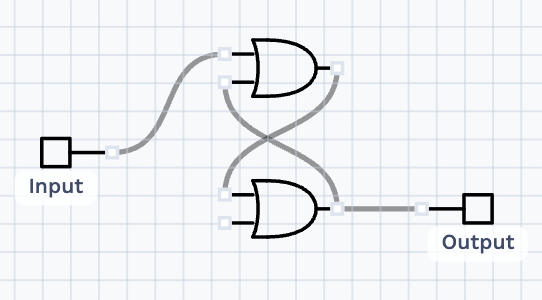
Imagine we send a pulse of 1 through Input A. The first OR gate sees this and turns its output to 1. That 1 then travels to the second OR gate, which also turns its output to 1. Because of the feedback wire, that 1 is sent back to the entrance of the first gate.
Even if you turn Input A back to 0, the first gate is still receiving a 1 from the feedback loop. The two gates are now "holding" each other in the on state. They have successfully stored a single bit of information!
Summary and Practice Preview
In this lesson, we learned that:
- State is the ability of a circuit to keep a value persistent, like a light switch.
- Standard gates are memoryless because the signal only moves in one direction.
- Feedback is created by connecting an
outputback to aninput, allowing a signal to sustain itself.
Now, it is your turn to see this in action. In the following practice exercises, you will work in the CodeSignal IDE with the circuit we described. You will interact with the inputs to see how a 1 can get trapped in a loop and how the circuit maintains its state even after you change the inputs. This is your first step in building complex digital memory!
