tSNE Parameter Tuning in R
Introduction
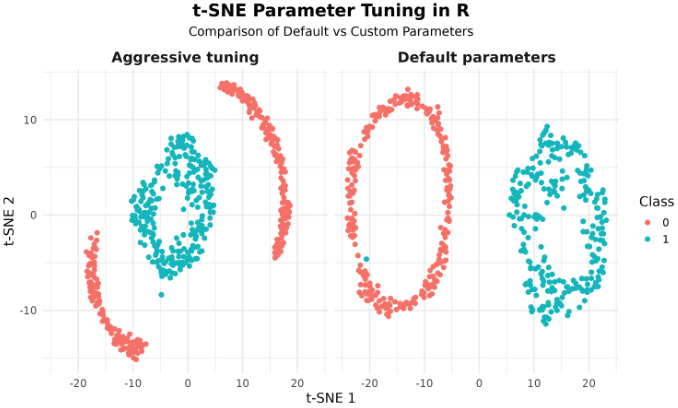
Welcome! Today's focus is on t-SNE parameter tuning using R and the Rtsne package. This lesson covers an understanding of critical t-SNE parameters, the practice of parameter tuning, and its impact on data visualization outcomes in R.
Preparing the data
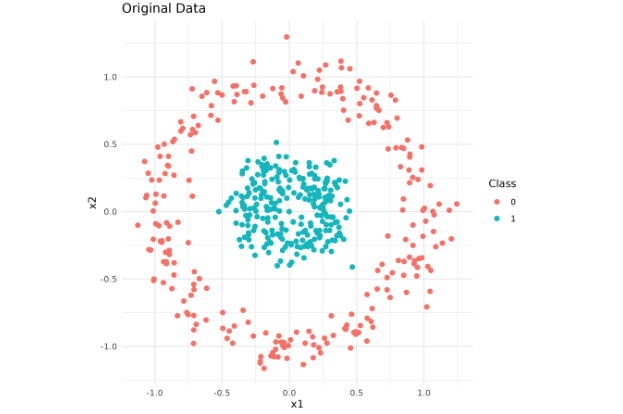
Before delving into parameter tuning, let's quickly set up the dataset:
Here's a basic setup in R:
Understanding t-SNE Parameters: Perplexity
We will now delve into the key parameters in R's t-SNE implementation (Rtsne). The first one is perplexity, which is loosely determined by the number of effective nearest neighbors. It strikes a balance between preserving the local and global data structure.
Understanding t-SNE Parameters: Early Exaggeration
The next parameter is exaggeration_factor (in Rtsne, this replaces early_exaggeration). It governs how tight natural clusters are in the embedded space. High values tend to make clusters denser.
Understanding t-SNE Parameters: Learning Rate
The final parameter, eta, modulates the step size for the gradient during the optimization process.