Welcome back to our Advanced Geometry and Model Loading course! In our previous lesson, we explored face culling and learned how proper vertex organization can dramatically improve rendering performance. Now, we're ready to tackle the next major challenge: loading complex, industry-standard 3D models into our OpenGL applications.
While manually defining simple geometric shapes like cubes and spheres teaches us fundamental concepts, real-world graphics applications require the ability to load detailed models created by artists using professional 3D modeling software. These models, often stored in formats like OBJ, contain thousands or even millions of vertices, complex surface details, and sophisticated material properties that would be impractical to define manually in code.
In this lesson, we'll integrate the powerful tiny_obj_loader library to handle the industry-standard OBJ file format, implement robust data structures for managing complex geometry, and develop a complete model loading system that seamlessly integrates with our existing OpenGL pipeline.
The OBJ file format is one of the most widely supported 3D model formats in computer graphics. Created by Wavefront Technologies, OBJ files use simple, human-readable text to describe 3D geometry. This format stores vertex positions, texture coordinates, surface normals, and face definitions using straightforward ASCII commands.
Let's examine a simple square defined in OBJ format to understand the structure:
Each line begins with a command specifier: v for vertex positions, vt for texture coordinates, vn for normals, and f for faces. The faces use 1-based indexing to reference vertices, texture coordinates, and normals in the format vertex/texture/normal. This simple yet flexible structure allows OBJ files to represent complex geometry while remaining human-readable and easy to parse.
The tiny_obj_loader library provides a robust, header-only solution for parsing OBJ files in C++ applications. Unlike complex model loading frameworks, this library focuses specifically on OBJ format support, offering excellent performance and minimal dependencies while handling the intricate details of file parsing, memory management, and data organization.
The library organizes loaded data into three primary structures: attrib_t contains all vertex attribute arrays (positions, normals, texture coordinates), shapes represent individual geometric objects within the file, and materials store surface material properties. The LoadObj function handles all parsing complexity, returning a boolean success status and providing detailed warning and error messages for debugging purposes.
Before we can process loaded model data, we need a comprehensive vertex structure that can accommodate all the geometric information typically found in complex 3D models. Our Vertex structure must efficiently store position, texture coordinates, surface normals, and tangent vectors for advanced lighting calculations:
This structure consolidates all per-vertex data into a single, memory-efficient layout that aligns perfectly with modern GPU architectures. The Position field stores the vertex's 3D coordinates in model space, while TexCoords provide 2D mapping coordinates for applying textures. The Normal vector defines the surface orientation at each vertex, essential for lighting calculations, and the Tangent vector enables advanced normal mapping techniques for detailed surface appearance.
The Mesh class encapsulates individual geometric objects, managing their vertex data, indices, and OpenGL resources. This class provides a clean interface for rendering complex geometry while handling the intricate details of GPU memory management and vertex attribute configuration:
The constructor accepts vertices and indices, immediately calling setupMesh() to configure OpenGL buffers. The destructor ensures proper cleanup of GPU resources to prevent memory leaks. The vertices vector stores all per-vertex information, while indices define triangle connectivity, enabling efficient rendering of shared vertices. The three OpenGL objects (VAO, VBO, EBO) manage GPU-side data storage and vertex attribute layout.
The setupMesh() method handles the complex process of transferring vertex data to GPU memory and configuring vertex attribute pointers for shader access:
This method creates three GPU buffers: a Vertex Array Object (VAO) to store attribute configuration, a Vertex Buffer Object (VBO) for vertex data, and an Element Buffer Object (EBO) for index data. The glBufferData calls transfer our CPU-side vectors to GPU memory using GL_STATIC_DRAW to indicate the data won't change frequently.
Our mesh setup must configure all four vertex attributes to provide complete data access for sophisticated shading calculations:
Each glVertexAttribPointer call defines how the GPU accesses different components of our vertex structure. The offsetof macro calculates the memory offset of each field within the Vertex structure, ensuring the GPU correctly interprets our packed vertex data. Location 0 provides 3D positions, location 1 supplies 2D texture coordinates, location 2 delivers surface normals, and location 3 offers tangent vectors for advanced lighting effects.
The Draw method provides a simple interface for rendering the mesh, handling shader activation and OpenGL draw calls:
This method activates the specified shader program, binds our configured vertex array, and issues a draw call using indexed rendering. The glDrawElements function renders triangles using our index buffer, efficiently reusing shared vertices to minimize GPU memory usage and bandwidth. After rendering, we unbind the vertex array to prevent accidental modification, maintaining clean OpenGL state management.
The Model class serves as a high-level container for complex 3D objects that may consist of multiple meshes, each with different materials or geometric properties. This class handles OBJ file loading and provides unified rendering for multi-mesh models:
The meshes vector stores all geometric components of the model, allowing complex objects like characters or architectural models to be composed of multiple parts. The directory string stores the base path for the model file, facilitating automatic texture and material loading. The loadModel method handles the intricate process of parsing OBJ data and converting it to our mesh format, while calculateTangents computes tangent vectors for normal mapping support.
The loadModel method leverages tiny_obj_loader to parse OBJ files and convert the loaded data into our mesh format:
This method initializes the three data structures required by tiny_obj_loader, calls the loading function, and performs comprehensive error checking. If loading fails, we output detailed error information and exit gracefully. In successful cases, we extract the directory path from the file location, enabling automatic resolution of texture and material file paths relative to the model location.
After successful OBJ loading, we must convert the tiny_obj_loader shape data into our mesh format, handling the complex process of vertex data extraction and organization:
For each shape in the loaded model, we create new vertex and index vectors. The shape.mesh.indices contain references to vertex attributes in the attrib structure. We extract position data by calculating the appropriate offset in the linear vertices array: multiplying the vertex index by 3 (since each position uses x, y, z components) and accessing the consecutive elements. Each processed vertex is added to our local vector, and we build a simple index sequence for rendering.
Complete vertex processing requires extracting texture coordinates and normals when available in the OBJ file:
Texture coordinate extraction requires special handling: we flip the Y coordinate by subtracting from 1.0 because OpenGL's texture coordinate system uses a different origin compared to many 3D modeling applications. The bounds checking ensures we handle OBJ files that may not include texture coordinates or normals for every vertex, providing sensible default values when data are missing.
After processing all vertex attributes, we normalize and calculate the tangent vectors, create a complete Mesh object and add it to our model's collection using emplace_back for efficient construction:
The emplace_back method constructs the Mesh object directly in the vector, avoiding unnecessary copying and ensuring optimal performance when building complex models with multiple geometric components.
The complete model loading and rendering system demonstrates how all these components work together in a real application. In the main rendering loop, we load textures, create our model, and render it with proper matrix transformations:
The system loads complex OBJ models with a single line of code, automatically handling vertex data extraction, tangent calculations, and GPU buffer setup. During rendering, we apply standard transformation matrices and call the model's Draw method, which efficiently renders all constituent meshes. This clean interface abstracts away the complexity of model loading while providing full access to the loaded geometry for advanced rendering techniques.
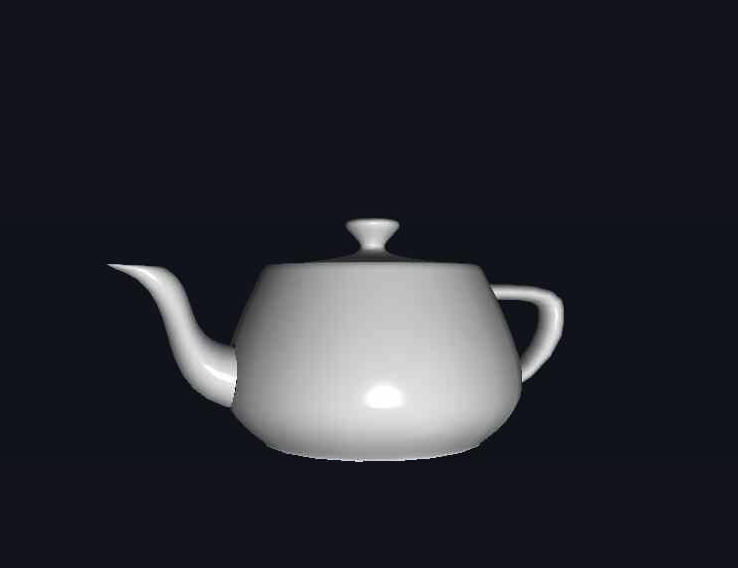
With our complete model loading system implemented, we can now render sophisticated 3D models with full material support and advanced lighting. The screenshot below demonstrates our system successfully loading and rendering a complex OBJ model with proper vertex attributes, smooth normals, and tangent vectors ready for advanced shading techniques.

Notice how our implementation seamlessly handles the transition from simple geometric primitives to industry-standard 3D assets. The model displays correct surface normals for realistic lighting, proper texture coordinate mapping, and maintains excellent rendering performance through efficient vertex buffer management. This foundation enables us to work with any OBJ-format model, from simple objects to highly detailed architectural scenes and character models.
We've built a comprehensive 3D model loading system that seamlessly integrates industry-standard OBJ files with our OpenGL rendering pipeline. By understanding the relationship among file formats, vertex data structures, and GPU resource management, we can now load and render complex models created by professional artists and designers. Our implementation handles the intricate details of data conversion, memory management, and advanced features like tangent vector calculation for normal mapping.
The Mesh and Model classes provide a solid foundation for more advanced graphics techniques, while the tiny_obj_loader integration demonstrates how to leverage existing libraries effectively. As we continue building more sophisticated graphics applications, this model loading capability enables us to work with realistic, detailed geometry that brings our 3D worlds to life. In the upcoming practice section, you'll apply these concepts hands-on to solidify your understanding of professional 3D model integration.