Monthly Running Order Value
Introduction
It is great to have you here for Window Functions Fundamentals. We are now in Lesson 3 of 4, where we will ask a time-based question: how much order value has accumulated by each month? In the previous lesson, PARTITION BY added category and country totals beside every line item. Today, we will change the row grain on purpose. We will first turn line-item order value into one row for each populated calendar month, then use an ordered window to carry that order value forward in one cumulative sequence.
We will build monthly_sales, place ORDER BY month_start inside a window, make the frame explicitly row by row, and keep the calculation order separate from the display order. By the end, we will have a 36-row report whose final running value represents the full order value total.
Build monthly_sales at the Calendar Month Grain
Let us begin with the aggregation that feeds the window. The starter query ranks customers, so it answers a different question. We replace it with a CTE whose contract is simple: one row per populated calendar month.
Orders supplies the order date, OrderItems supplies the purchased quantity, and Products supplies the price. The expression DATE_FORMAT(o.order_date, '%Y-%m-01') changes every date to the first day of its month. CAST(... AS DATE) turns that text into a real date value.
The GROUP BY month_start clause creates one row for each populated month. Unlike the recursive month spine from an earlier course, this query does not create empty months. In the seeded data, all 36 months from January 2021 through December 2023 are populated.
Understand What Rows the Window Function Receives
Before adding a window, we need to identify its input rows. As you may recall from previous units, each query stage has a row grain.
- The joins begin with line-item rows, where order value is calculated from quantity and price.
GROUP BY month_startcombines those line items into monthly rows.- The outer
SELECTreceives one row for each populated month.
Window functions execute after GROUP BY. Therefore, a later window over monthly_order_value sees monthly totals, not individual order items. This differs from Lesson 2, where partitioned windows were applied to line-level data and preserved every order_item_id.
This phase order also explains a common error: a window function cannot appear in WHERE, GROUP BY, or HAVING in the same query block. If we need to filter a running value, we calculate it in a CTE first, then filter the named result in an outer query.
Add a Chronological Running Order Value Total
With the monthly rows ready, we can ask a cumulative question: for each month, what is the order value from the first month through the current month?
Inside monthly_report, ORDER BY month_start tells SUM to begin with the earliest month and move forward chronologically. The current month is included in its own running value. Because there is no PARTITION BY, the calculation uses one sequence across all months and never resets for another group.
Naming the window result inside monthly_report is also what would let an outer query filter on it, as covered in Lesson 1. If the report only needs to display the values, as in the final query, we can calculate the window directly in the outer SELECT.
Make the Running Frame Explicitly Row by Row
The previous query leaves the window frame implicit. In MySQL 8.0, an ordered aggregate window without an explicit frame uses:
RANGE BETWEEN UNBOUNDED PRECEDING AND CURRENT ROW
RANGE treats rows with the same ordering value as peers. The seeded data contains deliberate ties in product prices and quantities, so this behavior is important. The following example orders its displayed rows by order_value and then by the unique product_id.
The two rows with order value 20.00 are peers for the RANGE window, so both receive a cumulative value of 40.00. The ROWS window advances one physical row at a time, so the tied rows receive 20.00 and 40.00. Because product_id is not part of the window ordering, SQL does not promise which tied product receives which of those two values. It only makes the displayed order stable.
The contrast is easier to see when the two frame behaviors are placed side by side.
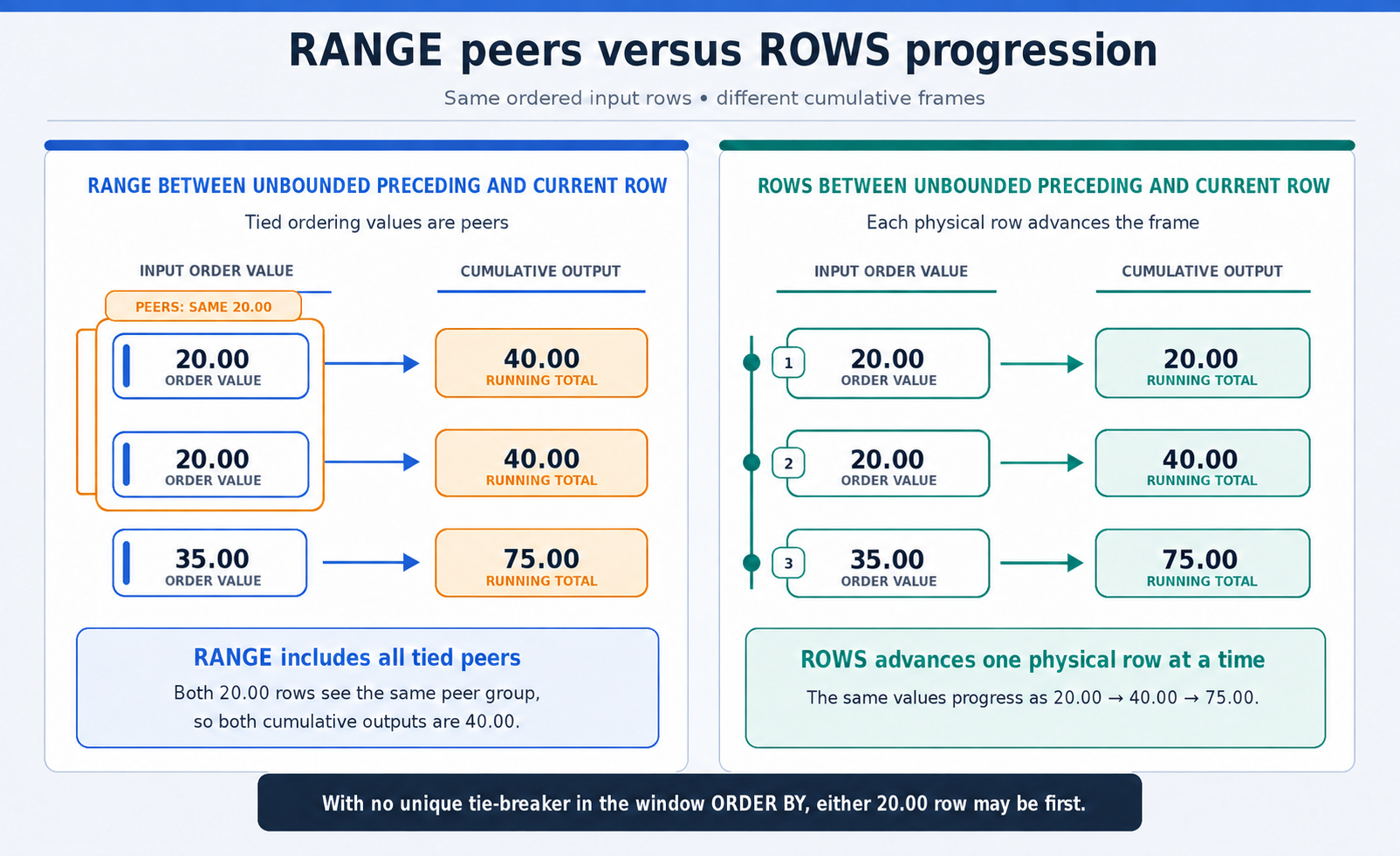
In the monthly report, month_start is unique after grouping, so RANGE and ROWS currently produce the same numbers. We still write ROWS BETWEEN UNBOUNDED PRECEDING AND CURRENT ROW because it clearly states that the intended calculation is a row-by-row running total.
Separate Calculation Order from Display Order and Finalize the Report
We can now combine the complete report. The monthly_sales CTE prepares one row per month. The window’s ORDER BY month_start controls the accumulation sequence, while the outer ORDER BY month_start controls how the finished report is displayed. Since month_start is unique in the CTE result, it fully determines the chronological order.
The ROUND functions format both order value columns to two decimal places. The monthly sum is calculated first and then rounded. The running total is also calculated first and then rounded, so rounding does not affect the accumulation.
When we run the query in the MySQL client with --table, the result has this shape. The exact amounts come from the seeded data, and the middle rows are abbreviated here for readability.
We should verify that the report contains 36 rows in ascending month order, that the running value includes the current month, and that it never resets. The running_order_value value in the final row should equal the sum of all 36 monthly_order_value values.
Conclusion and Next Steps
Today, we changed the report’s grain from line items to calendar months. We joined the order value tables, created the monthly_sales CTE, and used GROUP BY month_start to produce one row per populated month. We then added SUM(...) OVER (ORDER BY month_start) to calculate cumulative order value across the full time sequence.
We also learned why ROWS BETWEEN UNBOUNDED PRECEDING AND CURRENT ROW is valuable, even when the current month key is unique. Finally, we separated the window’s calculation order from the outer order that controls report display, and we reviewed how to filter a window result through an outer query.
In the practice section, we will inspect the starter customer ranking, build monthly_sales, add running order value, and verify the finished 36-row report before Lesson 4 uses the same monthly data for a three-month moving average.
