Understanding and Utilizing System Prompts
Introduction
Welcome to our next professional development session. This course focuses on the advanced concepts of Prompt Engineering, aiming to give you skills that can enhance your teaching practice when using AI tools. We'll start with understanding how to create effective system messages for educational purposes.
Understanding System Prompts
System prompts are special types of instructions that help guide AI tools to respond in specific ways. Think of them as setting up the "personality" or "role" of the AI assistant before you start asking it questions. These instructions help the AI understand how you want it to respond to your requests.
Getting Started with System Prompts
One of the best tips for configuring system messages to get high-quality outputs is to give clear guidance to the AI about the educational context.
Here is an example:
You can make your instructions more specific to get better results:
If you want the AI to use specific educational approaches in its answers, you can specify that as well:
Leveraging System Prompts for Tone and Style
Implementing system prompts effectively allows you to dictate the tone and style of the AI consistently across all exchanges. This ensures every response matches your needs as an educator without having to repeat your requirements each time.
Consider how style and tone requirements can be set:
System Prompts in ChatCPT
In the practices on our platform, you can setup the system prompt in the following way:
Open the "Settings" in the side bar.
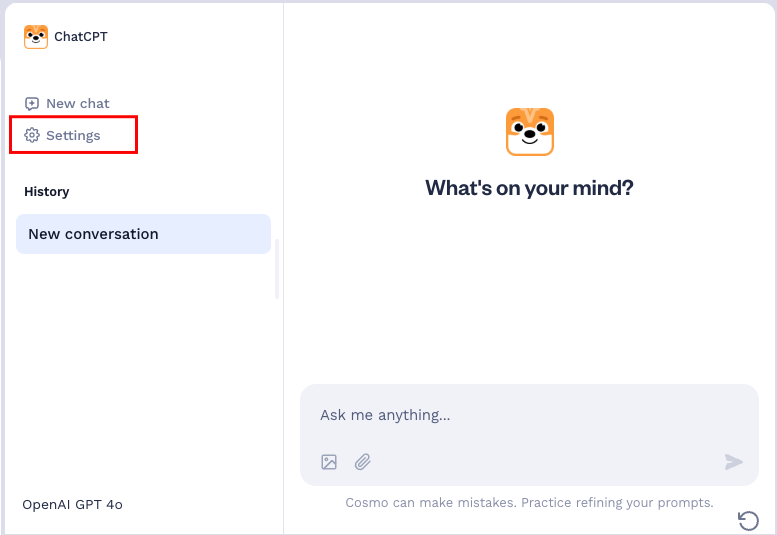
Enter your system prompt in the "Response Preferences" input field.
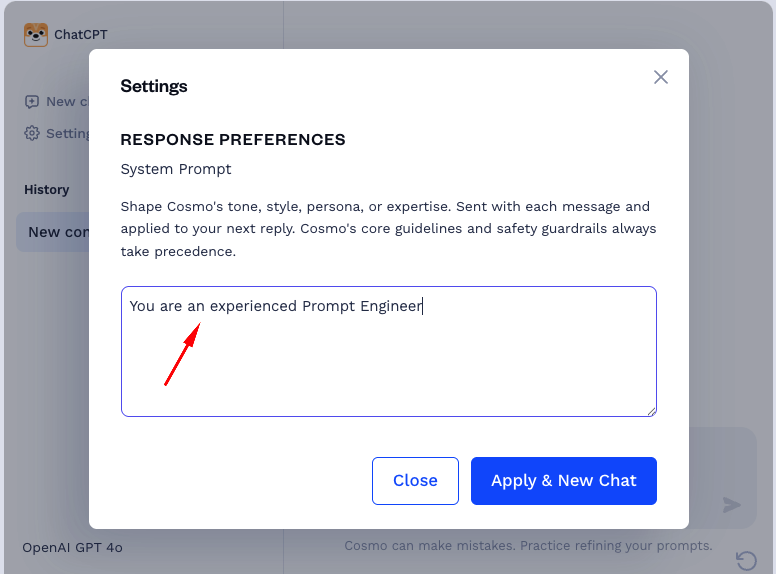
That's it! When you click the "Apply & New Chat" button, the system prompt will be applied to your next prompt.
Time to Practice
With these insights into system prompts, it's time for you to experiment and practice crafting your own. Remember, the effectiveness of an AI-driven response often depends on the quality of your initial instructions. By applying these tips to your system prompts, you'll be well-equipped to shape the AI's output to match your educational needs, whether you're creating lesson plans, developing assessments, or seeking creative teaching strategies.
