Welcome back to Shopping and Spending with Percentages! We have arrived at the sixth and final lesson of this course. Over the previous five lessons, we built up individual skills: calculating discounts, computing sales tax, figuring tips, estimating mentally, and working with markups. Now it is time to combine two of those skills into a single, realistic transaction: applying a discount and then calculating sales tax on the same purchase. This is exactly what happens at checkout when we grab a sale item and the register still adds tax on top.
Two Percentages, Two Different Bases
As you may recall from Lessons 1 and 2, a discount is a percentage taken off a price, while sales tax is a percentage added on. When both appear in the same transaction, the key question becomes: which amount does each percentage apply to?
The rule is straightforward:
The discount is applied to the original price.
The sales tax is applied to the discounted price, not the original.
This makes sense because tax is charged on what we actually pay for the item after the markdown, not on the sticker price. Getting the base wrong at either step will throw off the final total.
The Two-Step Process
Worked Example: A Pair of Sneakers
Another Example: A Decimal Tax Rate
Watch Out: Taxing the Wrong Base
The Combined Multiplier Shortcut
Conclusion and Next Steps
Combining a discount and sales tax is a two-step process where each percentage applies to its own base. First, we reduce the original price by the discount. Then, we calculate sales tax on that lower, discounted price — never on the original. Keeping these bases straight is the single most important skill in discount-then-tax problems, and it mirrors real checkout behavior everywhere from clothing stores to online carts.
Up next, you will put this skill to work in a set of hands-on exercises. You will identify which base each percentage applies to, complete guided calculations step by step, solve full discount-then-tax problems on your own, and walk through a realistic online checkout scenario explaining your reasoning. Let's head to practice!
Notice each formula uses a different base. The discount rate operates on the original price, and the tax rate operates on the result of step one. Let's see this in action with a concrete example.
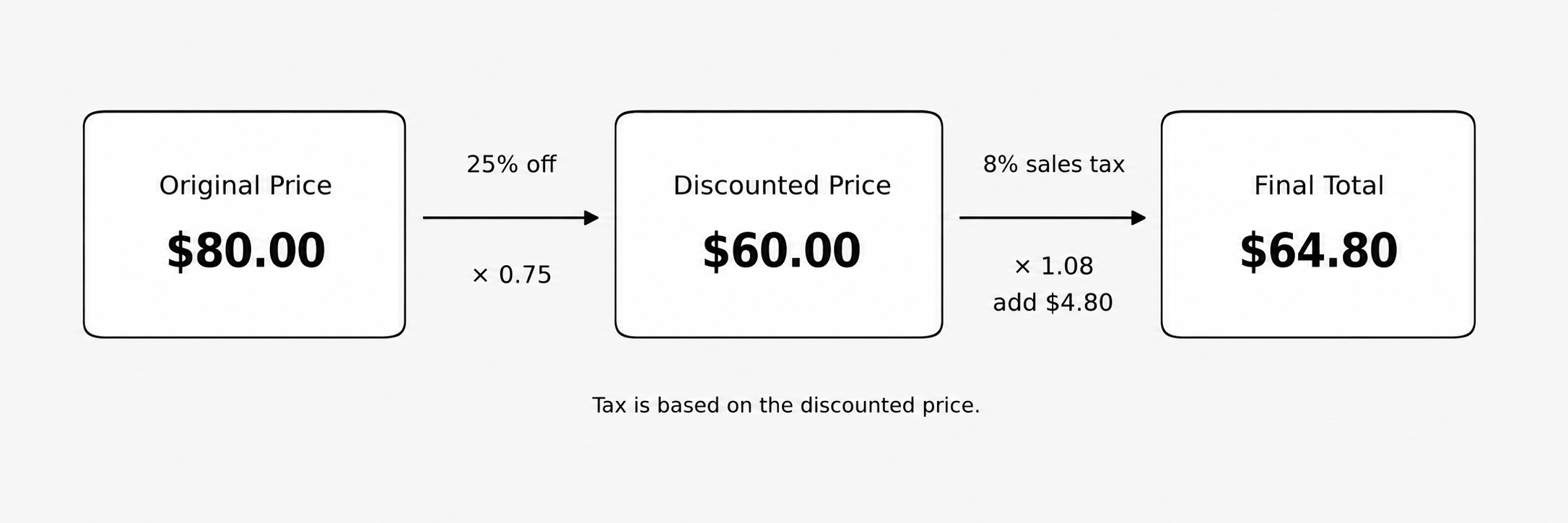
A pair of sneakers has an original price of $80.00. The store is running a 25% off sale, and the local sales tax rate is 8%. What do we actually pay at the register?
Step 1 — Apply the discount. Using the remaining-percent shortcut from Lesson 1, we multiply by (1−0.25)=0.75:
$80.00×0.75=$60.00
The discounted price is $60.00.
Step 2 — Apply sales tax to the discounted price.
$60.00×0.08=$4.80$60.00+$4.80=$64.80
The final total at the register is $64.80. Here is a summary of how the numbers flow through each step:
Step
Calculation
Result
Original price
—
$80.00
Discount (25% off)
$80.00 × 0.75
$60.00
Sales tax (8%)
$60.00 × 0.08
$4.80
Final total
$60.00 + $4.80
$64.80
Many areas have tax rates like 6.25% or 8.75%, so let's practice with one. A laptop is priced at $540.00 with a 15% discount, and the sales tax rate is 6.25%.
Step 1 — Discounted price:
$540.00×(1−0.15)=$540.00×0.85=$459.00
Step 2 — Sales tax on the discounted price:
$459.00×0.0625=$28.6875
As we practiced in Lesson 2, we round the tax to the nearest cent: $28.69.
Final total:
$459.00+$28.69=$487.69
The total at checkout is $487.69. Whenever the tax calculation produces more than two decimal places, round to the nearest cent before adding.
The most common mistake in these problems is applying the sales tax to the original price instead of the discounted price. Let's see the impact using the sneakers example from above.
If we incorrectly calculated 8% tax on the original $80.00:
$80.00×0.08=$6.40
Adding that to the discounted price would give $60.00 + $6.40 = $66.40, which is $1.60 more than the correct total of $64.80. The customer would be overcharged because the tax was computed on money they never actually spent. Always remember: sales tax is calculated on the price we actually pay, which is the discounted price.
If we want a single expression for the final total, we can chain the two multipliers together:
Final Total=Original Price×(1−Discount Rate)×(1+Tax Rate)
For the sneakers: $80.00 × 0.75 × 1.08 = $64.80. This combined form is handy for quick calculations, but it is still performing the same two steps in sequence. The discount multiplier comes first and the tax multiplier follows, each operating on its own base built into the chain.
For the laptop: $540.00 × 0.85 × 1.0625 = $487.6875, which rounds to $487.69 — the same answer we found earlier. Once you are comfortable with the two-step approach, this shortcut can save time, especially when comparing deals across several items.