Calculating Markups on Cost
Introduction
Welcome back to Shopping and Spending with Percentages! So far in this course, we have tackled discounts, sales tax, tips, and mental math estimation — all from the buyer's perspective. Now, in lesson five of six, we are stepping behind the counter to see how sellers set their prices. In this lesson, you will learn how to calculate markups on cost, the method businesses use to build a selling price that covers their expenses and earns a profit.
From Discounts to Markups
In our earlier lessons, we worked with percent decreases. A discount takes a percentage off a price, making it smaller. A markup does the opposite: it adds a percentage on top of a cost, making the price larger. If you have ever wondered why a water bottle that a store buys for $5 ends up on the shelf at $8, the answer is markup.
Here is the key idea: a store pays a cost (also called the wholesale price) to acquire an item, then increases that cost by a markup percent to arrive at the selling price the customer sees. The markup covers the store's rent, wages, and profit.
The Core Markup Formula
Calculating a markup follows the same percent-of-a-number pattern we have used throughout this course. There are two small steps:
- Find the markup amount: multiply the cost by the markup percent (written as a decimal).
- Add it to the cost: the result is the selling price.
Written as formulas:
Notice that the base for the percent calculation is always the cost, not the selling price. This is an important detail we will revisit shortly.
A Two-Step Example
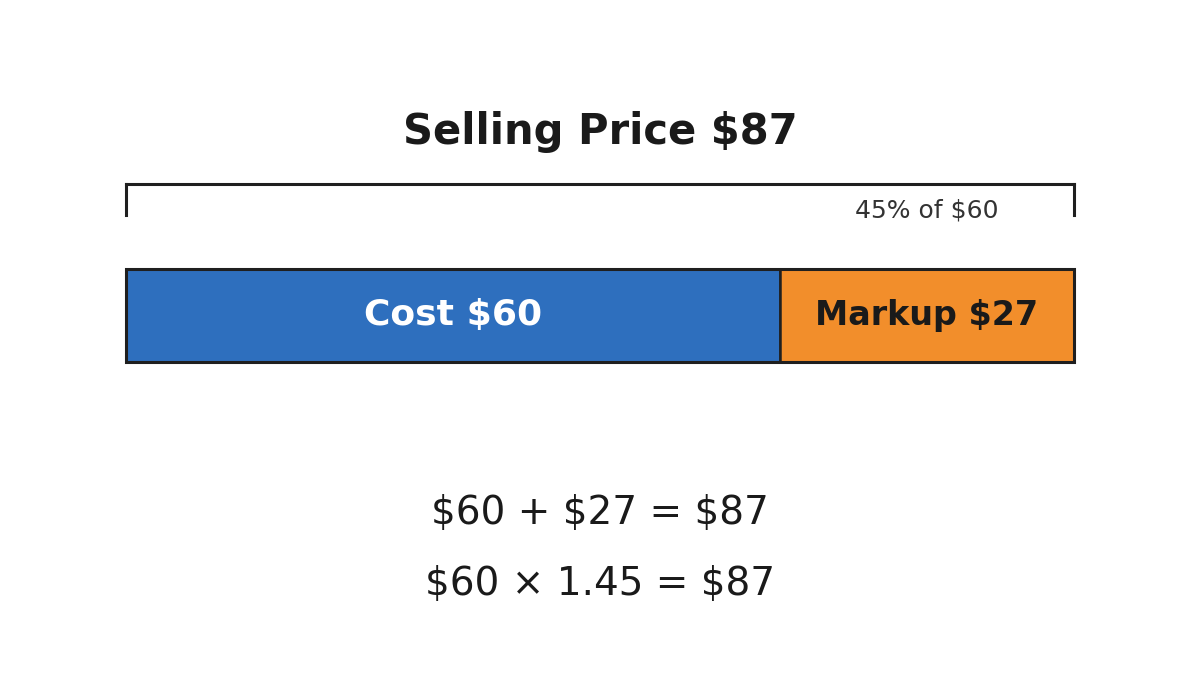
Suppose a clothing store buys a jacket at a cost of $60 and applies a 45% markup. Let's find the selling price.
Step 1 — Find the markup amount. Convert 45% to a decimal and multiply:
Step 2 — Add the markup to the cost:
The store would set the jacket's selling price at $87.00.
The One-Step Shortcut