Ranking Products by Category
Introduction
Welcome to Lesson 3 of Ranking with RANK, DENSE_RANK, and ROW_NUMBER. We have completed two of the four lessons in this course, and we are ready to apply tied rankings to a practical product question: which products have the highest number of units sold in each category?
The previous lesson showed how RANK() preserves equal values. Here, we will keep that behavior while making the ranking restart for every category. We will build the report in three stages: aggregate product totals, rank products within categories, and filter to ranks one through three.
One modelling note before we calculate money. OrderItems records what was bought and how many, but not the price paid at the time, so these reports reconstruct historical value from the current Products.product_price. A production schema would capture a transaction-time unit price on the order line, because catalog prices change. In this dataset prices are assumed to be immutable, and the current price is used as a deliberate proxy.
Establish the Product-Level Aggregation Grain
Before ranking, we need one comparable row per product. OrderItems may contain many rows for one product, so ranking it directly would compare item records instead of product totals. The product_sales CTE joins Categories, Products, and OrderItems, sums oi.quantity as units_sold, and groups by every category and product field we return. This creates the product-level grain that the window function needs.
The temporary outer query verifies that the aggregation has one row per product before ranking begins. Here, units_sold simply represents the summed order-item quantity. Since all products participate in the seeded data, these joins provide the complete set of product totals.
Rank Products Within Each Category
Now that each row represents a product, we can rank products within their own categories. PARTITION BY category_id starts a separate competition for each category, while ORDER BY units_sold DESC puts the largest total first.
We keep product_id out of the window ordering so equal totals remain tied. RANK() leaves gaps after ties; DENSE_RANK() would not. Here, RANK() lets us filter qualifying rank positions while preserving every tied product.
The outer SELECT currently exposes every ranked row so we can inspect the category resets. The ranking compares only units_sold. A product identifier may be used later for stable display, but it must not change the ranking itself.
Filter the Top Three Rank Positions
A window result cannot be filtered in the same query block in which it is calculated. As in earlier window reports, we first compute sales_rank inside ranked_products, then apply the condition in an outer query. Append the following condition after FROM ranked_products in the previous snippet.
This condition keeps ranks 1, 2, and 3. It selects qualifying rank positions, not a fixed number of rows. If several products share a qualifying rank, all of them remain in the report. Therefore, a category can contribute more than three products because ties are not discarded merely to force an exact row count.
Assemble the Deterministic Final Report
The final report selects the requested category and product details, units_sold, and sales_rank. Its outer ORDER BY groups rows by category, shows better ranks first, and uses product_id to make tied rows display consistently.
This identifier is a presentation tiebreaker only; it does not appear inside RANK(). The complete MySQL 8.0 statement combines all three stages.
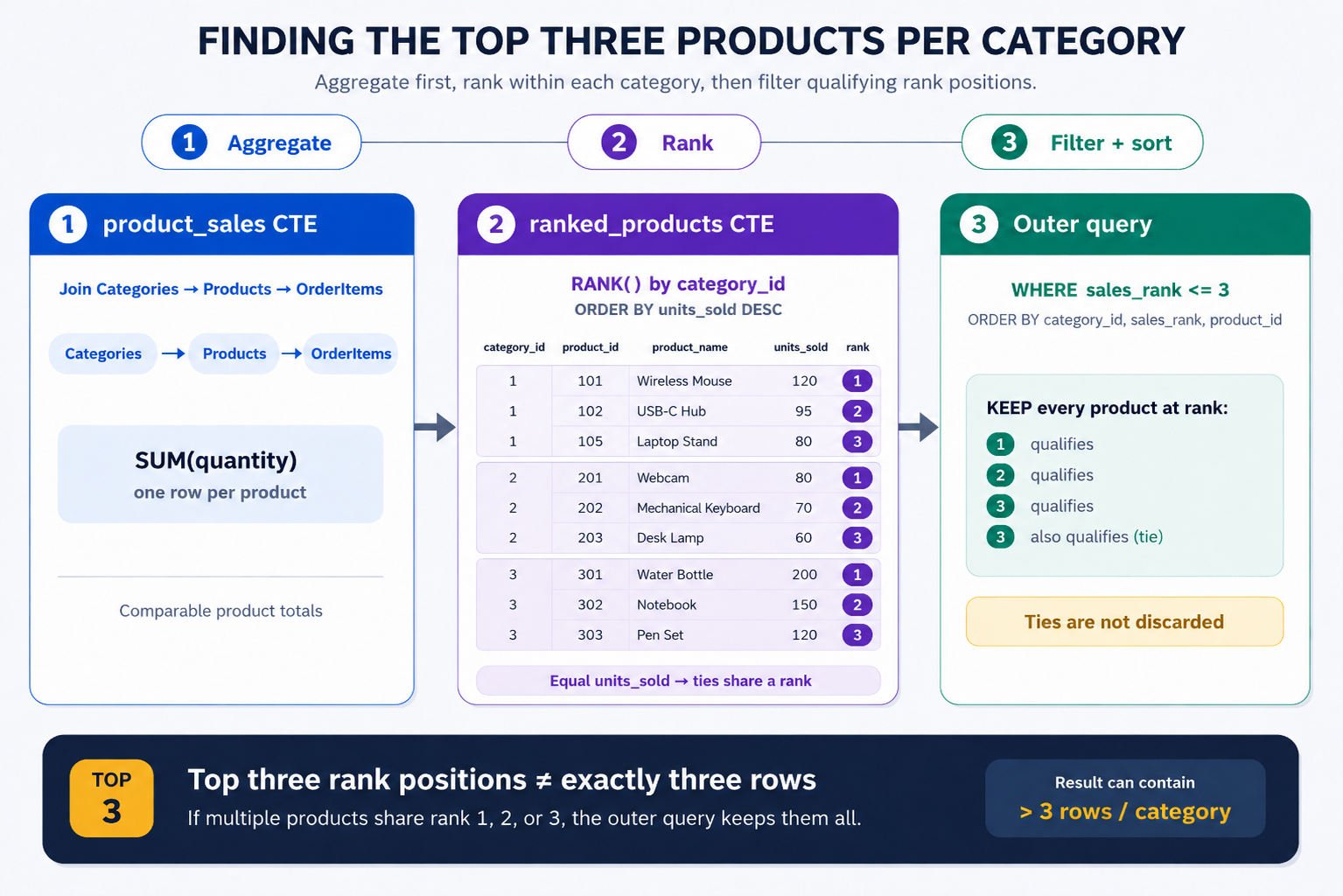
product_sales establishes the aggregation grain, ranked_products adds category-specific ranks, and the outer query keeps qualifying positions. Because the statement preserves ties, a category may return more than three products.
Conclusion and Next Steps
We have built a reusable pattern for finding the strongest products within every category. First, we protected the intended grain by aggregating order-item quantities to one row per product. Next, we used RANK() with PARTITION BY category_id to compare products separately and preserve ties. Finally, we filtered in an outer query with sales_rank <= 3, then applied a deterministic display order.
Remember: top-three rank positions do not always mean exactly three rows per category.
In the next lesson, we will use NTILE() to divide customers by total order value into four approximately equal buckets. Before then, the practice section will guide us through building, ranking, and verifying this report one stage at a time.
