Understanding Cloud Pricing
How Cloud Pricing Works 🧭
This lesson explains how cloud billing works and how to produce a defensible estimate for a small application.
In this lesson, you will learn to:
- Explain pay-as-you-go pricing and the billing units that appear on a cloud bill.
- Distinguish on-demand, committed-use, spot, and free-tier pricing.
- Build a rough monthly estimate using explicit assumptions and a pricing calculator.
Once you can name the providers and translate their services, the next question stakeholders ask is almost always about money: "so what will this cost us?" Cloud pricing looks intimidating because a single invoice can contain hundreds of lines, but underneath it there are only a handful of meters running. Learn what those meters count, and the bill stops being a mystery.
Pay-As-You-Go and the Units You Are Actually Billed In 🔎
Pay-as-you-go means you are charged for what you consume, with no upfront purchase and no fixed contract. If you switch something off, that meter stops. This is the direct consequence of the measured, on-demand nature of cloud services you met at the very start of this learning path.
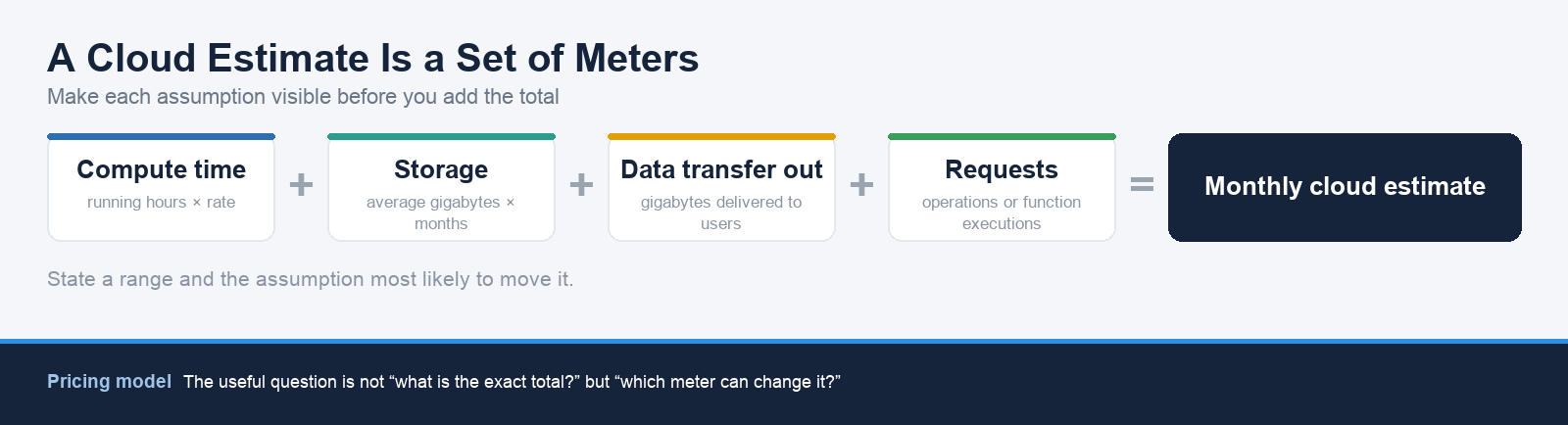
Four billing units cover most of what you will see. The first is compute time: virtual machines are billed for the time they run, usually per second with a minimum, quoted to you as an hourly rate. A machine costing $0.10 per hour that runs continuously for a month of roughly 730 hours costs about $73. The second is gigabyte-months of storage, because object storage is billed on the average number of gigabytes you hold over the month, so 500 GB held all month is 500 gigabyte-months.
The remaining two units catch people out more often. Gigabytes transferred are charged asymmetrically: data coming into the provider is normally free, while data leaving toward the internet, called data transfer out or egress, is charged per gigabyte. Additionally, the number of requests matters, because cloud functions are billed per execution and by how long each one runs, and object storage charges small amounts per operation such as reading or writing a file.
Here, Nova, a finance stakeholder, asks Tom, a cloud adviser, to explain an unfamiliar bill line.
- Nova: The invoice is fine on compute, but there's a line called data transfer out with no server attached to it. What is that?
- Tom: It's the data leaving the provider toward your users' browsers. Every product image someone downloads is billed by the gigabyte on the way out.
- Nova: So the pictures aren't charged when we upload them, only when people look at them?
- Tom: Exactly. Inbound is normally free, outbound is charged. That's why a busy month costs more even though nothing changed on the servers.
Notice that Tom names the unit before defending the number. That order matters when you talk to finance colleagues.
Four Ways to Buy the Same Compute ⚖️
The same virtual machine can be bought under four different pricing models, and choosing well is often worth more than choosing a cheaper machine. Compare the trade-offs before deciding:
| Pricing Model | Terms | Best Fit | Main Trade-Off |
|---|---|---|---|
| On-demand | Full price, no commitment; start and stop as needed | Unpredictable or short-lived work, such as a test environment used a few days a month | No discount for steady use |
| Committed-use or reserved | Discount in exchange for committing to one or three years | A production database that will run every hour for years | You pay for the commitment even if usage changes |
| Spot or preemptible | Cheap spare provider capacity | Interruptible, restartable batch work | The provider can take the capacity back with little notice |
| Free tier | Small monthly or trial allowance | A prototype consuming only a few hours a month | Limits are small and temporary or service-specific |
The honest answer to "can we get a discount?" is usually yes, but only for workloads whose shape matches the discount.
Building a Rough Estimate with a Pricing Calculator 💡
Every major provider publishes a free pricing calculator where you add each resource, set its size and region, and see a monthly figure. The tool is easy. The discipline is in your assumptions.
- AWS Pricing Calculator — and the AWS pricing index for per-service rate cards.
- Azure Pricing Calculator — and Azure pricing by product.
- Google Cloud Pricing Calculator — and the Google Cloud pricing overview.
Work one line at a time. For compute, ask how many machines, what size, and how many hours a month they genuinely run. Weekday business hours of roughly ten hours across five days is about 215 hours a month, against 730 for a machine left on continuously, so switching non-production machines off overnight and at weekends can cut that line by two thirds. For storage, enter the gigabytes and the tier. For a managed database, enter the instance size and note that it is billed for every hour it exists. For data transfer out, estimate the gigabytes leaving the provider each month and say out loud where that number came from.
Then present a range rather than a single figure. A number like "roughly $180 to $260 a month, and the assumption that moves it most is how much data leaves toward users" survives scrutiny; "$213.47" does not, because you cannot defend the decimal places. State every assumption in writing next to the estimate so a finance colleague can substitute their own figures rather than argue with yours.
The core insight to carry forward is that a cloud bill is not a price, it is a set of meters multiplied by your own assumptions, which is why the assumptions deserve more attention than the total. Next you'll test the vocabulary in two quick checks on billing units and pricing models, then take an estimate into a live conversation with a finance stakeholder who will interrogate every assumption you make.
