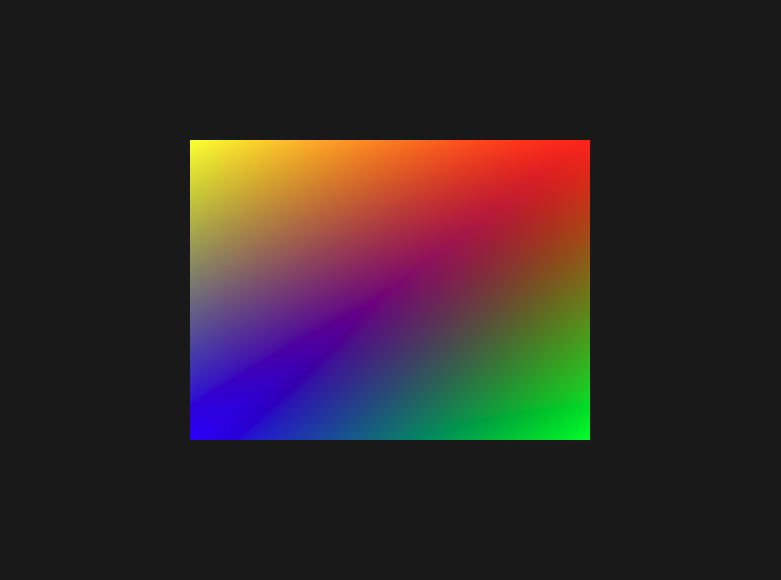
Per Vertex Colors
Introduction
Welcome back to OpenGL Fundamentals: Your First Triangle! In our previous lesson, we mastered the art of efficient geometry rendering by implementing index buffers. We successfully transformed our approach from using six duplicate vertices to just four unique vertices, learning how Element Buffer Objects eliminate redundancy and improve performance.
In this sixth lesson, we're ready to add visual richness to our renders by exploring per-vertex colors. Instead of our uniform orange-red square, we'll create a vibrant, multi-colored square where each corner displays a different hue. This technique introduces us to the concept of vertex attributes beyond position and demonstrates how the GPU interpolates data smoothly across triangle surfaces. By the end of this lesson, our square will showcase beautiful color gradients, and we'll have established good habits for managing GPU memory efficiently.
Understanding Per-Vertex Colors
Per-vertex coloring represents a fundamental technique in computer graphics, where color information is stored directly with each vertex rather than applying a uniform color to entire shapes. This approach offers several compelling advantages: it requires no additional texture memory, provides smooth color gradients through GPU interpolation, and allows for rich visual variety with minimal data overhead.
When we assign different colors to each vertex of a triangle, the GPU automatically performs smooth interpolation between those colors across the triangle's surface. This process, called linear interpolation or lerping, creates beautiful gradients that transition seamlessly from one vertex color to another. For our square, composed of two triangles, this means each corner can have its own distinct color, and the interior will display smooth color transitions.
The beauty of per-vertex colors lies in the graphics pipeline's automatic handling of this interpolation. We simply provide color data at each vertex, and the GPU takes care of computing the appropriate color for every pixel between those vertices. This technique forms the foundation for more advanced shading effects and demonstrates how vertex attributes flow through the rendering pipeline to create rich visual results.
Updating the Vertex Shader
Our vertex shader needs to accept color data as an additional input attribute and pass it along to the fragment shader for interpolation. Let's examine how we modify our vertex shader to handle this new color information.
We've added a second input attribute aColor at location 1 to receive our per-vertex color data, formatted as a 3-component vector representing RGB values. The crucial addition is the out vec3 vertexColor declaration, which creates an output variable that will be automatically interpolated across triangle surfaces. In our main function, we simply assign the input color to our output variable, allowing the graphics pipeline to handle the interpolation between vertices. This demonstrates the elegant simplicity of the vertex shader's role in per-vertex coloring: it receives the data and forwards it for interpolation.