Welcome back to Multi-Step Percent Problems! With two lessons now behind us, we are at the midpoint of this five-lesson course. In Lesson 1, we practiced choosing the correct base when a problem involves more than one number. In Lesson 2, we learned how to work backward from a final amount to recover the original value before a percent change. Both of those skills feed directly into what comes next.
This third lesson tackles a situation that shows up all the time in everyday life: two percent changes happening one after another. A store runs a 20% sale and then takes an extra 10% off at the register. An investment gains 15% one year and loses 10% the next. In each case, the second percent change does not apply to the starting amount — it applies to whatever the amount became after the first change. Learning to handle these consecutive percent changes correctly is our goal for this lesson.
Why the Base Shifts After Each Step
Every percent change has a base, the number the percent is taken from. When two changes happen in sequence, the base for the second change is the result of the first change, not the starting value.
Think of it like climbing stairs. After the first step, you are standing on a new level. The second step begins from wherever you landed, not back on the ground floor. Percent changes work the same way: each change updates the amount, and the next change starts from that updated amount. Keeping track of this shifting base is the key to getting consecutive percent problems right.
Walking Through Two Consecutive Changes
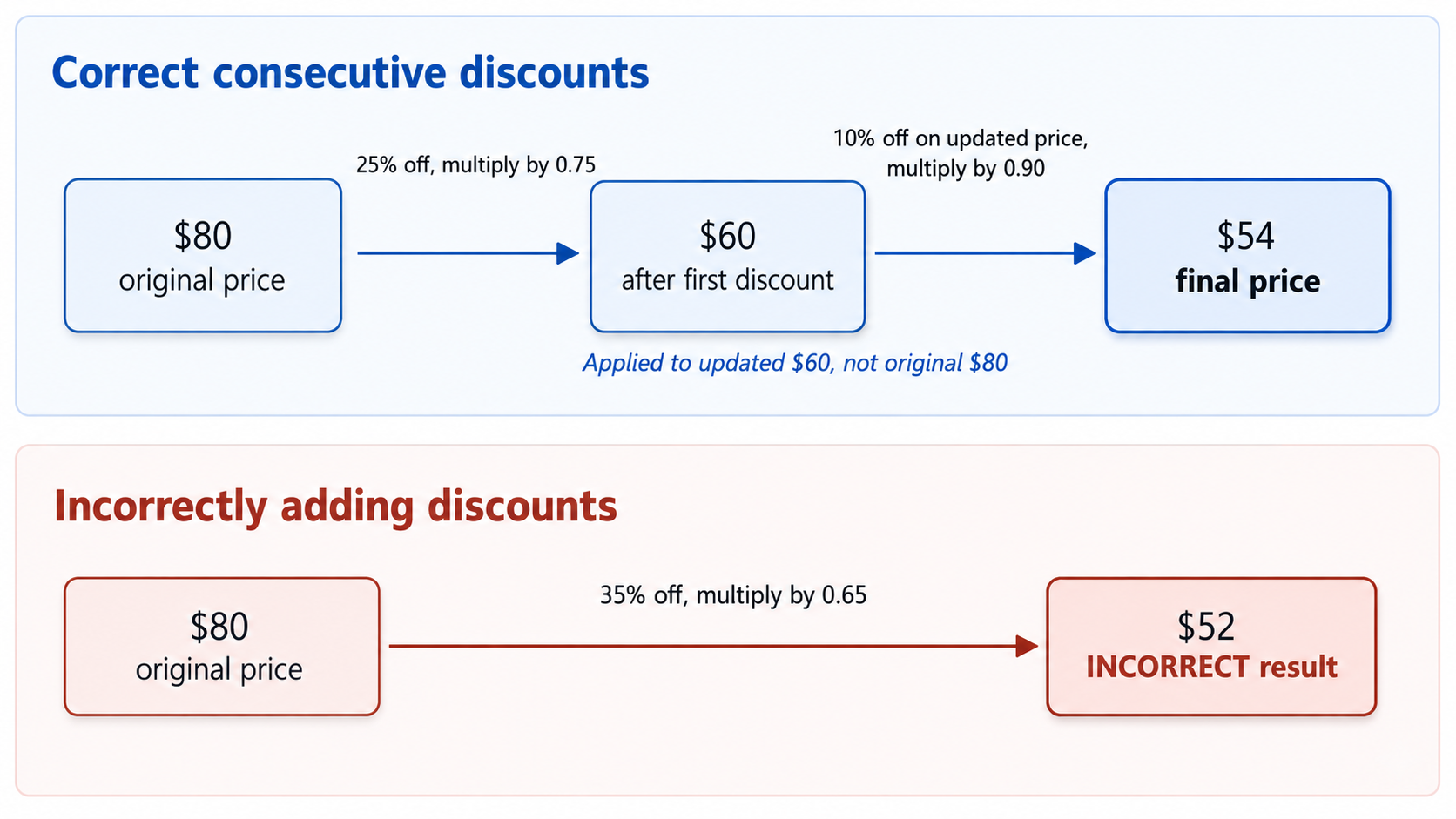
Let's work through a concrete example. Suppose a jacket is originally priced at $80. The store applies a 25% discount, and then a loyalty program gives an extra 10% off the already-reduced price. What do we actually pay?
Step 1 — Apply the first change. A 25% discount means we pay 75% of the original price:
80×0.75=60
The price drops to $60 after the first discount.
Step 2 — Apply the second change to the updated amount. The extra 10% off is calculated on $60, not on the original $80:
60×0.90=54
The final price is $54. Notice what would happen if we mistakenly combined the two discounts into one 35% discount: 80×0.65=52. That gives $52, which is lower than the correct answer. The two discounts do not simply add up, because the second discount applies to a smaller base than the first.
The flow diagram below makes the changing base easy to see:
Join the 1M+ learners on CodeSignal
Be a part of our community of 1M+ users who develop and demonstrate their skills on CodeSignal
There is a handy shortcut. Instead of computing the intermediate amount first, you can multiply the individual change factors together in one expression. As a quick refresher, each percent change has a multiplier:
A percent increase of rate r has a multiplier of 1+r.
A percent decrease of rate r has a multiplier of 1−r.
For the jacket example, the two multipliers are 0.75 (for the 25% discount) and 0.90 (for the 10% discount). Chaining them looks like this:
80×0.75×0.90=80×0.675=54
The combined multiplier is 0.675, which tells us the final price is 67.5% of the original — even though the individual discounts were 25% and 10%. The shortcut saves a step and makes it easy to see the overall effect at a glance.
This method works for any mix of increases and decreases. For example, if a $1,000 investment gains 12% and then loses 5%:
1,000×1.12×0.95=1,000×1.064=1,064
The investment ends at $1,064, reflecting an overall gain of 6.4% — not the 7% you might expect from subtracting the two rates.
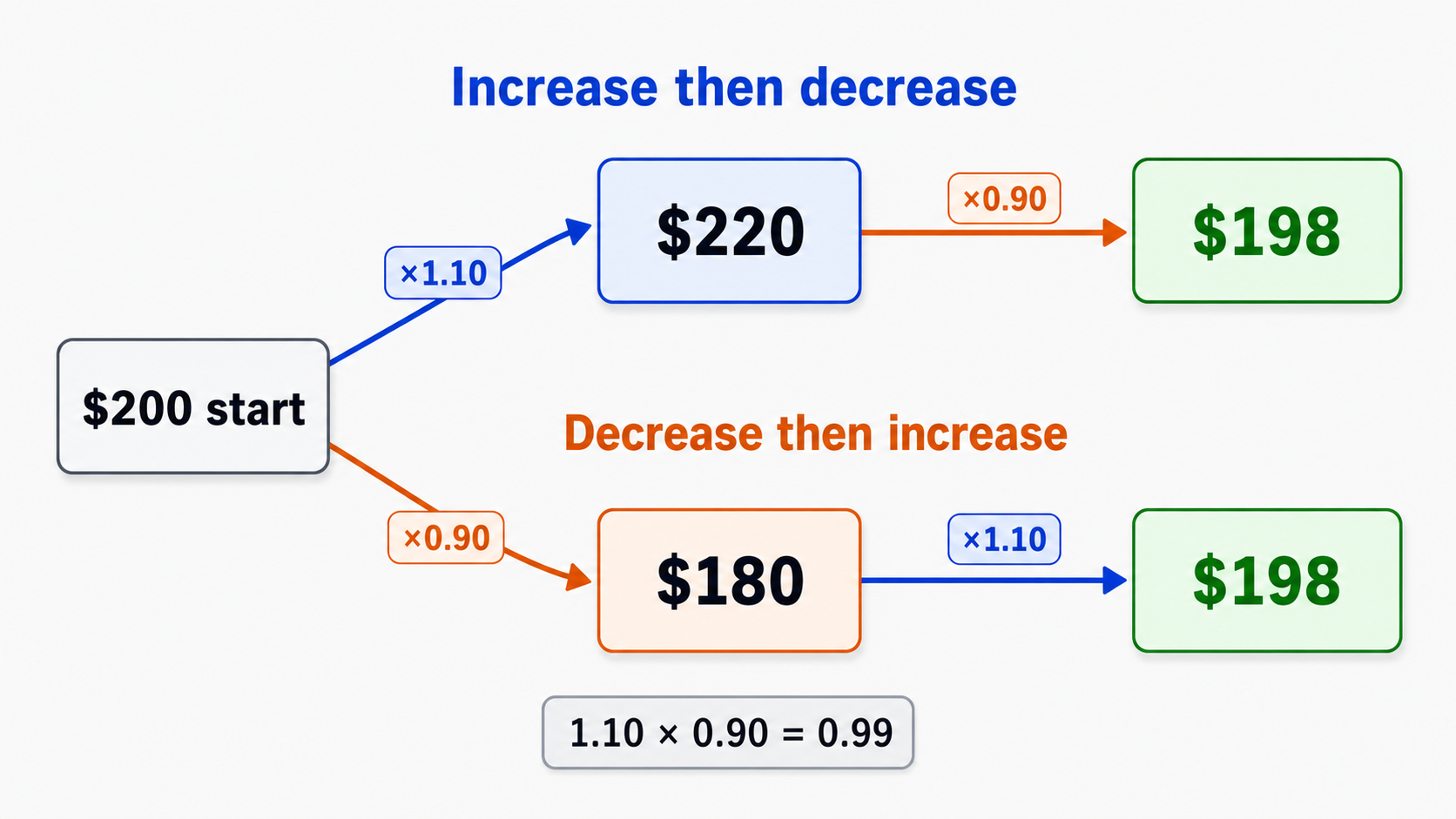
Here is a result that catches many people off guard. Suppose a $200 item increases in price by 10% and then decreases by 10%. Common sense might suggest we end up right back at $200. Let's check.
Step 1 — 10% increase:
200×1.10=220
Step 2 — 10% decrease (applied to $220, not $200):
220×0.90=198
The final amount is $198, not $200. We lost $2 along the way! The order does not matter either — if we decrease first and then increase, we get the same result:
200×0.90=180⟶180×1.10=198
We still land on $198. Both paths are shown below:
The combined multiplier explains everything: 1.10×0.90=0.99. A 10% increase paired with a 10% decrease always produces a combined multiplier of 0.99, which is a net 1% loss. The decrease removes 10% of a larger number than the one the increase built up from, so the two changes never perfectly cancel.
This pattern is not specific to 10% — it holds for every pair of equal-magnitude opposite changes. If the rate is r expressed as a decimal, the combined multiplier is:
(1+r)(1−r)=1−r2
Because r2 is always positive for any nonzero rate, the product is always less than 1. The net effect is a small loss equal to r2 of the original amount. The table below shows how this plays out at different rates:
Rate (r)
r2 (net loss as decimal)
Net loss as percent
5% (0.05)
0.0025
0.25%
10% (0.10)
0.01
1%
20% (0.20)
0.04
4%
50% (0.50)
0.25
25%
The larger the rate, the bigger the gap. A 50% gain followed by a 50% loss wipes out a full quarter of the original value — far from the break-even result many people expect. This insight is especially important when thinking about investments or prices that swing up and down by the same percentage over time.
In this lesson, we learned how to apply consecutive percent changes by treating each step's result as the new base for the next step. We saw that multiplying the individual change factors gives a single combined multiplier that captures the overall effect. We also discovered that equal-size increases and decreases do not cancel out — the combined multiplier (1+r)(1−r)=1−r2 is always less than 1, producing a net loss every time.
In the practice exercises ahead, you will trace through two-step calculations, fill in intermediate amounts, compare increase-then-decrease scenarios, and explain in your own words why consecutive changes behave the way they do. Take your time with each problem, and remember: always apply the next percent change to the updated amount, never the original.