Understanding Generative AI Methods
Welcome to the Course 🚀
Welcome to Introduction to Generative AI. If your work involves writing, research, presentations, or visuals, generative AI is already becoming part of your workflow. In this first unit, you’ll build a plain-language mental model for what generative AI does, how it works, and where it can go wrong.
You’ll cover:
- The five major AI capabilities: text generation, image generation, image description, web search, and automation
- The three main model families: large language models, diffusion-style image models, and multimodal models
- Key limitations like context windows and hallucinations, plus why human verification matters
Five Capabilities, Not One Tool ⚒️
When people say "AI," they may be talking about five different capabilities, and mixing them up can lead you to use the wrong tool for the job.
| Capability | What it does | Useful for |
|---|---|---|
| Text generation | Drafts written content | Emails, summaries, talking points |
| Image generation | Creates pictures from a description | Hero slides, illustrations, mockups |
| Image description / vision AI | Reads a picture and describes what’s in it | Alt text, triage photos, chart interpretation |
| Web search | Retrieves current information from the internet | Recent facts, live sources, up-to-date research |
| Automation | Chains AI capabilities together with your other tools | Multi-step workflows and repeated tasks |
The practical move: before you open a tool, name which capability you actually need. "I need a draft" is text generation. "I need a visual" is image generation. "What's in this photo?" is image description. Asking the wrong tool the right question is a top reason people decide AI "doesn't work."
The Three Model Families Behind AI Tools 🧑🧑🧒
Three model families sit underneath those capabilities, and a rough mental picture of each will save you a lot of guesswork.
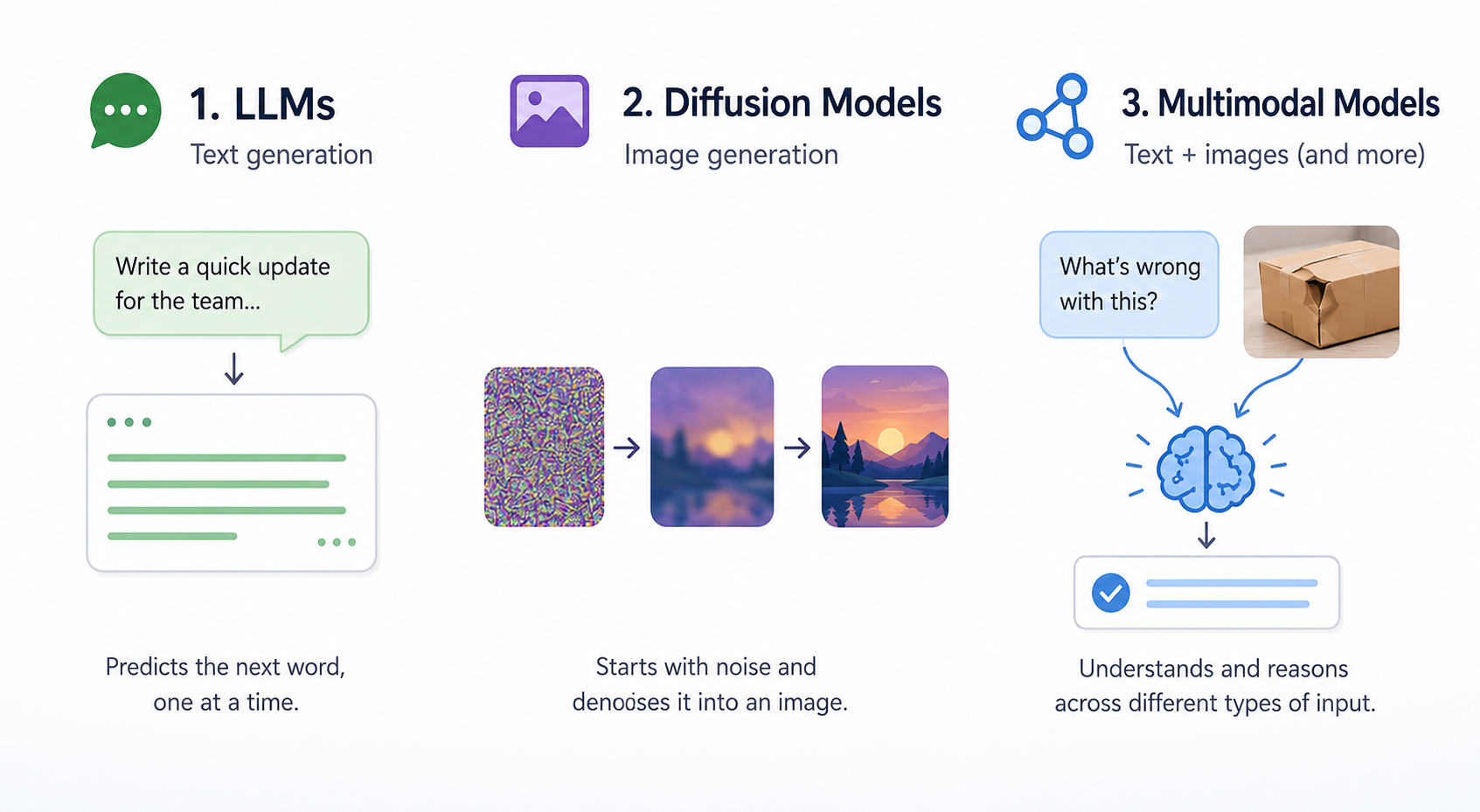
Large language models (LLMs) power text generation. Picture an extremely well-read autocomplete: given everything you've typed so far, the model predicts the most likely next word, then the next, then the next, all the way to the end of the response. It learned these patterns from massive amounts of human-written text. It doesn't "understand" in the way you do; it pattern-matches at a scale that feels like understanding.
Diffusion-style image models power image generation. Think of them as starting with a screen of static (random noise) and gradually "uncrumpling" it into a coherent picture that matches your description, one denoising pass at a time. They learned what a "warm, candid office photo" looks like by training on millions of captioned images.
Multimodal models can take in more than one type of input, like text plus an image, and reason across them. That's what lets a single tool answer "what's wrong with this shipment photo?" or "turn this whiteboard sketch into a summary." Capabilities like image description and most modern chat tools live here.
Prediction, Context Windows, and Hallucinations ⚠️
Because LLMs predict the next likely word, they will happily produce a confident, well-formed sentence even when the underlying claim is false. That’s called a hallucination: an output that sounds factual but is unsupported, inaccurate, or invented.
A hallucination might be a fake statistic, a made-up citation, an award a company never won, or a confident answer to something the model was never given enough information to know. The model is not “lying” on purpose; it is generating a plausible pattern. That’s why hallucinations are not a bug you can fully prompt your way out of; they’re a property of how the model works.
Another term worth noting is a context window: everything the model can "see" in your current conversation, including your prompt, any pasted text, and its own prior responses. Past that window, it has no memory. And because the model is optimizing for plausible-sounding output, the most dangerous hallucinations are the polished ones: awards, statistics, and citations that look exactly right.
Here’s what that looks like in a normal work task. Jake used an AI tool to draft a short vendor bio from a few bullet points, but the draft included a specific award he didn’t recognize. He asks Nova, a teammate with more experience reviewing AI output, what to do with it.
- Jake: I asked it for a vendor bio and it gave me this clean line about a 2021 industry award. Looked totally real.
- Nova: Did the bullet points you fed it mention any award?
- Jake: No, I just gave it the company name and a couple of facts.
- Nova: Then the model filled the gap with whatever sounded plausible. That's a hallucination, not a fact.
- Jake: So I need to verify anything it added that I didn't give it?
- Nova: Exactly. If you didn't put it in, treat it as a claim, not a quote.
Notice the move: Nova didn't argue with the output, she traced it back to what was in the prompt versus what the model invented.
The single most important takeaway from this unit: generative AI doesn't retrieve truth, it generates plausible patterns, so your value as the human in the loop is to pick the right capability, then verify what came out.
Everything above is theory until you have to explain it to someone else in plain English. Your next step is a live roleplay where a curious teammate asks you how this stuff actually works: your job is to make the three model families stick using everyday analogies, no jargon allowed.
