Welcome to the "Enabling & Customizing CORS in Your TypeScript REST API" course! In this first lesson, we'll explore what CORS is and set up basic CORS support in your API.
Let's start with a common scenario: You're building a web application where your frontend (running on https://myapp.com) needs to make API requests to your backend server (running on https://api.myapp.com). When you try to fetch data, the browser blocks these requests with an error like:
This happens because of the same-origin policy - a security feature built into browsers that prevents scripts from one website from accessing resources from a different domain. This is where CORS comes in.
Cross-Origin Resource Sharing (CORS) is a mechanism that allows your server to indicate which origins (domains) should be permitted to access its resources. It's not a security feature itself, but rather a controlled relaxation of the same-origin policy.
CORS works through a series of HTTP headers exchanged between the browser and the server:
- The browser automatically adds an
Originheader to cross-origin requests - The server responds with specific CORS headers that tell the browser whether to allow the request
The key response headers include:
Access-Control-Allow-Origin: Specifies which origins can access the resource (e.g.,https://myapp.comor*for all origins)Access-Control-Allow-Methods: Lists permitted HTTP methods (GET, POST, etc.)Access-Control-Allow-Headers: Indicates which headers can be used in the request
Here's a visualization of how CORS works:
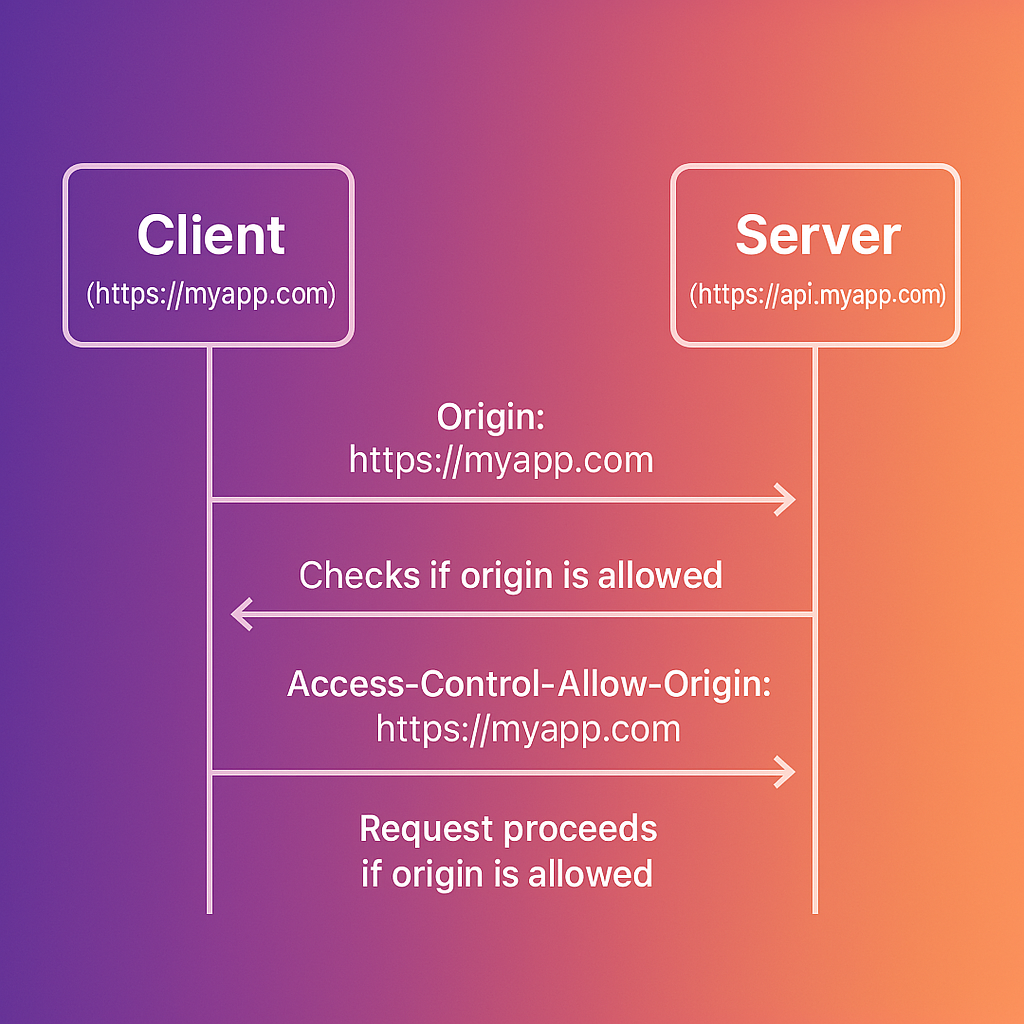
CORS distinguishes between two types of cross-origin requests:
-
Simple requests that meet specific criteria (GET, POST, or HEAD methods with only standard headers)
- These follow the basic flow shown above
-
Complex requests that use other methods (PUT, DELETE) or custom headers
- For these, the browser first sends a "preflight" OPTIONS request
- The server must respond to this preflight with appropriate CORS headers
- Only if the preflight succeeds will the browser send the actual request
We'll explore preflight requests in more detail in upcoming lessons.
A common CORS configuration mistake is setting Access-Control-Allow-Origin: *, which allows any website to make requests to your API. This can lead to security issues in certain contexts.
For example, imagine you have an API for a banking application that responds with sensitive account information. If this API uses Access-Control-Allow-Origin: * and relies on session cookies for authentication, a malicious site could make requests that include the user's authenticated cookies:
If the server responds with:
The malicious site now has access to the user's banking information - all because the CORS policy was too permissive.
It's important to note that when the server sets Access-Control-Allow-Origin: *, it cannot use the Access-Control-Allow-Credentials: true header. This is because allowing credentials (like cookies or HTTP authentication) from any origin would be a major security flaw. Browsers enforce this restriction by rejecting such configurations, and requests will fail with an error like:
The correct approach would be to specifically allow only trusted origins, such as:
Now that we understand why CORS matters, let's implement a basic CORS setup in an Express application:
First, install the required packages:
Here's a simple implementation:
With this setup, any website can make requests to your API. Let's modify it to only allow specific origins:
Before CORS: When attempting a cross-origin request from https://myapp.com to https://api.myapp.com, you would see an error in the browser console:
After CORS: With proper CORS configuration, the same request succeeds because the server now responds with the appropriate headers:
Remember these key points about CORS:
- CORS is not a security feature - it relaxes security restrictions, so configure it carefully
- Setting
origin: '*'allows any website to access your API, which may be appropriate for public APIs but risky for APIs handling sensitive data - For APIs that use cookies or authentication, always specify exact origins rather than using the wildcard
- CORS is enforced by browsers - API requests from server-side code or tools like Postman will not be blocked by CORS
In this lesson, we've covered the basics of CORS, why it's necessary, and how to implement a simple CORS configuration in an Express TypeScript application. You now understand how to control which origins can access your API resources and the security implications of different CORS configurations.
In the upcoming lessons, we'll explore more advanced CORS configurations, including how to handle different CORS settings for different routes, dynamic origin validation, and handling preflight requests.
