Reusing Python Functions
Introduction: One Definition, Many Runs
Welcome back to Defining and Calling Python Functions! We are now in the second unit of the course, standing on solid ground: as you may recall from Unit 1, a def block stores a body under a name, and a matching name() call at column 0 is what actually runs it.
That first program called its function exactly once, which raises an obvious question: What happens if we call the same function again? And again?
Our example for this unit is a small report with three labeled sections, each one framed by a horizontal divider rule made of dashes. Our goal is deliberately narrow but very useful: write that divider line once, then make it appear on-screen four times.
The Duplication Problem
Before reaching for a function, let's write the report the direct way, with every line spelled out at column 0:
This works perfectly; the output is exactly the report we want. The trouble is the statement print("-" * 20), which appears four separate times. Suppose our team later decides the divider should be thirty equal signs instead. That is four separate edits, four chances to fumble one, and a report in which one stray section is framed differently from its neighbors. The duplication is not wrong, just fragile.
Storing the Repeated Line Once
The repeated statement is the perfect candidate for a function. Let's give it a home:
The shape is exactly the recap from Unit 1: the def keyword, a snake_case verb-first name, empty parentheses, a colon, and an indented body. (The empty parentheses simply declare no parameters, so callers pass no arguments.) The only genuinely new detail is size — the body here is a single statement. Functions have no minimum size; even a one-statement function can be useful when the statement represents one meaningful operation that is genuinely reused. And as before, this def prints nothing when Python reads it: the line is stored, not run.
Calling It Four Times
With the divider stored, the report becomes a sequence of calls interleaved with headings:
Three counts are worth saying out loud. There is one def in the file, the text "-" * 20 appears exactly once, and yet we can write as many print_separator() calls as the report needs. That gives us the central rule of this unit: the number of calls, not the number of definitions, determines how many times a body runs.
Also note the alignment: every call sits at column 0, at the very same level as the heading print statements around it. Calls and plain statements are peers here; nothing is nested.
Tracing Execution In and Back Out
Here is the complete program, with the fourth call added so each section is framed above and below:
Python reads from top to bottom: it stores the body silently, then runs the seven top-level statements in order. At the first call, control jumps into the body, prints one rule, and returns to the line right after the call, which is print("Section 1: Sales"). Each later call repeats that same round trip into the same single body.
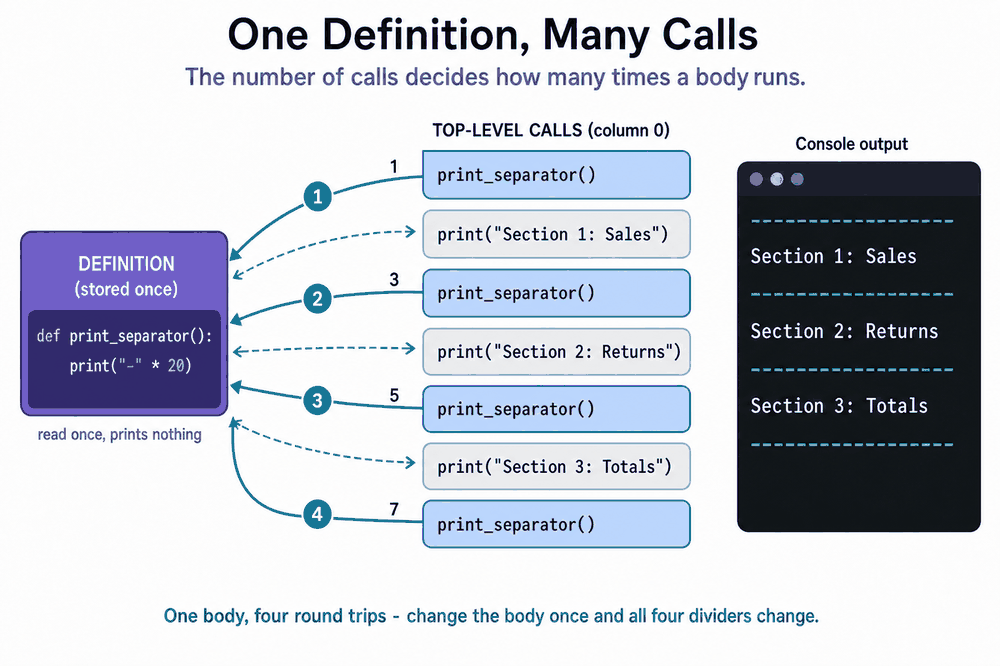
There are seven lines; four of them are dashes produced by that one body line.
What Reuse Buys You
Now the payoff becomes concrete. If we change the body to print("=" * 30), all four dividers change at once because all four came from the same place. If the report grows to include a fourth section, we add one heading and one print_separator() call, with nothing to copy. In the duplicated version, each of those edits had to be repeated at every site.
One caution before we get carried away: reuse like this is only safe while every call site genuinely wants identical output. A section that needs a different divider width cannot be served by this function as written. Making a single function produce different results per call is exactly what parameters are for, and that is the subject of the next course in this path.
Refactoring Checklist: Duplicated Lines to One Function
The move we just made has a name: refactoring, meaning that we changed the structure of the code without changing what it prints. It follows a recipe we can reuse anywhere:
- Spot an identical statement repeated at column 0.
- Write a
defabove the calls, with that statement as its indented body. - Replace each duplicate with a call to the new function, keeping the original positions so the printed order remains untouched.
- Run the program and confirm that the output is character-for-character the same as before.
A quick sanity check helps confirm the wiring: comment out one call and run again. Exactly one line should disappear from the output. If two vanish, or none do, we know that a call is in the wrong place before the bug can hide in a longer file.
Conclusion and Next Steps
Let's collect the four takeaways from this unit: one definition can serve any number of calls; the call count, not the definition, controls how many times the body runs; each call jumps into the body and returns to the statement immediately after it; and replacing duplicated lines with calls keeps the output identical while shrinking the file and centralizing every future edit.
As in Unit 1, these calls sit directly at module level so the execution order reads top to bottom — a teaching simplification we keep throughout the course; production scripts usually move such orchestration into a main() function.
In the practices ahead, we will frame an unfinished section by adding a single call, refactor three repeated star lines into one tidy function, write a brand-new divider function from scratch, and repair a report whose calls were shuffled out of order. Let's put that one definition to work!
