Organizing Multiple Python Functions
Introduction: From One Function to a Team of Functions
Welcome to the third and final unit of Defining and Calling Python Functions! By now, we own two solid tools: a def block stores a body under a name, and a single definition can serve as many calls as we like.
Both of those units revolved around one function. Real scripts rarely do. A program usually has several distinct jobs to do, each deserving its own name.
Our example for this unit is a small daily standup script: it prints a meeting title, then a numbered agenda, and then a closing line with the meeting time. We will write three separate functions in one file and coordinate them with a short block of top-level calls. Along the way, three ideas become visible: many def blocks can live side by side, the calls decide the output order, and every name must exist before it is called.
One Job per Function: Writing the Three Definitions
Each definition follows the familiar Unit 1 shape — def, name, (), colon, indented body — so we will move quickly here and spend our attention on what is new: several definitions coexisting in one file. Let's build the definitions one at a time, starting with the title line:
One job, one name. Now the agenda, whose body happens to be longer:
And finally, the closing line:
Three things are worth noticing across all three blocks:
The new idea to hold onto is that bodies may be different sizes: show_agenda holds three statements while the others hold one, and that size has nothing to do with how often each function is called. Everything else is review — each header sits at column 0, each name is snake_case and verb-first, and reading these definitions prints nothing at all.
Indentation Is the Boundary Between Functions
If nothing marks the end of a function, how does Python know where show_header stops and show_agenda starts? The answer is purely about columns: a function body continues as long as lines stay indented, and it ends the moment a line returns to column 0.
The two blank lines between top-level definitions are a widely followed style convention; they cost nothing and make a long file much easier to scan. One "what if" is worth internalizing: if a print statement accidentally drifts out to column 0, it leaves the body and becomes top-level code, so it runs immediately when the script starts, whether or not we ever call the function. Surprise output usually traces back to exactly that slip.
The Call Block: Top-Level Code as the Coordinator
Definitions alone print nothing, so the program still needs a coordinating half:
This is the division of labor that gives the unit its name: the definitions name the pieces, and the top-level code orders them. All three calls sit at column 0, each name is called exactly once, and the block reads almost like a table of contents for the output. Here is the finished program in one piece:
Definitions first, then the comment, and then the calls: that shape is the layout we will keep for the rest of the path.
Tracing Five Lines from Three Calls
Let's walk through the file from top to bottom. Python reads the three def blocks and silently stores them, printing nothing. Then it reaches the first real action, show_header(), jumps into that body, prints one line, and returns to the statement immediately after the call. That statement is show_agenda(), which prints three lines in a single round trip, and then show_footer() prints one more.
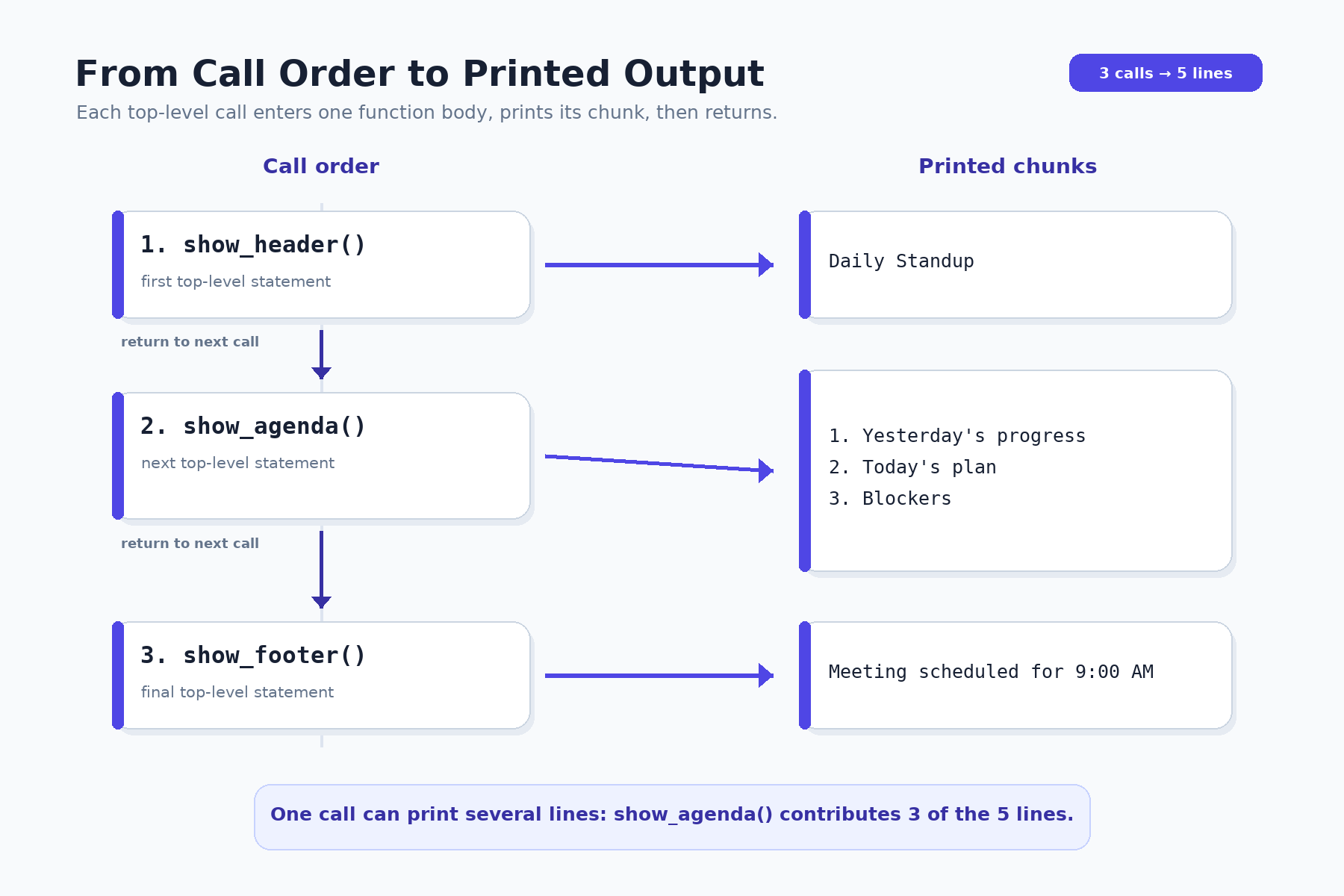
Let's reconcile the counts out loud: three calls produced five printed lines because one of the bodies happens to hold three statements. Since every call returns to the line right below it, the top-level sequence marches on undisturbed.
Call Order Decides Output Order, Definition Order Does Not
Now for the central distinction of this unit. Consider swapping two lines in the call block while leaving the definitions untouched:
The console changes right away: the meeting time is announced before the standup even has a title. But if we instead swap the whole def show_footer(): and def show_header(): blocks and leave the calls alone, the output is byte-for-byte identical.
The conclusion deserves to be stated plainly: definition order is about availability, while call order is about execution. The practical payoff is that resequencing a report means moving a single call line, never a function body.
Define Before You Call: Understanding `NameError`
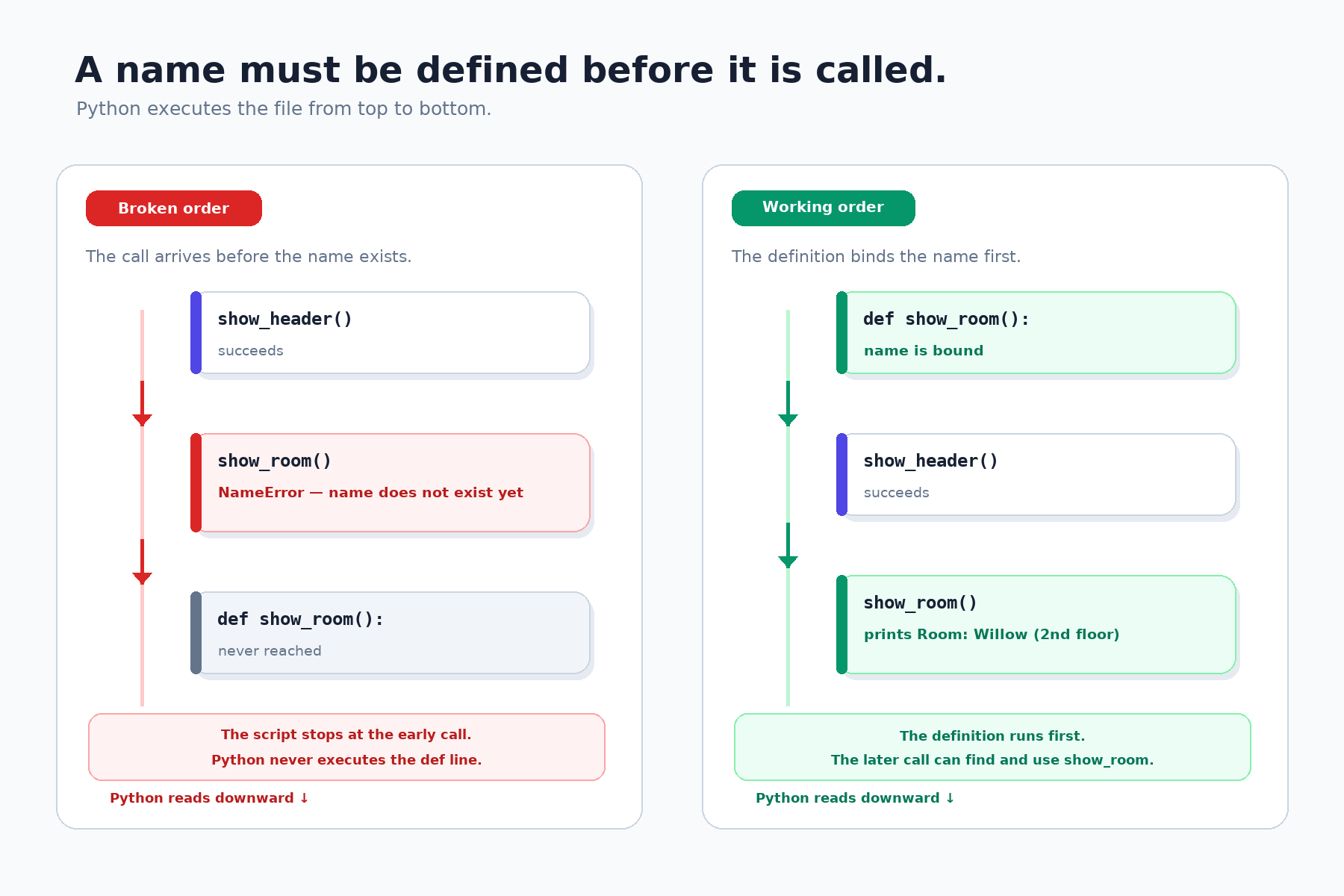
There is one limit on that freedom. A def is an executable statement that binds a name, so the name does not exist until Python has actually run its def line. Watch what happens when a call sits above its definition:
The header line prints fine, and only then does the script stop:
Notice that the crash happens at the moment of the call, not when the file is read; earlier output has already reached the console. The fix is to move the whole def show_room(): block, including its header and indented body, above the call block. That is precisely why our reference layout is definitions first and calls last.
A Layout Checklist for Multi-Function Scripts
The standup script is small, and its two-part shape — small, well-named functions plus a deliberate block of calls — is worth carrying forward. One honest caveat first: putting those calls directly at module level is a teaching simplification. It keeps execution order easy to read, but code written this way runs the moment the file is imported, which makes a module harder to reuse or test safely. The idea that scales is small functions plus deliberate orchestration; in real projects the orchestration itself is usually placed inside a main() function that runs only when the file is executed directly:
With that caveat noted, here is the layout recipe to reuse for the flat scripts in this course:
- Give each job one small function with a snake_case, verb-first name;
- Group every
defblock near the top of the file, with headers at column 0 and bodies indented one level; - Leave one short comment marking where the call block begins;
- Place each call at column 0 below all definitions, one per line, in the order in which the output should appear;
- Run the program and confirm that the printed order matches the call order.
A fast self-check keeps the wiring honest: comment out a single call and run again. Exactly that function's chunk of output should disappear, no more and no less. If something else vanishes, a call is not where we think it is.
Conclusion and Next Steps
Let's gather the takeaways: one file can hold many independent definitions; indentation binds statements to their function, while column 0 marks top-level code; the order of the calls, not the definitions, sets the output order; and every name must be defined before the line that calls it, or the script halts with a NameError.
In the practices ahead, we will inspect the three-function standup program, add a fourth function and slot its call into a precise position, repair a call block whose lines were scrambled, fix a NameError caused by a late definition, and finally write three functions of our own and slot their calls into the standup script.
Congratulations on reaching the end of Defining and Calling Python Functions: we can now define, reuse, and organize no-parameter functions with confidence. Next up in this path, functions learn to accept parameters, so one function can produce a different result on every call. Let's run these final practices and finish the course strong!
