Defining and Calling Functions
Introduction: Why Functions Exist
Welcome to Defining and Calling Python Functions! This is the very first unit of the course, so we begin at the foundation: teaching Python to remember a block of code under a name we choose.
Imagine a reporting script that prints a decorated welcome banner in three different places. Without functions, we type those same three print lines three separate times. Later, when the wording changes, we have to hunt down all three copies and edit each one, hoping we do not miss any.
A function solves this by letting us store a block of code once, attach a name to it, and run it whenever we want. In this lesson, we build a small program with a print_banner function that frames a welcome message. Along the way, we focus on the single idea this unit hinges on: defining code and running code are two completely separate events.
Anatomy of a Function Definition
Every function starts with a header line. Let's look at ours before adding anything else:
That short line carries four required pieces, in this exact order:
def: the keyword that announces "a function definition begins here";print_banner: the name we will use later to run this code;(): empty parentheses, which declare that this function has no parameters, so callers do not pass it arguments (parameters come later in this path);:: the trailing colon, which tells Python that an indented block follows.
None of these parts are optional. Writing def print_banner: without parentheses, or def print_banner() without the colon, stops the program with a SyntaxError before anything runs. Python is strict here on purpose: the header is a contract, and it must be complete.
One nuance about those parentheses: empty parentheses declare that the function takes no parameters, so nothing is passed in when we call it. That is not the same as saying the function can never use outside information — a no-parameter function could still read a global value or ask the user for input — but print_banner happens to rely on nothing external at all.
The Indented Body
The header alone does nothing useful; it needs a body, which is the code the function will run. In Python, indentation is what marks that body, rather than braces or an end keyword:
All three print lines are indented one level (four spaces is the standard convention), and they must be indented consistently with each other. The body continues for as long as the indentation continues, and it ends the moment a line returns to column 0.
Notice "=" * 30: multiplying a string repeats it, so this produces a rule of exactly thirty = characters. That keeps the framing line tidy without typing thirty symbols by hand.
Defining Is Not Running
Here is the part that surprises many learners: if we run a file containing only the definition above, the console stays completely empty. Not one = appears.
When Python reads a def block, it does not execute the body. It packages those three print statements together, attaches the package to the name print_banner, and then moves on to the next line at column 0. The body is now stored, waiting.
Think of writing a recipe card. Writing down "boil water, add pasta, drain" does not produce dinner; it just records the steps for later. A silent program like this one is not broken; it is simply a program that stored some code and never asked for it to run.
Calling The Function
To actually run the stored body, we call the function by writing its name followed by parentheses. Here is our complete program:
Three rules make that final line work: the name must match the definition exactly, the parentheses are required (writing print_banner alone evaluates the name and runs nothing), and the call must come after the def so the name already exists. Critically, the call sits at column 0, which makes it part of the script rather than part of the body. Running this prints:
Tracing The Execution Order
Let's follow the file exactly as Python does, from top to bottom. First, it reads the comment and skips it. Then it reads def print_banner():, stores the three-line body under that name, and prints nothing at all. It skips straight over the indented lines without running them. Next, it reaches print_banner() at column 0, jumps into the stored body, runs the three print statements in order, then returns to the call line and continues with the rest of the file, which is empty here.
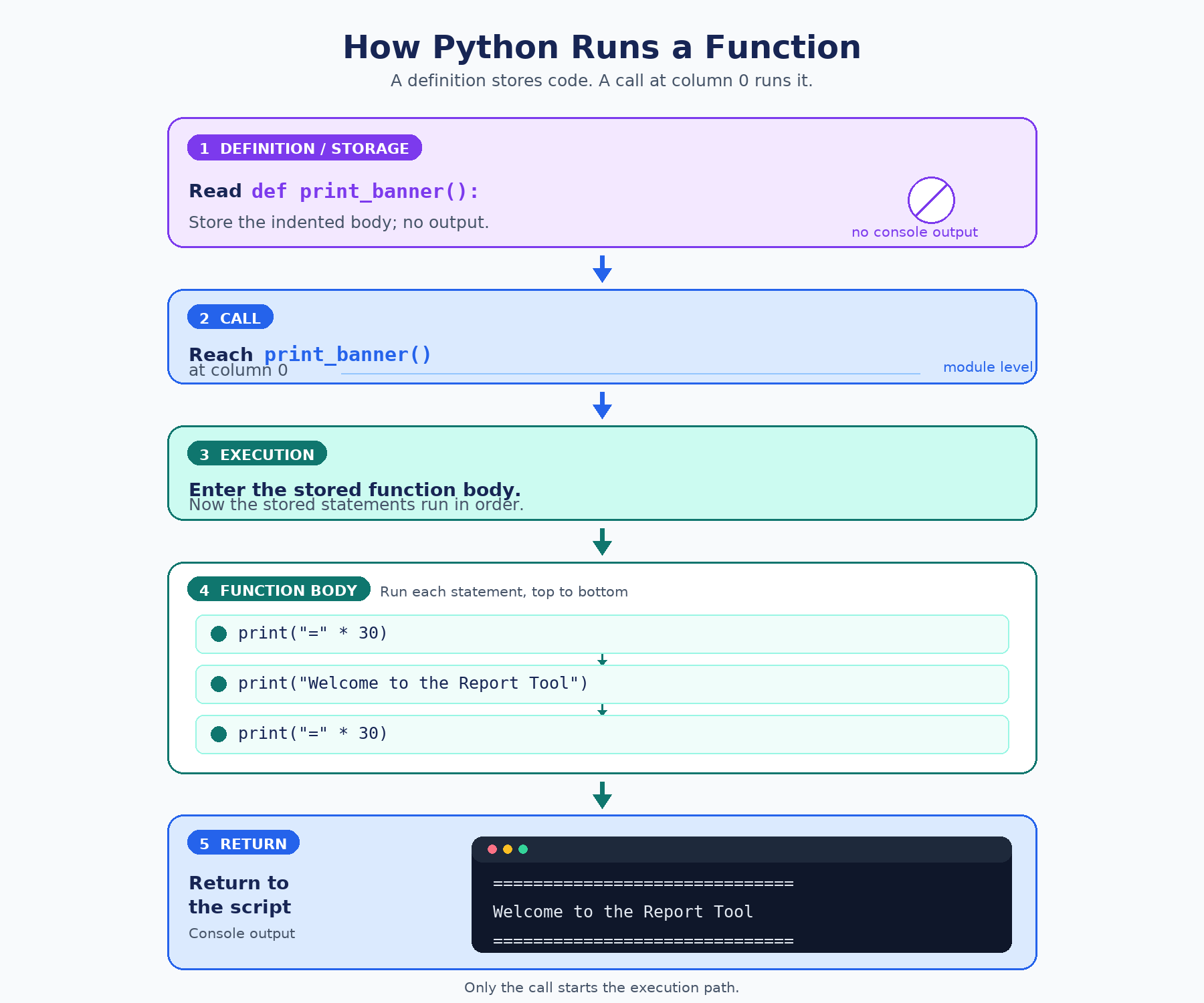
All three output lines therefore come from that one call, never from the def block. A quick "what if" makes the point stick: indent the call by four spaces, and it becomes part of the body itself, so the only thing that could trigger it is the function already running. Nothing calls it, and the program falls silent again.
Naming Functions Well
Since the name is how we run the code later, it deserves some care. Python's convention is snake_case: lowercase words joined by underscores. For functions, we also prefer starting with a verb that says what the function does, such as print_banner, print_footer, or show_menu.
Compare that with weaker choices:
| Name | Problem |
|---|---|
PrintBanner | CapWords is conventionally used for class names, so snake_case is preferred for functions |
pb | Too short to explain anything to a future reader |
banner | Reads like a piece of data, not an action |
A few hard rules also apply: names cannot contain spaces, cannot start with a digit, and should avoid reusing built-in names like print or list, since redefining those quietly takes away the original tool for the rest of the program.
Conclusion And Next Steps
Let's gather the four takeaways: a definition starts with def name():, including the colon; the code it stores lives in a consistently indented body; a matching name() call at column 0 is what actually runs that body; and storing code is a separate event from running it. Notice also the compact style we used, with no main() wrapper and no if __name__ == "__main__": block, so the execution order reads straight down the page. That flat layout is a deliberate teaching simplification: calling functions directly at module level keeps the execution order easy to follow while we concentrate on defining and calling. Larger programs usually gather these calls inside a main() function guarded by if __name__ == "__main__":, a convention this path returns to later.
Next up are the practices, where we will add the missing call to a silent script, write a brand-new function from scratch, and play detective on a function whose call is trapped inside its own body. Let's go make some code actually run!
