Comparing Rows with LEAD
Introduction
Welcome back to Comparing Rows with LEAD and LAG. We are now in Lesson 2 of 4, where we will move from comparing an order with the previous order to comparing it with the next one. We will use LEAD to follow signup and order timelines, DATEDIFF to measure known waits, and a fixed January 1, 2024 cutoff to identify possible customer lapses. When no later event is available, we will preserve NULL instead of inventing a date or a zero gap.
Understand LEAD’s Forward-Looking Sequence
As we may recall from Lesson 1, a window function needs a clear sequence before it can identify a neighboring row. Although MySQL can accept LAG() or LEAD() without a window ORDER BY, neighboring rows are not meaningfully or deterministically defined without one. Always provide an ORDER BY for chronological comparisons.
LAG()retrieves a value from the previous row. The first row in each partition returnsNULL.LEAD()retrieves a value from the next row. The final row in each partition returnsNULL.
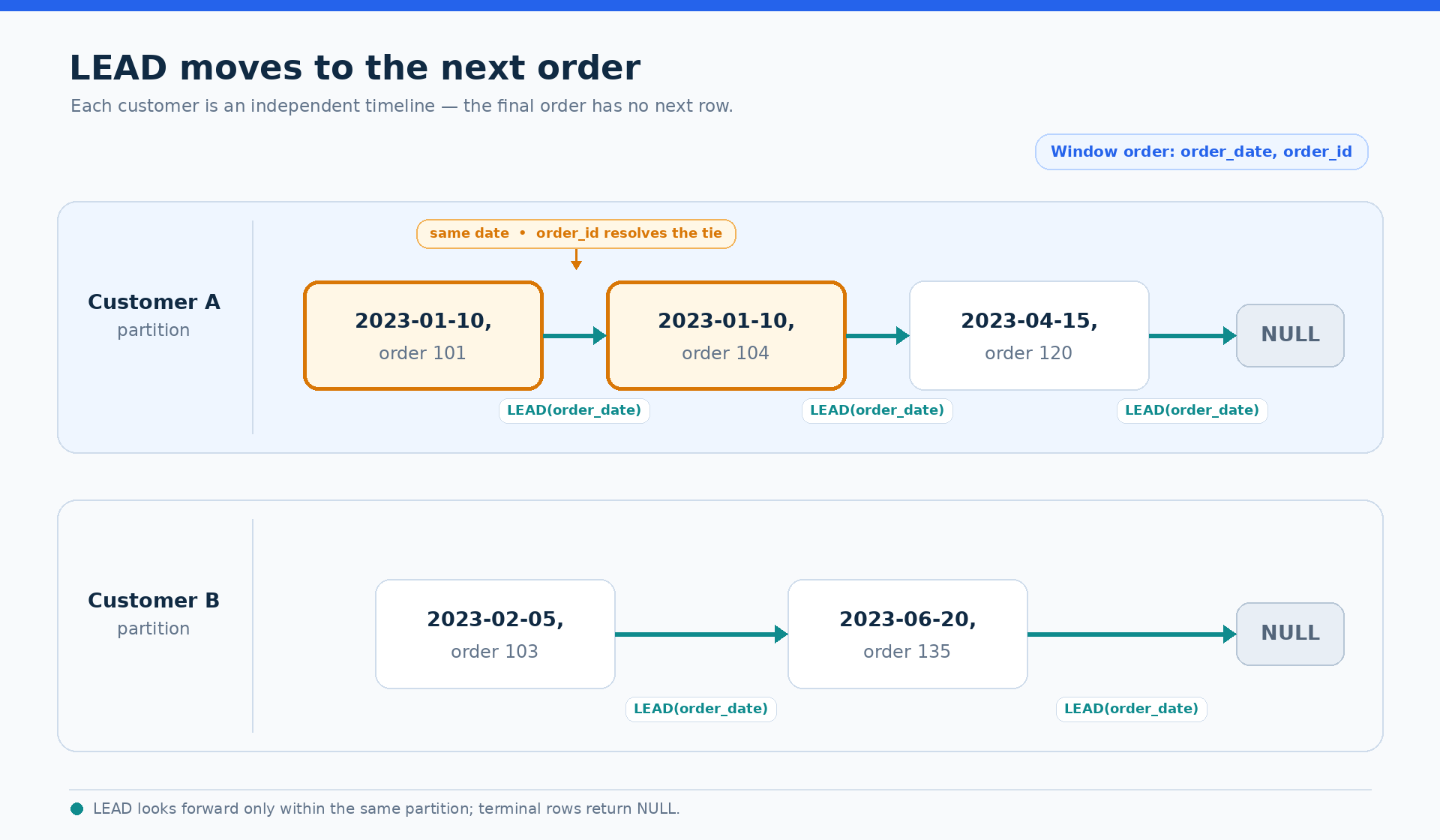
PARTITION BY keeps each timeline independent. For customer orders, one customer has two orders on the same date, so order_date alone cannot determine their order. Adding order_id creates a deterministic sequence. The window ordering decides which row is next, while the final ORDER BY controls how we display the report.
The following timeline shows how LEAD moves forward within each customer partition without crossing into another customer’s orders.
Build a Signup Timeline by Country
We will first apply LEAD to signup events. Each customer contributes one row, and country creates a separate timeline for each group. The CTE calculates the next signup date, and then the outer query measures the wait using DATEDIFF.
LEAD(c.signup_date) looks one row ahead within the customer’s country. The customer_id tiebreaker makes two signups on the same date appear in a stable order. Because DATEDIFF expects the later date first, we use DATEDIFF(next_signup_date, signup_date). The final signup in each country has no next date, so both next_signup_date and its wait remain NULL.
Retrieve Each Customer’s Next Order
The same pattern now applies to individual order records. We partition by customer_id, so each customer receives an independent order timeline. The CTE keeps every order visible while adding the date of the next order.
The window sequence uses both order_date and order_id. This matters because one customer has two orders on the same date, and order_id determines which same-day order comes first. There is no status filter, so canceled and refunded orders remain in the timeline. The final order for each customer has no following order and therefore receives NULL for next_order_date.
Measure Known Waits Without Inventing a Gap
A missing next order does not represent a measured wait. It only tells us that the available timeline has ended. For rows with a known next order, we can calculate the calendar gap and identify waits longer than 60 days.
Here, order_date is the earlier date and next_order_date is the later date, so their positions in DATEDIFF are important. A terminal order keeps NULL for days_until_next. The next_order_date IS NOT NULL condition ensures that has_long_wait describes a known wait between two orders, not an unknown period after the final order.
Define Possible Lapses with a Fixed Cutoff
A terminal order may indicate that a customer has stopped ordering, but LEAD alone cannot tell us whether the customer has lapsed. We need a reporting cutoff so the result does not change from one day to the next. The cutoff has to do two jobs. It bounds the source timeline before LEAD runs, so that an order later than the cutoff cannot decide whether an earlier order is terminal, and it supplies the fixed comparison date. We report as of January 1, 2024, and treat that date as the exclusive upper bound, so activity on the cutoff date itself is not included.
Without that filter the report is only accidentally correct: it depends on the table happening to end before the cutoff. Add an order in 2024 and terminal orders from late 2023 silently stop being terminal, changing a historical classification.
The following expression then marks only terminal orders that occurred more than 90 days before the cutoff.
next_order_date IS NULL limits the flag to orders with no known future purchase, which is only meaningful once the source timeline is bounded by the same cutoff. The fixed date is the later date in DATEDIFF, and the comparison uses more than 90 days. An order with a known next purchase is never marked as lapsed, even when the known wait is longer than 90 days. This separates a measured gap from a possible lapse.
Assemble the Complete Lapse Report
We can now combine the bounded timeline, the known wait calculation, and the cutoff-based lapse rule. The CTE filters to the reporting window and performs the forward comparison first. The outer query uses next_order_date for both DATEDIFF and is_lapsed.
The order_timeline CTE returns one row per order inside the reporting window and calculates the next order date within each customer’s history. Because the filter runs before LEAD, a terminal order is terminal as of the cutoff and stays that way no matter what the table gains later. The cutoff date appears twice, in the filter and in DATEDIFF, and the two must always match; in a production report you would bind it once as a query parameter rather than repeating the literal. The outer query preserves the next order date, calculates days_until_next, and returns the Boolean is_lapsed value as 1 or 0. Terminal orders keep NULL for their unknown next date and wait. The final ordering makes the complete report deterministic and easy to inspect.
Conclusion and Next Steps
We built the forward comparison pattern with LEAD: partition the timeline, define a deterministic order, retrieve the next row’s date, preserve the terminal NULL, and calculate a gap only when a later event exists. We also separated known long waits from possible lapses by bounding the source timeline at DATE('2024-01-01') before applying LEAD, then comparing against that same date with a 90-day threshold.
In the practice section, we will build a signup timeline by country, measure each customer’s order gaps, and complete the lapse report independently. Use the terminal NULL values as useful signals, and let the fixed cutoff guide the final classification.
