Comparing Orders with LAG
Introduction
Welcome to Comparing Rows with LEAD and LAG. We are beginning Lesson 1 of 4, in which we will measure the time between a customer’s orders. Instead of reducing each customer to one summary row, we will keep every order visible and compare it with that customer’s immediately preceding order. By the end, our report will show one row per order, the previous order date, and the number of days since that date. For a customer’s first order, no earlier purchase exists, so the gap must remain NULL, not zero.
Start with One Row per Order
Before a window function can compare neighboring orders, the query must expose those orders as separate rows. An aggregate customer report shows information such as an order count, but aggregation removes the individual order detail we need. We begin directly from Orders and select the fields that define each customer’s history.
Each input order remains one output row. The order_date column provides the chronological field, while order_id is the unique identifier that can settle ties. The final ORDER BY groups orders by customer, arranges them by date, and then applies the identifier. No status filter is used, so every order remains part of the history.
Retrieve the Previous Order with LAG
Now we can retrieve a value from the preceding row. LAG is the window function for this job. Although MySQL can accept LAG or LEAD without a window ORDER BY, neighboring rows are not meaningfully or deterministically defined without one, so always provide an ORDER BY for chronological comparisons. We partition by customer so that each order is compared only with orders from the same customer.
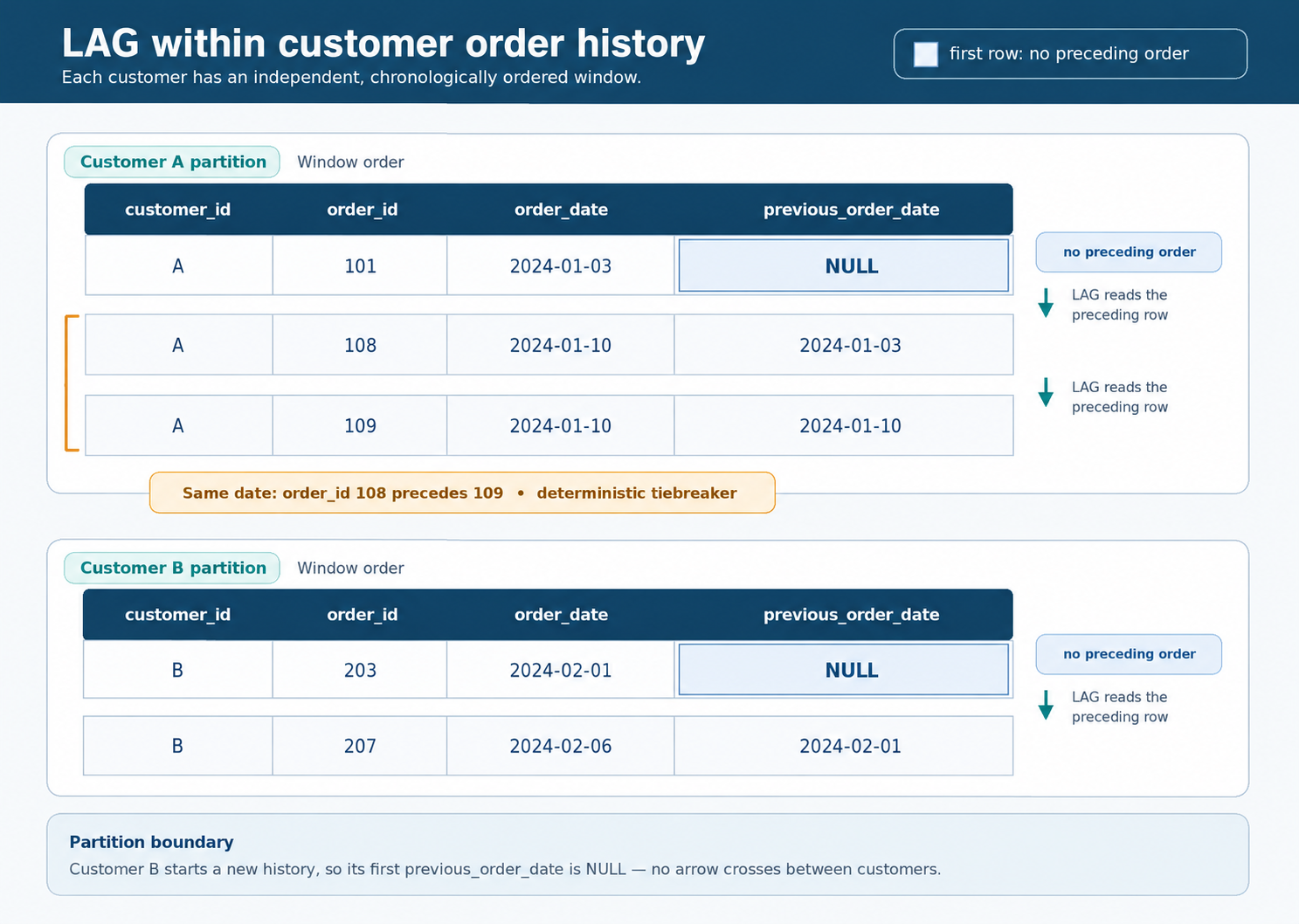
Read the window from the inside out. PARTITION BY o.customer_id creates an independent order history for each customer. Inside each history, ORDER BY o.order_date, o.order_id creates a stable chronological sequence. In this dataset, one customer has two orders on the same date, so order_id is necessary to decide which same-day order comes first. The final ORDER BY controls display, while the ordering inside OVER controls the comparison.
Understand Window Edge NULLs and Deterministic Ordering
LAG returns NULL for the first row in every customer partition because that row has no preceding order. This is useful information: it identifies the customer’s first chronological purchase. We preserve the NULL instead of changing it to zero because zero would incorrectly suggest that a previous order existed on the same date.
The following schematic shows how each customer forms a separate partition and how order_id determines the sequence of same-day orders.
There are two separate ordering jobs:
- The
ORDER BYinsideOVERdecides which order counts as previous. - The final
ORDER BYdecides how the completed report is displayed.
Using the same keys for both makes the result easy to inspect, but these clauses serve different purposes.
Calculate Days Since the Previous Order
Once previous_order_date is available, we can turn the two dates into a day gap with DATEDIFF. MySQL expects the later date first and the earlier date second: DATEDIFF(order_date, previous_order_date). For a later purchase, the expression returns the number of calendar days between the two orders. For two orders on the same date, it returns zero.
The days_since_previous column therefore has a clear meaning:
NULL: this is the customer’s first order in the history.- Zero or a positive number: that many calendar days have passed since the immediately preceding order.
When the earlier date is NULL, DATEDIFF also returns NULL. MySQL therefore preserves the correct first-order behavior without a special replacement rule.
Assemble the Final order_history CTE Report
We can now separate the prior-date calculation from the day-gap calculation with an order_history CTE. The CTE creates the row-level order history and adds previous_order_date. The outer query treats that result like a regular table, selects the report columns, and calculates days_since_previous.
Inside the CTE, the alias o refers to Orders. Outside the CTE, we use the CTE’s column names directly. The final ordering includes customer_id, order_date, and order_id, so each customer’s first order appears first, and same-day orders follow a stable sequence. This is one complete, runnable MySQL 8.0 statement, and it does not modify the seeded database.
Conclusion and Next Steps
We built the complete LAG pattern for order histories: preserve one row per order, partition by customer_id, order each history by order_date with order_id as a unique tiebreaker, preserve the first row’s NULL, and calculate gaps with DATEDIFF using the later date first. The order_history CTE keeps the prior date available for the outer calculation.
In the practice section, we will inspect the order data, compare previous order statuses, measure signup gaps by country, and complete the final order-gap report. After that, the next unit will introduce LEAD so we can compare each order with the customer’s next purchase. Let’s begin the practices by examining the order history and confirming why a stable chronological sequence matters.
