Building and Modifying Lists
Introduction: Lists That Change
Welcome back to Building and Modifying Lists in Python. Now that we can already create lists, read items out of them, and slice them apart, our lists can do more than stay read-only: we can reshape them.
That changes now. Lists are mutable, which means they can be modified after they are created. Recall that strings were immutable: text.replace() handed us a brand-new string and left the original untouched. Lists work the other way around. When we add or remove an item, the list itself changes, and every variable pointing to that list sees the update.
Throughout this lesson, we will work with one small task list that starts with two tasks and gets reshaped step by step. Along the way, we will meet three ways to add items (append(), insert(), and extend()) and three ways to take them away (remove(), pop(), and del).
Two Questions Behind Every Change
Before touching any code, it helps to know what separates these six tools from one another. Almost every choice comes down to two questions.
- How many items are involved?
append()andinsert()handle exactly one item;extend()adds every item produced by an iterable we hand it. - Do we know the value or the position?
remove()searches for a value and deletes the first match.pop()anddelwork by position, so they need an index instead.
Keeping these two questions in mind turns a list of six method names into two short steps. Our starting point is deliberately tiny, so the effect of each operation stays easy to follow:
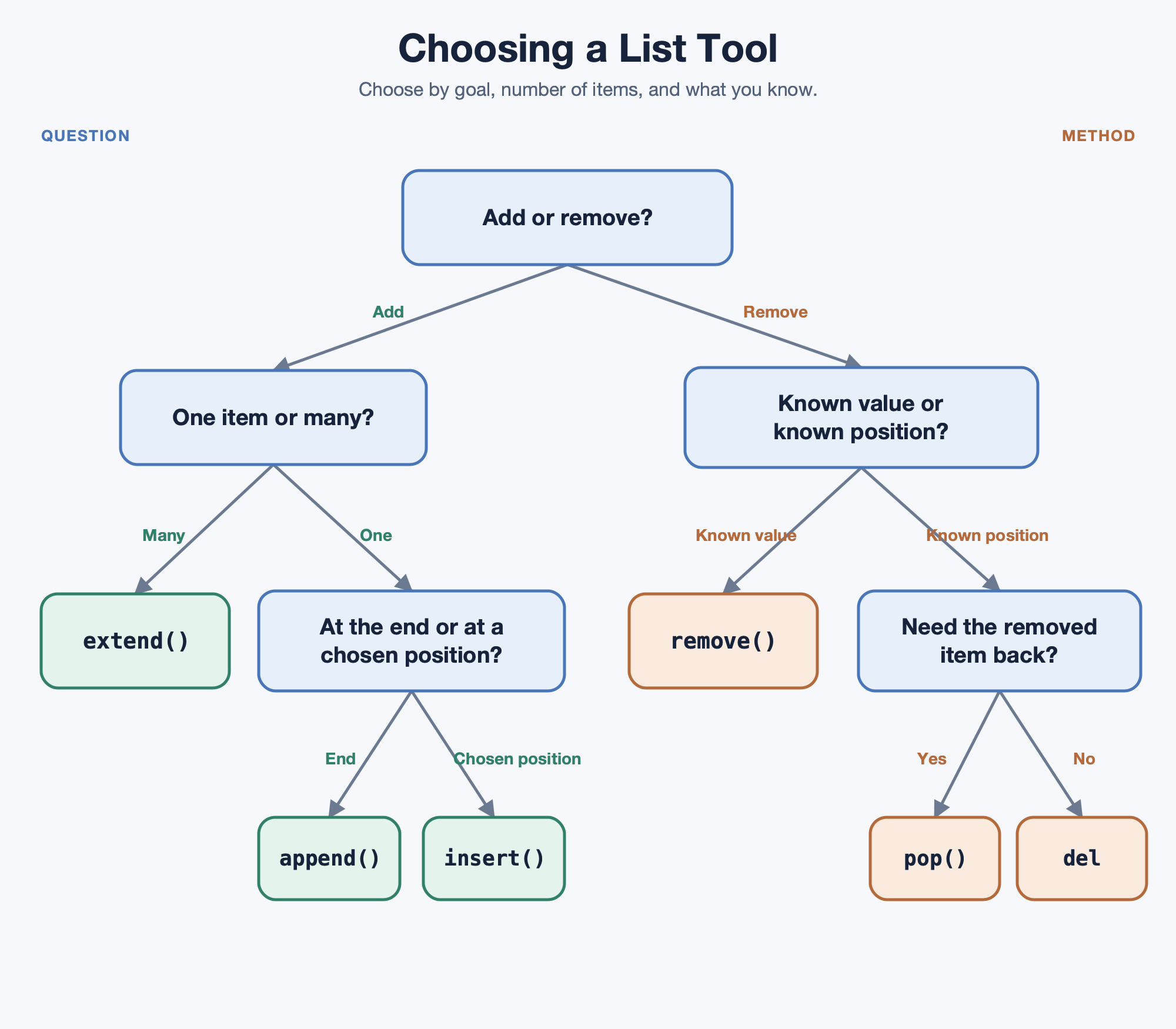
With those choices in mind, start with this small task list:
Adding One Item to the End with append()
The most common way to grow a list is append(), which sticks a single item onto the end:
Three details are worth locking in:
- It adds exactly one item, whatever that item happens to be.
- The new item always lands at the end, so the existing positions stay valid.
- It changes the list in place and returns
None. This is whytasks = tasks.append("call")is a classic beginner bug: it quietly replaces our list withNone.
The list grew from two items to three, in the order we expect:
Placing an Item at a Position with insert()
When the end is not where we want the new item, insert() lets us pick the spot. It takes two arguments: the index the new item should occupy and the value itself.
Index 0 means "make this the first item," so "standup" moves to the front and everything else shifts one position to the right: "email" was at index 0 and is now at index 1. The list is one item longer than before.
An index past the end is not an error; insert() simply appends in that case. Also worth knowing: inserting at the front means Python has to shift every other item over, so it takes a little more work than appending. That is intuition for later, not a rule to memorize.
Adding Many Items at Once with extend()
To add several items in one step, we reach for extend(). It accepts an iterable—a value Python can take items from—and adds each item it produces one by one, in order, onto the end of the list. A list is a common introductory example:
Our list now holds six items, all at the same level:
The contrast with append() is the part to remember. extend() takes the items from the iterable one at a time; append() would treat the entire iterable as one single value:
Lists are not the only values that work with extend(). For example, tasks.extend(("lunch", "review")) works with a tuple, and tasks.extend("go") adds "g" and "o" because strings are iterable too. In this course, we will usually use another list because it makes the added items easy to see.
Removing by Value with remove()
Now we start shrinking. Use remove() when we know what should disappear but not where it currently sits:
Python scans the list from left to right, finds "lunch" at index 4, and takes it out; the items after it shift left to close the gap.
Two behaviors deserve attention. First, only the first match goes away: if "lunch" had appeared twice, the second copy would still be in the list. Second, a value that is not in the list raises a ValueError. The in operator from the strings course is the natural guard here, since if "lunch" in tasks: lets us check before removing. And like the methods that add items, remove() changes the list in place and returns None, so there is nothing worth catching from it.
Removing by Position with pop()
Sometimes we want the removed item back so we can use it. That is exactly what pop() is for:
Called with no argument, pop() removes the last item and hands it back, so done now holds the string "review" while tasks is one item shorter. This makes pop() ideal for "take the next item off the list and do something with it" patterns.
We can also pass an index: tasks.pop(0) removes and returns the first item, and the items after it shift left to close the gap, exactly as they do with remove(). On an empty list, pop() has nothing to give back and raises an IndexError, so an emptiness check is wise in loops.
Deleting by Position with del
When we know the position and do not care about the value, del is the most direct option:
Notice the shape of this line: del is a statement, not a method. There is no dot, no parentheses, and no return value, so writing x = del tasks[0] is not valid Python at all. Here, it drops "standup" from index 0 and the later items shift left to close the gap, leaving the three original-flavored tasks behind:
One bonus: del accepts slices, too. del tasks[0:2] would delete a whole range in a single statement, something neither remove() nor pop() can do.
Choosing the Right Tool
Here is the whole toolkit side by side:
| Tool | What it does | Works by | Items affected | Returns |
|---|---|---|---|---|
append(x) | Adds x at the end | Position (end) | One | None |
insert(i, x) | Adds x at index i | Position | One | None |
extend(iterable) | Adds each item from an iterable | Position (end) | Many | None |
remove(x) | Deletes first match of x | Value | One | None |
pop([i]) | Removes item at i (default last) | Position | One | The item |
del list[i] | Deletes item or slice at i | Position | One or many | Nothing |
The central split is by value (remove()) versus by position (pop() and del), paired with the one item versus many items split on the adding side. Put together, our full script reshapes one list six times:
Conclusion and Next Steps
In this lesson, we made lists move. We grew them with append() for a single item at the end, insert() for a chosen position, and extend() for many items from an iterable. We shrank them with remove() by value, pop() by position with the value handed back, and del by position with the value discarded.
The idea tying all six together is mutability. Each of these operations edits the existing list rather than producing a copy, which is why we print the list afterward instead of assigning the result to a new variable. Only pop() gives us something worth catching, and what it gives us is the removed item, not the list.
Time to put this into practice: you will append and insert tasks, extend a list with another one, remove an item by value, and finish by popping and deleting by position. Once those feel natural, explore how to change items that are already in a list and how to put them in order.
