Python Lists Fundamentals
Introduction: From Text to Collections
Welcome to Building and Modifying Lists in Python, and congratulations on beginning this course. Earlier, we spent our time with strings: ordered sequences of characters that we could index, slice, and measure with len(). Those skills are about to pay off in a big way.
A list applies those same ideas to any kind of data, not just single characters. A list can hold numbers, strings, booleans, or even other lists, all kept in the order in which we placed them. Whenever we need to keep several related values together (test scores, names in a queue, or rows of a table), a list is the tool we reach for.
In this lesson, we will create lists, access single items, measure how many items a list holds, slice out sublists, and reach into lists that contain other lists. The list tools ahead build on these basics.
Creating Empty and Populated Lists
A list is an ordered collection of values kept together in one variable. Lists are written with square brackets, and we can start with nothing inside or fill one in right away:
Here is what each piece does:
[]creates an empty list: a container with no items yet, which is a common starting point when we plan to collect data later.[90, 85, 72, 95, 60]creates a populated list from a comma-separated sequence of values.type(scores)confirms that we really are working with Python's built-in list type.
Notice that Python prints lists with their brackets and commas intact and that the scores appear in exactly the order we typed them. Lists are ordered: items stay in the positions where we put them.
One list is also free to mix types. [90, "Ana", True, 3.5] holds an integer, a string, a Boolean, and a float side by side, and Python keeps them in that order like any other list. Most of our lists will hold one kind of value because that is what the data calls for, not because Python requires it.
Accessing Items with Positive and Negative Indices
Because lists are ordered, we can pull out any single item by its position, exactly as we did with strings:
Positions start at 0, so the first score is at index 0, and the fifth is at index 4. Negative indices count backward from the end, which makes -1 a convenient shortcut for "the last item":
| Score | 90 | 85 | 72 | 95 | 60 |
|---|---|---|---|---|---|
| Positive index | 0 | 1 | 2 | 3 | 4 |
| Negative index | -5 | -4 | -3 | -2 | -1 |
Using these index positions, the two expressions produce the following output:
Indexing gives back the item itself, here a plain integer, not a one-item list. And just as with strings, asking for a position that does not exist (say scores[5]) raises an IndexError.
Counting Items with len()
The familiar len() function works on lists, too, and it answers a simple question: how many items are inside?
A few details are worth keeping in mind:
len()counts items, not characters, so a list of five long names still has a length of5.- The last valid index is always
len(list) - 1; forscores, that is index4. - An empty list has nothing inside, so
len(empty_scores)is0.
This is why len() pairs so naturally with indexing: it tells us the exact boundary we must stay within.
Slicing to Extract Sublists
Slicing carries over from strings without any surprises: the start is included, the stop is excluded, and an omitted bound means "from the beginning" or "to the end."
scores[:3] runs from the start up to (but not including) index 3, collecting the first three scores. scores[-2:] starts two positions from the end and continues to the end.
The one new detail deserves emphasis: slicing a list always returns a new list, even when it holds a single item. Compare scores[0], which gives the integer 90, with scores[:1], which gives the list [90]. The same value is inside, but the shapes are very different.
Slicing creates a new outer list. This is a shallow copy: if a list contains mutable values such as inner lists, the slice and the original still refer to those same inner objects. Copying nested data independently is a later topic.
Nested Lists: Lists Inside Lists
Since a list can hold any kind of value, it can also hold another list. This is how we model rows, tables, and grids:
Spreading a list across multiple lines is purely for readability; Python treats it as one expression. The comma after the final row is a harmless trailing comma, and it makes adding another row later a one-line change.
grid holds exactly two items, and each of them happens to be a list of three numbers, so len(grid) is 2: Python counts the rows, not the numbers hidden inside them. Indexing grid[1] therefore hands us an entire inner list.
Chained Indexing to Reach Nested Values
To reach a single number inside a nested list, we index twice, from left to right:
Python evaluates this expression in two steps:
grid[1]produces the inner list[4, 5, 6].[2]then picks the item at index2of that inner list, which is6.
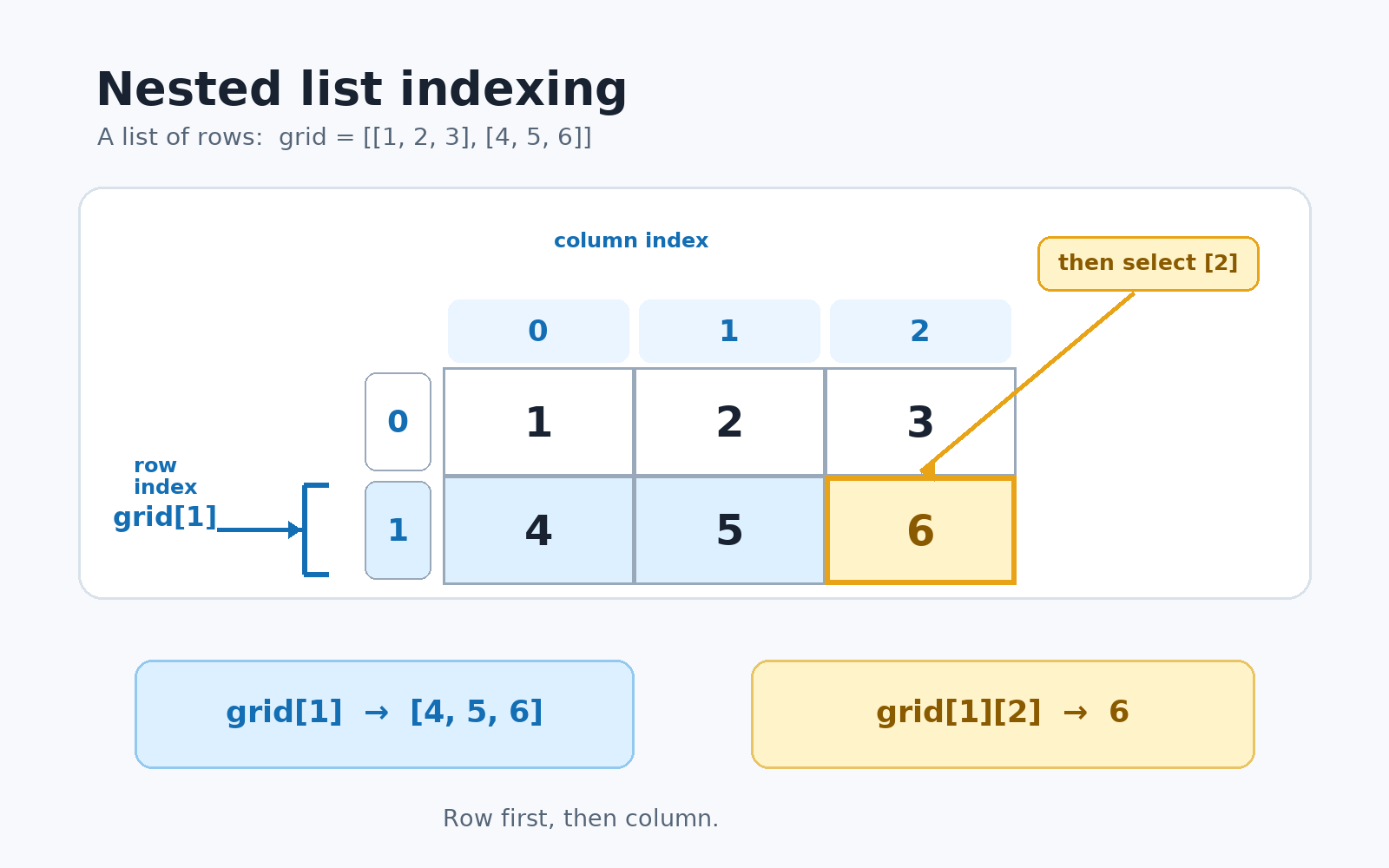
Following the row-first, column-second lookup gives this result:
A helpful way to remember the order is "row first, then column." The same left-to-right chaining keeps working for deeper nesting: if an item three levels down is what we need, data[0][1][2] gets us there one bracket at a time.
Conclusion and Next Steps
In this lesson, we covered the full starting toolkit for lists: creating them with square brackets (empty or populated), accessing single items with positive and negative indices, counting with len(), slicing out brand-new sublists, and chaining indices to reach values inside nested lists.
Most of this transferred directly from our work with strings, with one important new idea: a list can hold values of any type, including other lists. That flexibility is what makes lists the workhorse of Python programs.
The hands-on practices let you build lists from scratch, pull out specific scores, slice out ranges, and navigate a nested grid. After those feel comfortable, explore how to grow and shrink lists by adding and removing items.
