Reading a Box Plot
Introduction
Welcome to Analyzing Data with Box Plots, the fourth course in this learning path! Over the previous three courses, you have built a solid toolkit: measures of center, measures of spread like the range and IQR, and the ability to read and interpret histograms. Now we are going to explore another powerful visualization that packs a surprising amount of information into a simple graphic.
In this first lesson, we will learn how to read a box plot. By the end, you will be able to look at any box plot and confidently identify its five key values: the minimum, first quartile (), median, third quartile (), and maximum.
A Quick Refresher: The Five-Number Summary
As you may recall from earlier courses, when we computed quartiles and the IQR we were working with five important values that together describe a dataset's spread and center:
- Minimum — the smallest value
- (first quartile) — the value below which 25% of the data falls
- Median — the middle value (50th percentile)
- (third quartile) — the value below which 75% of the data falls
- Maximum — the largest value
These five numbers are collectively called the five-number summary. Until now, we calculated them from raw data. A box plot is simply a picture that displays all five of these values at once, making it easy to see center, spread, and overall shape in a single glance.
The Anatomy of a Box Plot
A box plot sits along a number line (which can be horizontal or vertical). It has three main visual pieces: a box, a line inside the box, and two whiskers. Let's walk through each one.
The box is a rectangle that stretches from on one side to on the other. Inside the box, a vertical (or horizontal) line marks the median. Because the box spans from to , its width represents the IQR, which covers the middle 50% of the data.
The whiskers are thin lines that extend outward from each side of the box. The left whisker (or lower whisker, if the plot is vertical) reaches from the box all the way to the minimum value. The right whisker (or upper whisker) reaches from the box to the maximum value. Together, the whiskers show the full range of the data outside the middle 50%.
The labeled diagram below connects each visual piece to the corresponding value in the five-number summary:
![[Labeled anatomy of a horizontal box plot]](https://k3-production-bucket.s3.us-east-1.amazonaws.com/uploads/eiz59STjyqsAKvWPK_image.png)
For the introductory box plots in this lesson, the whiskers do reach the minimum and maximum. Later in the course, though, you will also see modified box plots: when outliers are shown as separate dots, the whiskers stop at the smallest and largest non-outlier values instead of the dataset's absolute minimum and maximum.
Mapping the Visual to the Numbers
Now that you have seen the big picture, here is a compact reference table you can return to any time you need a reminder of which part maps to which statistic:
| Visual Component | Statistical Name | What It Tells Us |
|---|---|---|
| Endpoint of the left whisker | Minimum | Smallest value in the dataset |
| Left edge of the box | 25th percentile | |
| Line inside the box | Median | 50th percentile (center) |
| Right edge of the box | 75th percentile | |
| Endpoint of the right whisker | Maximum | Largest value in the dataset |
When we read a box plot, our job is simply to look at where each of these five features sits on the number line and note the corresponding value. With this mapping in hand, let's try it on a real example.
Reading Values: A Walkthrough
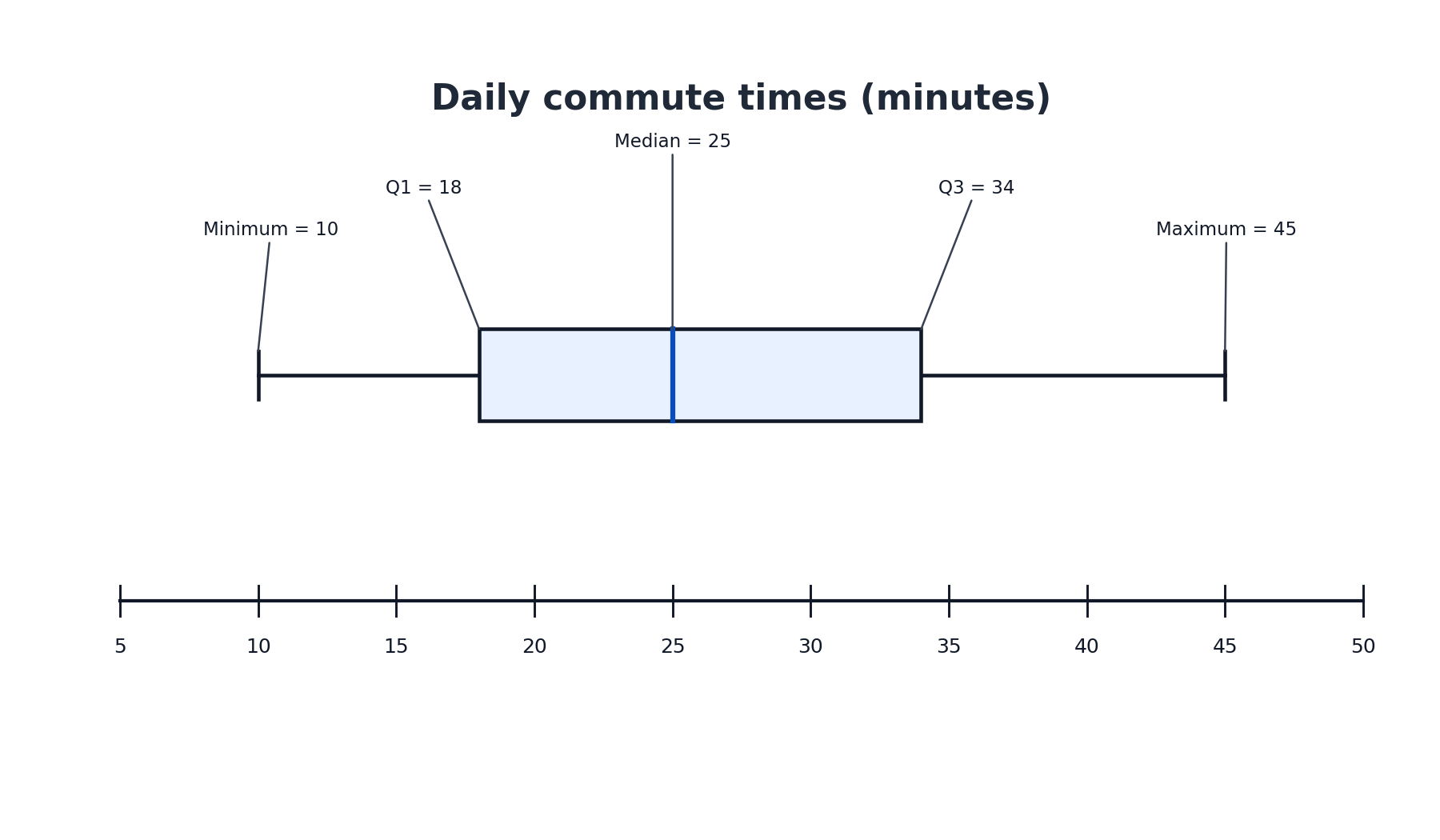
Imagine a horizontal box plot showing daily commute times (in minutes) for a group of employees, placed above a number line that runs from 5 to 50. A plot like this would look as follows:
Working from left to right along the number line, here is what we observe:
- The left whisker ends at 10. This is the minimum: the shortest commute is 10 minutes.
- The left edge of the box sits at 18. This is : 25% of commuters have a commute of 18 minutes or less.
- The line inside the box falls at 25. This is the median: the middle commute time is 25 minutes.
- The right edge of the box sits at 34. This is : 75% of commuters have a commute of 34 minutes or less.
- The right whisker ends at 45. This is the maximum: the longest commute is 45 minutes.
From these five values we can also quickly compute the IQR:
That tells us the middle half of commute times spans a 16-minute window. Notice how much information we pulled from one small graphic!
Tips for Accurate Reading
Reading a box plot is straightforward once you know what to look for, but a few simple habits will help you avoid common mistakes.
- Check the scale. Look at the number line first. Note the units and the spacing between tick marks so you do not misread a value.
- Work from left to right (or bottom to top for vertical plots). Start with the minimum at the whisker tip, then move to , the median, , and finally the maximum. Going in order helps you stay organized.
- Distinguish the median from the box edges. The line inside the box is the median. It is easy to confuse it with the edges, so look carefully at its position relative to and .
Conclusion and Next Steps
In this lesson, we learned that a box plot is a visual display of the five-number summary: minimum, , median, , and maximum. The box captures the middle 50% of the data, the median line marks the center, and the whiskers stretch out to the smallest and largest values. Reading a box plot comes down to matching each visual feature to its spot on the number line.
Up next, you will put these skills to work in a set of hands-on practice tasks where you will identify, label, and read values from box plots. You will start by matching each part of the graphic to its statistical name, then practice reading individual values, and finally extract a complete five-number summary on your own — let's jump in!
