Prompting Image Generation Clearly
From Reading Images to Making Them 🎯
Reading images is one half of the job. The other half is making them. When you ask AI to generate an image, the model is guessing at thousands of choices you didn't make: where the camera sits, who's in the shot, what time of day it is, what the space looks like, whether it reflects your workforce or a generic stock cliché. Leave those choices to chance and you get a vaguely-stock-photo result that's off-brand, doesn't fit the onboarding deck or the all-hands slide, and — worst case — depicts your people in a way that's stereotyped or inauthentic. This unit gives you a structure for making those choices on purpose.
By the end of this lesson, you'll be able to:
- Apply the Image Prompt Anatomy to specify Subject, Style, Composition, Mood/Lighting, and Constraints.
- Translate an HR communication goal — a welcome visual, an all-hands hero — into a concrete, photographable scene.
- Refine the prompt by tightening specificity and exclusions after reviewing the first batch.
Apply the Image Prompt Anatomy 🦴
The Image Prompt Anatomy is a five-part checklist for what to put into an image prompt: Subject, Style, Composition, Mood/Lighting, and Constraints. If any one is missing, the model fills the gap with whatever its training data suggests, which is usually a cliché that looks nothing like your organization.
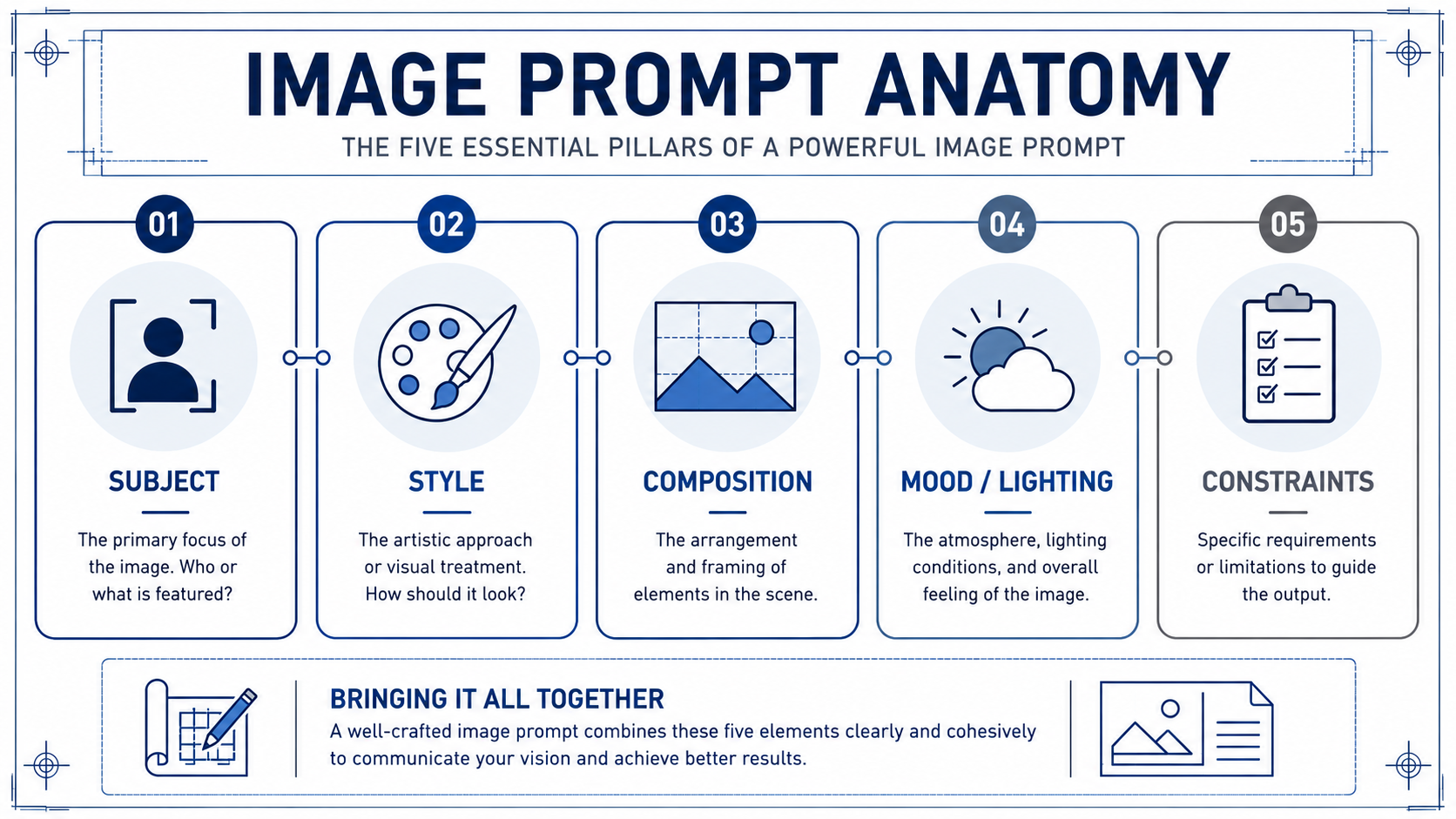
- Subject is what is literally shown: who or what is in the frame, doing what.
- Style is the visual treatment: photo, line illustration, 3D render, or a reference to your organization's known look. This is where brand and authenticity live.
- Composition is how the shot is framed: close-up or wide, eye-level or overhead, centered or off-axis, and crucially where the negative space sits for a slide title or headline.
- Mood/Lighting sets atmosphere: warm and optimistic, cool and clean, grounded and natural.
- Constraints are the guardrails: aspect ratio (16:9 for a wide slide), exclusions (no readable text, no fake logos, no stereotyped or tokenized depictions of employees), and any must-haves like a safe area for the title.
Run through all five every time, even when one feels obvious. "Obvious" is exactly where models default to the average — and average is off-brand and often stereotyped.
Here's how the checklist works in practice. Milo, a design partner from internal comms, is helping an HR colleague turn a vague all-hands idea into a usable prompt before opening the image tool:
- Milo: What's the subject?
- HR colleague: Our team, growing together.
- Milo: That's a theme, not a subject — and "growing" is going to get you sprouting plants. Be specific. Who's in the shot, where, doing what?
- HR colleague: A small, mixed group of colleagues mid-conversation at a bright open workspace, a couple standing, one sketching on a whiteboard, candid, not posed.
- Milo: Better. Now style, composition, lighting, constraints. Skip any of those and you'll get the stock-photo version, plus we'll have to fight stereotypes and a title that won't sit anywhere.
Notice Milo's pressure isn't on creativity, it's on specificity. A vague subject equals a vague, off-brand, easily-stereotyped output.
Draft a Prompt from a Communication Goal 🥅
A prompt starts with the communication goal, not the image. Ask yourself: what does this image need to do, and where will it live? Anchor the opening slide of an all-hands? Welcome a nervous new hire on the onboarding deck? Set a tone on the careers page? The goal and the placement tell you the constraints before you touch subject or style.
Once you know the goal, translate the theme into a concrete scene. "Growing together" is a theme, not a subject; a model can't draw a theme. Push it into something you could photograph: a small group of colleagues mid-conversation at a whiteboard, a new hire being shown around a workspace, a mentor and a junior teammate reviewing something on a laptop. Pick one. Then layer the other four anatomy elements on top, tuned to how your organization actually looks.
Write the prompt as one block of clear sentences, not a list of tags. Something like: a wide-angle, documentary-style photograph of a small, genuinely diverse group of colleagues mid-conversation at a bright open workspace, one sketching on a whiteboard; warm, optimistic natural light; grounded and authentic, not posed; 16:9 with clear empty space across the top third for a slide title; no readable text, no fake company logos, no stereotyped or tokenized depictions of employees, no literal "growing" metaphors. That's all five elements, on purpose, on brand, in one paragraph.
Refine by Tightening Specificity and Exclusions 🔧
Your first batch will almost never be the one you ship. Treat it as a diagnostic. Look at what's off and trace it back to an anatomy element. Faces look uncanny or airbrushed? Tighten Style ("documentary photo, natural skin texture") or add an exclusion ("no airbrushed faces, no warped hands"). People feel like generic stock or lean on a stereotype? Subject is still too abstract, or you're missing an exclusion for authentic, non-tokenized representation. Title won't fit? You forgot a safe-area Constraint. Wrong shape for the slide? You skipped the aspect-ratio Constraint.
The move is targeted edits, not rewrites. Change one or two elements, regenerate, compare. Keep a short, reusable exclusions list you add every time (no readable text, no warped hands, no fake logos, no stereotyped or tokenized depictions of employees, no literal metaphors), plus your standard aspect ratio and safe area for slides.
The throughline of this unit: a usable HR image prompt is a deliberate set of five choices that match your organization and your placement, not a wish. Vague in, generic out; specific and authentic in, slide-ready out.
The test of any of this is whether it holds up live, so the next step is a conversation with a design partner where you'll walk through each anatomy element for a real all-hands hero before you ever open the tool. Bring a concept that's already concrete, and expect to leave the call with it sharper, more on-brand, and free of clichés.
