Reading Images with Vision AI
Welcome to the Course 🚀
Welcome to AI Images for Workplace Communication. Images show up across HR work: a welcome visual on the onboarding deck, a hero slide behind the opening of an all-hands, a careers-page photo a candidate sees first, an infographic in a benefits announcement, a photo attached to a workplace accommodation request. Generative AI now lets you describe, create, and edit those images in seconds — which means the bottleneck has shifted from "can I make this?" to "should I publish this, and does it say what I think it says about our people?" This course gives you the moves to handle both ends responsibly.
Course readiness: use only synthetic, stock, or explicitly approved non-sensitive images for every practice. Never upload a real candidate, employee, accommodation, medical, or personnel photo into a general AI tool. If you don't have image-capable access, you can still complete the work by writing and reviewing the prompts and briefs against the frameworks, using described or stock sample images instead of generating your own.
By the end of this lesson, you'll be able to:
- Request structured image descriptions from vision AI for a specific HR purpose like intranet alt text, meeting prep, accommodation-issue triage, or chart reading.
- Separate what an image actually shows from what AI (or you) is guessing about it, so an inference never becomes a fact in a personnel record.
- Turn a clean description into a usable HR deliverable like accessible alt text, accessible documentation, or a restricted case-note triage summary.
Before any AI-assisted HR task, keep the HR AI Safety Checkpoint in mind: approved tools only, data minimization (never paste real candidate, employee, medical, accommodation, or personnel data — use synthetic or de-identified inputs), source verification, human review, escalation of legal/EEO/compliance-sensitive matters, and recordkeeping (AI chats are not a system of record).
Asking Vision AI for the Right Kind of Description 🔍
Vision AI is the family of models that can "look at" an image you give it and describe it in words. The trap is treating it like a one-size tool. A generic prompt like "what's in this image?" gives you a generic answer: a wall of detail, half of which you don't need, with no structure you can paste into an alt-text field, a meeting note, or a case file.
The fix is to name the purpose upfront. Different HR jobs need different shapes of description:
- For alt text (the text a screen reader announces for an image on the HR wiki or intranet), you want a tight, neutral sentence focused on visible content.
- For meeting prep, you want a plain inventory of what's literally in a slide or whiteboard photo before you summarize it.
- For issue triage on something like a (simulated) accommodation-request photo, you want the visible setup separated cleanly from any guess about cause, fault, or medical conclusion.
- For chart interpretation on a screenshot of a headcount or engagement-survey chart, you want axes, units, the trend, and the highest/lowest values called out.
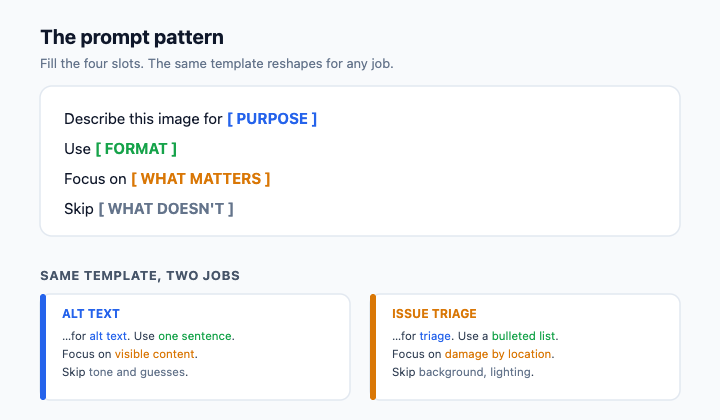
A reliable prompt pattern looks like this: Describe this image for [purpose]. Use [format]. Focus on [what matters]. Skip [what doesn't].
For an onboarding photo headed to the HR wiki, you might write: Describe this image for alt text on our HR intranet. Use one neutral sentence plus a short bullet list. Focus on the objects and setting actually visible. Skip any guesses about who the people are, their role, status, or how they feel. You've now turned a vague request into something you can act on.
Telling Observation Apart from Interpretation ⚖️
Here is the single most important habit in this unit, and it's where HR gets burned: vision AI will hand you observations and interpretations mixed together, in the same confident tone — and an interpretation that slips into a personnel record can become a conclusion about cause or fault that nobody can stand behind.
An observation is something visible in the pixels: "An office chair without a lumbar cushion at a standing-height desk." An interpretation is a guess about meaning or cause: "The setup caused the strain." An inferred intent or assumption goes further: "The employee was sitting incorrectly." Only the first kind is safe to build on. The other two are stories the model wrote from patterns in its training data, not evidence from this specific image — and in a case note, "the chair caused the injury" reads as a medical and fault conclusion HR has no business asserting from a photo.
Watch for tell-tale verbs: "appears to," "looks like," "seems to," "suggests that," "clearly." Those are interpretation flags, as is any line that names a feeling, a status, a cause, or fault the image can't actually prove.
Before we go further, the boundary that governs this whole skill in HR. You never run a real employee's accommodation photo through a general AI tool. That kind of disability/medical evidence is only ever processed, if at all, inside an approved restricted case system under organizational policy — and it is never published to the intranet or wiki. For practice, you work from a simulated, de-identified training image that stands in for an accommodation-request photo, so you can build the skill safely.
Here's how that filtering sounds when a People Ops peer catches it:
- You: The vision AI says it's "an employee who was sitting incorrectly, which caused the strain." That's useful for the case note, right?
- Dan: What does the photo actually show?
- You: A standard office chair with no lumbar cushion, at a desk raised to standing height.
- Dan: Then say that. "Sitting incorrectly" and "caused the strain" are a story — a fault and a medical conclusion. If we put that in the case file, we've decided cause from a photo we can't back up.
- You: Fair. I'll keep the note to the visible setup and flag that cause isn't determinable from the image.
Notice Dan isn't rejecting AI, he's rejecting AI-shaped fiction dressed up as fact. Your job is to be the human filter between the description and whatever HR records or acts on next — especially when a real person's accommodation is on the line.
Turning a Clean Description Into Something Useful 🛠️
Once you've stripped a description down to observations, you can shape it into the deliverable you actually need — but the deliverable depends entirely on which workflow you're in, and the two must never be mixed.
For non-sensitive, approved images (a stock onboarding photo, an office scene cleared for the HR wiki), a clean observation set becomes alt text: short (aim for under 125 characters), neutral, and focused on visible content so employees using screen readers get a faithful description. It can also become accessible documentation or a stakeholder update.
For a restricted accommodation case, the same observation discipline produces a case-note triage summary that stays inside the approved case system — never the intranet. A good triage note states the visible setup, names explicitly what is not determinable from the photo (cause of injury, medical conclusion, who is responsible), and recommends one concrete next step like "schedule an ergonomic assessment." The discipline is the same in every format: say what you can see, name the gaps out loud, and never let a confident sentence become a conclusion about a real person just because it sounded authoritative.
The throughline of this unit: vision AI gives you a draft, not a verdict, and the value you add is sorting signal from story before anything carries an employee's name. With that in mind, the next step is a live conversation: you'll walk a People Ops peer reviewer through an AI description of a simulated accommodation-request image and defend, line by line, which sentences are observations you can act on and which are interpretations you need to strip.
