Reading Images with AI
Welcome to the Course 🚀
Welcome to AI Images for Marketing Communication. Images are the heart of marketing: hero shots on a landing page, ad creative in a feed, lifestyle photos in an email, user-generated content (UGC) on social, a competitor's campaign you're sizing up. Generative AI now lets you describe, create, and edit those images in seconds, which means the bottleneck has shifted from "can I make this?" to "should I publish this, and does it say what I think it says about our brand?" This course gives you the moves to handle both ends responsibly.
By the end of this lesson, you'll be able to:
- Request structured image descriptions from vision AI for specific marketing purposes like alt text, UGC vetting, competitor-creative analysis, or chart reading.
- Separate what an image actually shows from what AI (or you) is guessing about it, so an inference never becomes an accidental claim in a caption.
- Turn a clean description into a usable marketing deliverable like alt text, a caption starting point, or asset notes.
Asking Vision AI for the Right Kind of Description 🔍
Vision AI is the family of models that can "look at" an image you upload and describe it in words. The trap is treating it like a one-size tool. A generic prompt like "what's in this image?" gives you a generic answer: a wall of detail, half of which you don't need, with no structure you can paste into a caption, an alt-text field, or a competitive brief.
The fix is to name the purpose upfront. Different marketing jobs need different shapes of description:
- For alt text (the text description screen readers announce, which also feeds SEO and image search), you want a tight, neutral sentence focused on content.
- For UGC vetting, you want a plain inventory of what's literally in the customer's photo before you decide whether to repost it.
- For competitor-creative analysis, you want the visible elements — headline, product shot, offer, badge — separated from your strategic guesses about them.
- For chart interpretation on a performance screenshot, you want axes, units, the trend line, and the highest/lowest values called out.
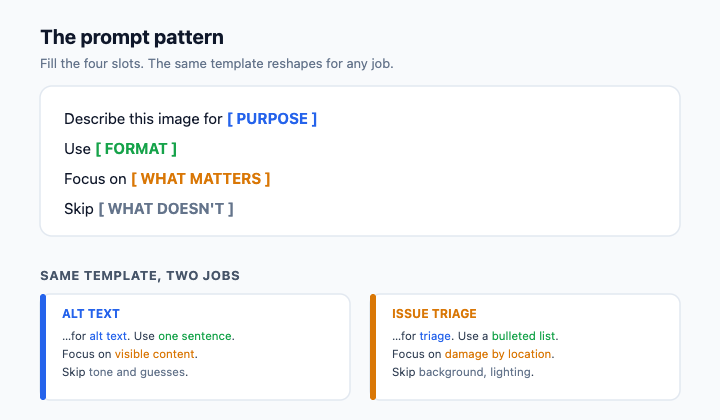
A reliable prompt pattern looks like this: Describe this image for [purpose]. Use [format]. Focus on [what matters]. Skip [what doesn't].
For a lifestyle photo headed into a campaign, you might write: Describe this image for alt text and a caption starting point. Use one neutral sentence plus a short bullet list. Focus on the objects and setting actually visible. Skip any guesses about the person's mood, status, or lifestyle. You've now turned a vague request into something you can act on.
Telling Observation Apart from Interpretation ⚖️
Here is the single most important habit in this unit, and it's where marketers get burned: vision AI will hand you observations and interpretations mixed together, in the same confident tone, and an interpretation that slips into a caption can become a claim you can't back up.
An observation is something visible in the pixels: "A laptop, a coffee mug, and a small plant on a wooden desk." An interpretation is a guess about mood or meaning: "A calm, productive morning." An inferred intent goes further: "This person has achieved work-life balance." Only the first kind is safe to build on. The other two are stories the model wrote from patterns in its training data, not evidence from this specific image — and in a public caption, "for people who've finally found balance" reads as a promise about your customers' lives.
Watch for tell-tale verbs: "appears to," "looks like," "seems to," "suggests that," "clearly." Those are interpretation flags, as is any line that names a feeling, a status, a backstory, or a cause the image can't actually prove.
Here's how that filtering sounds when a teammate catches it:
- Jessica: The AI says it's "a premium home office of a successful remote professional." Good caption hook, right?
- Dan: What does the photo actually show?
- Jessica: A laptop, a mug, a plant, some papers on a desk.
- Dan: Then say that. "Premium" and "successful" are a story. If we put that in the caption, we're implying things about whoever's desk this is that we can't stand behind.
- Jessica: Fair. I'll keep the description to what's visible and write the hook myself.
Notice Dan isn't rejecting AI, he's rejecting AI-shaped fiction dressed up as fact. Jessica's job is to be the human filter between the description and whatever the brand publishes next.
Turning a Clean Description Into Something Useful 🛠️
Once you've stripped a description down to observations, you can shape it into the deliverable you actually need. The same observation set can become several different marketing artifacts: alt text for a post, a factual starting point for a caption, asset notes for your DAM (digital asset manager), or a neutral row in a competitive teardown.
Alt text should be short (aim for under 125 characters), neutral, and focused on the visible content. It does double duty: it makes the post accessible to people using screen readers and gives search engines something real to index, so vague or keyword-stuffed alt text fails on both counts. Asset notes stay structured and consistent so they're searchable later. A caption starting point keeps the facts the model gave you and leaves the brand voice and any claims to you. The discipline is the same in every format: say what you can see, name the gaps out loud, and never let a confident sentence become a claim just because it sounded good.
The throughline of this unit is simple: vision AI gives you a draft, not a verdict, and the value you add is sorting signal from story before anything carries your brand's name. With that in mind, the next step is a live conversation: you'll walk a peer reviewer through an AI description of a campaign lifestyle photo and defend, line by line, which sentences are observations you can publish and which are interpretations you need to strip.
