Prompting Image Generation Clearly
From Reading Images to Making Them 🎯
Reading images is one half of the job. The other half is making them. When you ask AI to generate an image, the model is guessing at thousands of choices you didn't make: where the camera sits, who's in the shot, what time of day it is, what color the walls are, whether it looks like your brand or like everyone else's. Leave those choices to chance and you get a generic, vaguely-stock-photo result that's off-brand and doesn't fit the ad, the landing page, or the email. This unit gives you a structure for making those choices on purpose.
Apply the Image Prompt Anatomy 🦴
The Image Prompt Anatomy is a five-part checklist for what to put into an image prompt: Subject, Style, Composition, Mood/Lighting, and Constraints. If any one is missing, the model fills the gap with whatever its training data suggests, which is usually a cliché that looks nothing like your brand.
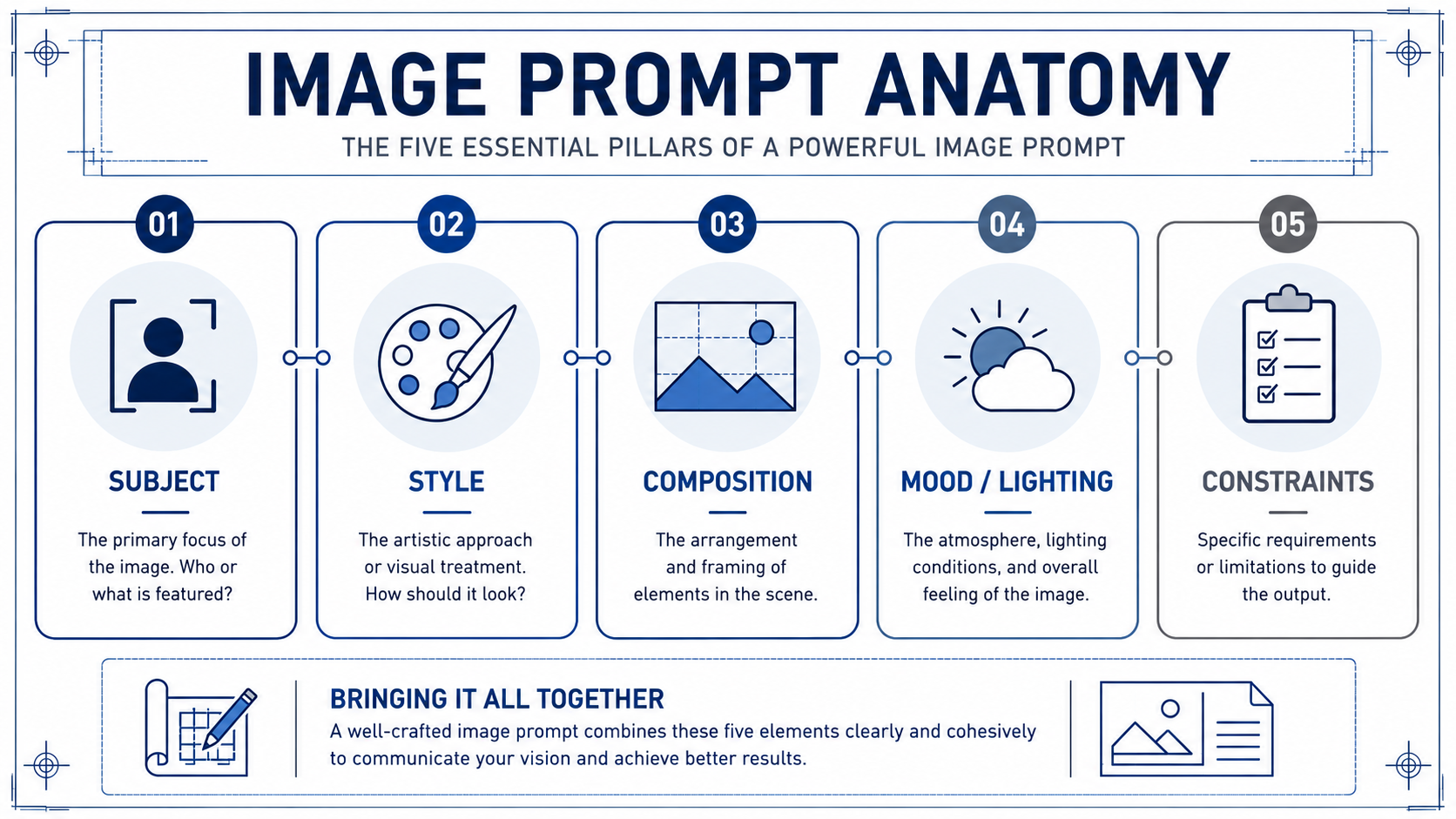
- Subject is what is literally shown: who or what is in the frame, doing what.
- Style is the visual treatment: photo, line illustration, 3D render, watercolor, or a reference to your brand's known look. This is where brand consistency lives.
- Composition is how the shot is framed: close-up or wide, eye-level or overhead, centered or off-axis, and crucially where the negative space sits for your headline and call-to-action (CTA).
- Mood/Lighting sets atmosphere: warm afternoon light, cool overcast, bright and clean, moody and premium.
- Constraints are the guardrails: aspect ratio (16:9 for a wide hero, 1:1 or 4:5 for feed, 9:16 for stories), exclusions (no readable text, no fake logos, no stereotypes), and any brand must-haves or must-avoids.
Run through all five every time, even when one feels obvious. "Obvious" is exactly where models default to the average — and average is off-brand.
Here's how the checklist works in practice. Milo is helping a marketer turn a vague campaign idea into a usable prompt before opening the image tool:
- Milo: What's the subject?
- Marketer: A team collaborating around a laptop.
- Milo: That's a stock-photo prompt. Be specific. Where? Who's in the shot? What are they actually doing?
- Marketer: Three people, side-by-side at a kitchen-style office counter, looking at one laptop, mid-conversation, hands gesturing, not posed.
- Milo: Better. Now: style, composition, lighting, constraints. Skip any of those and you'll get the LinkedIn-stock version of your idea, which is not our brand.
Notice Milo's pressure isn't on creativity, it's on specificity. Vague subject equals vague, off-brand output.
Draft a Prompt from a Marketing Goal 🥅
A prompt starts with the communication goal, not the image. Ask yourself: what does this image need to do for the reader, and on which channel? Anchor a landing-page hero? Stop the scroll in a feed? Set a tone in an email? The goal and the channel tell you the constraints before you touch subject or style.
Once you know the goal, translate the theme into a concrete scene. "Effortless productivity" is a theme, not a subject; a model can't draw a theme. Push it into something you could photograph: a support specialist on a video call with a customer, a designer watching someone use a prototype, a small team reviewing a dashboard at a standing desk. Pick one. Then layer the other four anatomy elements on top, tuned to your brand's visual identity.
Write the prompt as one block of clear sentences, not a list of tags. Something like: a wide-angle photograph of three colleagues at a standing desk reviewing a dashboard on a laptop, mid-conversation; warm afternoon light from a window on the left; muted earth tones matching our brand palette; 16:9 with empty space on the upper right for a headline and CTA; no readable on-screen text, no fake logos, no clip-art-style poses. That's all five elements, on purpose, on brand, in one paragraph.
Refine by Tightening Specificity and Exclusions 🔧
Your first batch will almost never be the one you ship. Treat it as a diagnostic. Look at what's off and trace it back to an anatomy element. Faces look uncanny? Tighten Style ("documentary photo, natural skin texture") or add an exclusion ("no airbrushed faces"). Off-brand colors? Tighten Style/Mood to your palette. Image feels generic? Subject is still too abstract. Headline won't fit? You forgot a safe-area Constraint for the text. Wrong shape for the placement? You skipped the aspect-ratio Constraint for that channel.
The move is targeted edits, not rewrites. Change one or two elements, regenerate, compare. Keep a short, reusable exclusions list you add every time (no readable text, no warped hands, no stereotyped depictions, no fake brand logos, no off-palette colors), plus your standard aspect ratios per channel.
The throughline of this unit: a usable marketing image prompt is a deliberate set of five choices that match your brand and your channel, not a wish. Vague in, generic out; specific and on-brand in, channel-ready out.
The test of any of this is whether it holds up live, so the next step is a conversation with a design partner where you'll walk through each anatomy element for a real campaign hero before you ever open the tool. Bring a concept that's already concrete, and expect to leave the call with it sharper and more on-brand.
