Modern Vue Project Setup
Introduction And Lesson Overview
Welcome to your first step into the world of Vue.js! In this lesson, you will learn how a modern Vue project is set up and why this structure is important for building scalable and maintainable web applications. We will use the CodeSignal environment, which has all the necessary tools and libraries pre-installed for you. This means you can focus on learning Vue.js without worrying about setup or installation issues. However, I will also point out how you would do this on your own computer so you are prepared for real-world development.
By the end of this lesson, you will understand the basic structure of a Vue project, how the main files work together, and how to organize your code for both small and large applications. You will also see how Vue keeps your code clean and easy to manage by using Single File Components (SFCs) and scoped styles. Let’s get started!
Exploring The Project Structure
A modern Vue project is organized into several key folders and files. The most important ones are the public folder, the src folder, and the assets folder inside src. The public folder contains static files that are served directly, such as the main index.html file. The src folder is where you write most of your application code, including components, styles, and logic. Inside src, the assets folder is used for images, fonts, and global styles like CSS files.
This structure helps keep your project organized as it grows. For example, you might start with just one or two components, but as your app gets bigger, you can add more folders inside src to group related features. This makes it easier to find and update code later.
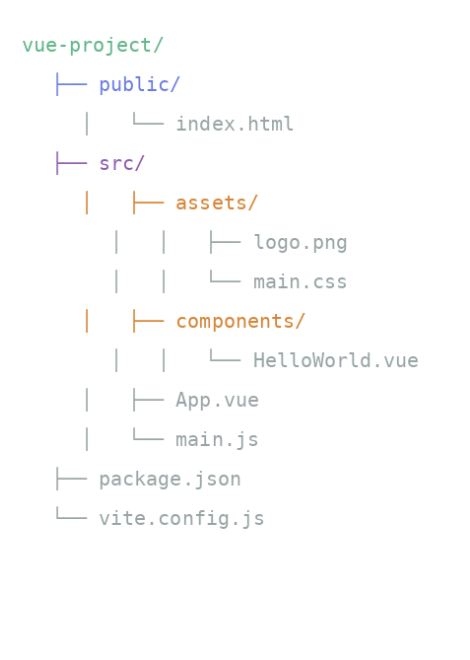
Understanding public/index.html
The public/index.html file is the entry point of your Vue application. This is a regular HTML file, but it has a special role. It contains a <div> element with the id app:
This is where your entire Vue application will be rendered. The file also includes a script tag at the bottom:
This line tells the browser to load your main JavaScript file, which will start your Vue app and mount it to the #app element. Everything you see in your app will appear inside this div.
Diving Into src/main.js
The src/main.js file is where your Vue application comes to life. Here, you import the createApp function from Vue, as well as your main App.vue component. You also import global styles from a CSS file. The key line is:
This line creates a new Vue application using the App component as the root and mounts it to the element with the id app in your index.html. This is how Vue connects your JavaScript code to the HTML page.
For example, your main.js might look like this:
This code imports everything needed and starts your app. The result is that whatever you define in App.vue will be displayed on the page.
Breaking Down App.vue
The App.vue file is a Single File Component (SFC). This means it contains everything needed for a component in one file: the template (HTML), the script (JavaScript), and the style (CSS). Here is an example:
The <template> section defines what will be shown on the page. The <script setup> section is where you add logic, such as variables and functions, using Vue’s Composition API. The <style scoped> section contains CSS that only applies to this component, so you do not have to worry about styles affecting other parts of your app.
When this component is rendered, you will see:

Styling In Vue Applications
Vue allows you to use both global and scoped styles. Global styles are defined in files like src/assets/css/main.css and apply to the entire application. For example:
This CSS will affect the whole page. On the other hand, styles inside a <style scoped> block in a component, like in App.vue, only apply to that component. This helps prevent style conflicts and makes it easier to manage your app’s appearance as it grows.
For example, the .container class in App.vue will only style the content inside that component, not other components that might use the same class name.
Summary And Preparation For Hands-On Practice
You have now learned how a modern Vue project is structured, how the main files work together, and how Vue keeps your code organized with Single File Components and scoped styles. You have seen how the public/index.html file serves as the entry point, how src/main.js starts your app, and how App.vue brings together template, logic, and styles in one place.
In the next exercises, you will get hands-on practice with these concepts. You will explore the project files, make changes, and see how everything fits together. Great job making it through your first lesson — this is the foundation for everything you will build with Vue.js!
