Summarizing Arrays Along Axes
Introduction
Welcome to Summarizing 2D Arrays Along Axes. In this first lesson, we’ll learn how to turn a whole table into useful summaries without writing loops. We’ll compare a whole-table total with row and column totals, then use the table’s shape to predict each result’s shape before running the code. By the end, we’ll be able to explain what each total represents and check our predictions on a non-square table.
Aggregates as Methods: hours.sum() vs np.sum(hours)
NumPy can calculate an aggregate, such as a sum, in two equivalent ways: call it as a function or call it as a method on the array. Both approaches use the same array of employee hours and calculate its sum. In this lesson, we’ll use the method form because it makes the array being summarized easy to see.
The array method is .sum(), while np.sum() is the NumPy function. We can also pass an axis argument to either form. Here, we’ll use .sum(axis=...) to explore how summarizing along an axis changes the result.
No Axis: Collapsing the Whole Table to One Number
Before asking for totals by day or by employee, let’s start with the entire table. The rows represent three employees, and the columns represent four days. Calling .sum() with no axis adds every value in the table and returns one number.
The array contains 12 daily hour values. Its shape is printed first; then .sum() combines all 12 values into one total.
So the table has shape (3, 4), and the total number of hours across all employees and days is 88.
axis=0: Collapsing the Rows (One Result per Column)
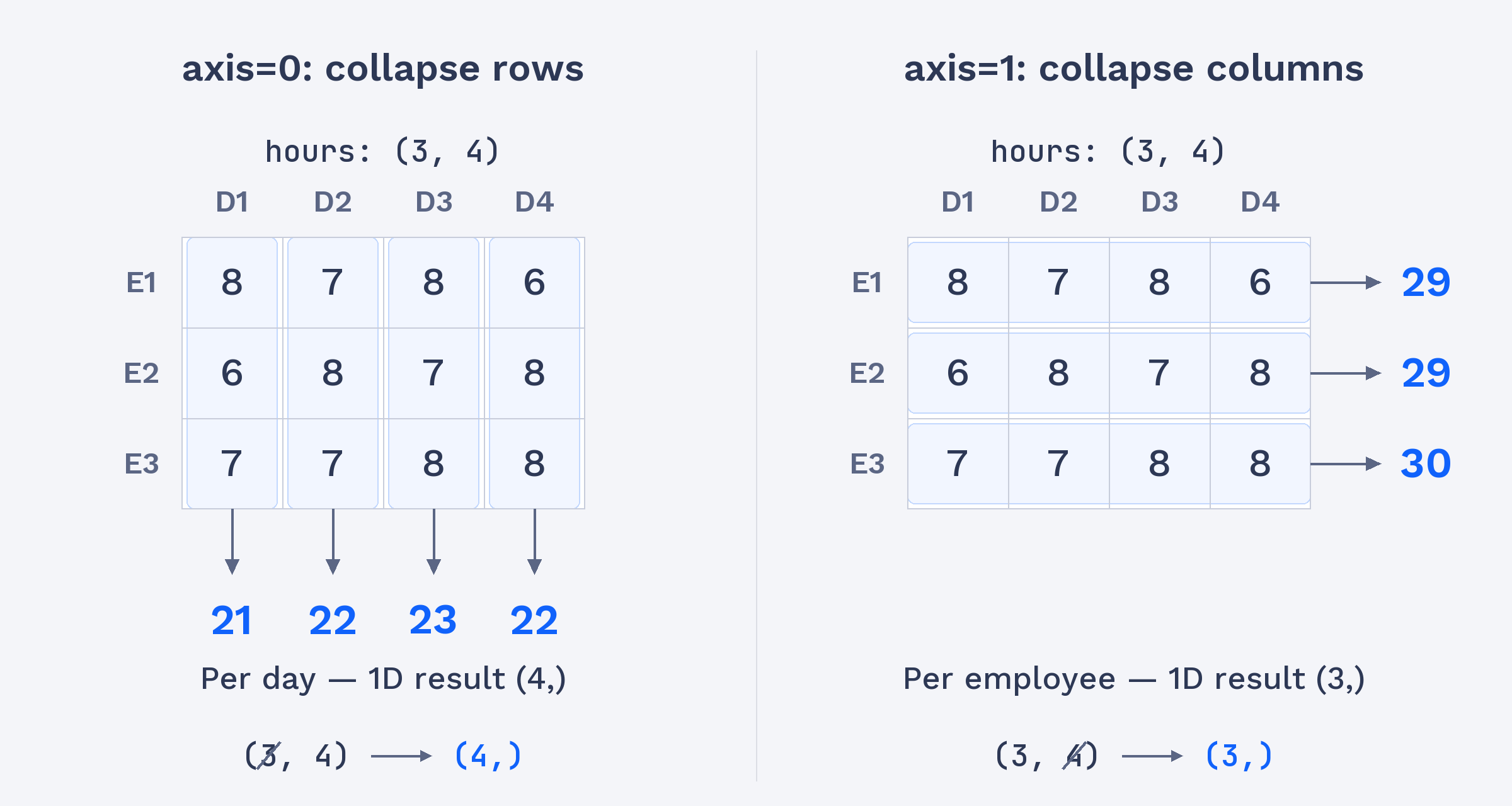
With axis=0, NumPy collapses the rows. The columns remain, so the result contains one sum for each day. For example, the first value adds the first day’s hours across all three employees: 8 + 6 + 7 = 21.
The prediction comment is useful: it states both the expected shape and what each value represents before we calculate the result. Since there are four days, we expect four totals.
The four values correspond to the four days, in column order. The shape (4,) confirms that the result is a one-dimensional array with one value per day.