Selecting Winning Records
Introduction
Welcome back to Summarizing 2D Arrays Along Axes. This is lesson 4 of 4 in the course. So far, we’ve used axes to summarize arrays and find extreme positions. Now we’ll use those ideas to select a complete winning record from a table. We’ll total each store’s sales, find the position of the largest total, and use that position to select both the store’s name and its full row. We’ll also see why calling argmax() directly on a table can point us to the wrong place.
From a 1D Position to a Full Winning Record
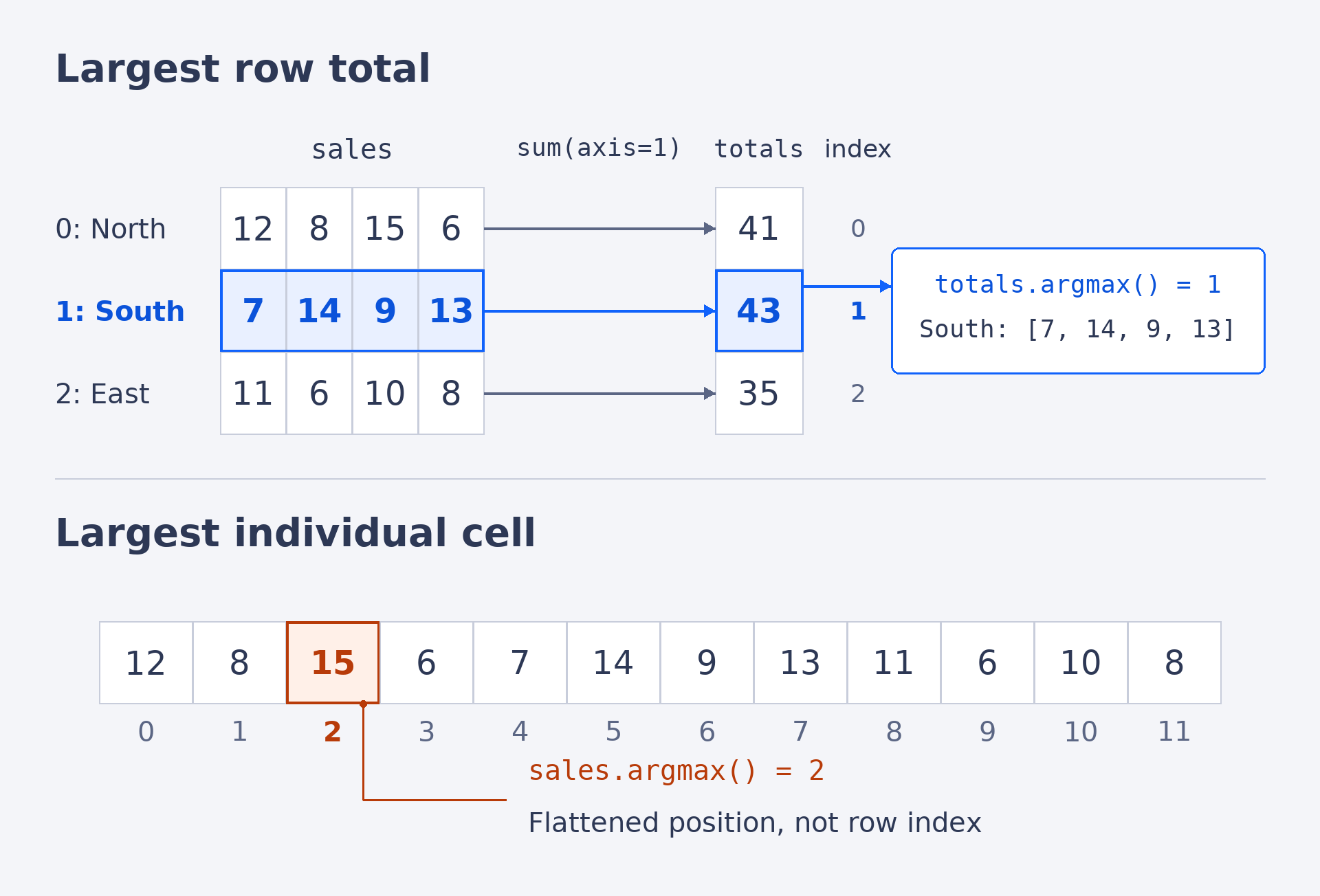
Imagine a table where each row represents a store and each column represents a week. We want to answer a question like, “Which store had the highest total sales, and what were its weekly sales?” The useful pattern is to reduce each row to one number, find the position of the winning number, and then use that position to select the whole row. Since the store names are kept in the same order as the table rows, that position can also identify the store by name.
Reduce Each Row to One Number with sum(axis=1)
Let’s begin with the store sales table. It has three rows and four columns, so each row contains one store’s sales across four weeks. As you may recall from earlier lessons, axis=1 collapses the columns and leaves one result per row. Summing along that axis gives us one total for each store.
The result is a one-dimensional array with three values, one total for each store in row order. We can check the first total by adding 12 + 8 + 15 + 6, which gives 41.
Turn Totals into a Winning Position with argmax()
Now we have one total per store, so we can find the position of the largest total. In Lesson 3, we used argmax to find where a largest value occurs. Here, totals is one-dimensional, so calling argmax() without an axis gives us one position: the position of the highest total.
The largest total is 43, at position 1 in totals. This position is also the row index for the winning store because totals was created in the same order as the rows of sales. We can carry that position forward to select the matching record.