Building Complete Monthly Reports
Introduction
Welcome back to Structuring Queries with Common Table Expressions. We are opening Lesson 4, the final lesson in this course. So far, our CTEs have organized calculations and summaries around rows that already exist. Today, we will add a reliable calendar structure to our reports. We will generate every month from January 2021 through December 2023, attach order counts and order value, and preserve months with no orders. By the end, we will understand how a recursive CTE supports complete time-based reporting.
Why a Month Spine Matters
Reports built directly from order rows describe activity, but they do not automatically describe inactivity. When a month has no orders, there is no source row for GROUP BY to summarize, so that month disappears. A month spine gives the report a row for every required period before we attach business data.
- The order tables show which months contain activity.
- The generated spine defines which months the report must show.
This separation is useful for trend reports, period comparisons, and later window calculations. We will create the calendar first, then connect orders to it.
Understand Recursive CTE Anatomy
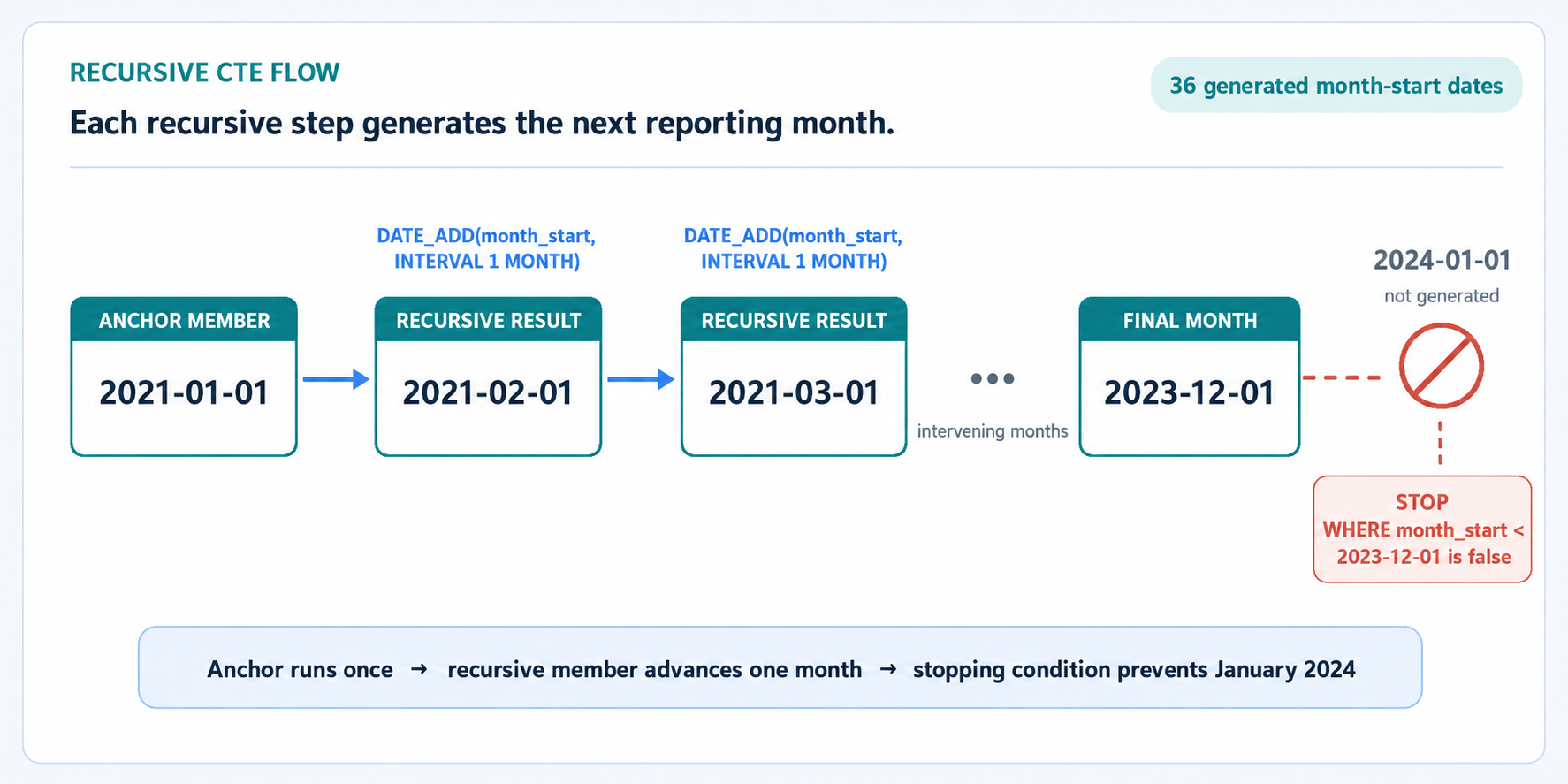
A recursive CTE defines an initial row, then uses earlier rows to create later rows. In MySQL 8.0, the pattern contains an anchor member, UNION ALL, and the recursive member.
The anchor runs once and returns January 1, 2021. The recursive member reads each generated month_start and advances it by one month with DATE_ADD. The WHERE clause is the stopping condition. When the current value reaches December 1, 2023, the condition becomes false, so January 2024 is not generated.
Trace the Final Recursive Steps
Following the last few iterations makes the stopping condition concrete. Each step reads the current month_start, evaluates the WHERE condition, and only then produces the next value.
Current month_start | month_start < '2023-12-01' | Next generated value |
|---|---|---|
2023-11-01 | true | 2023-12-01 |
2023-12-01 | false | none, recursion stops |
2024-01-01 | never evaluated | never generated |
December 1, 2023 is generated and kept in the result, but it cannot produce a successor because the condition fails when that row is read. This is why the spine ends exactly at the intended upper boundary.
Make Sure the Recursion Terminates
Every recursive CTE must eventually stop producing new rows. Termination depends on two things working together: a recursive step that actually moves toward the boundary, and a WHERE condition that eventually becomes false. If the step does not advance the value, or the comparison uses the wrong column or direction, the recursion never ends on its own.
MySQL protects the server from that situation with a recursion-depth limit controlled by cte_max_recursion_depth, which defaults to 1000. When a recursive CTE exceeds that many iterations, the query fails with an error instead of running forever. That error is a useful signal: it usually means the recursive step or the stopping condition is wrong, not that the limit needs to be raised. Our spine performs 35 recursive iterations, so it stays well inside the default.
In production date-series queries, validate both parts before trusting the output: confirm the recursive step advances by the intended interval, and confirm the upper boundary produces exactly the expected number of periods.
Build the Standalone Month Spine
Now we can use the CTE in a complete statement. The final SELECT reads the generated dates, while ORDER BY makes their chronological order explicit.
The anchor and recursive member produce one month start at a time, resulting in exactly 36 dates. The first value is 2021-01-01, and the last value is 2023-12-01. Because each month_start is unique, the final ordering is both chronological and deterministic. This standalone spine will become the stable foundation for the full report.
Add Reusable Order Level CTE Stages
The month spine provides dates, but it does not provide shop metrics. We reuse order_totals unchanged. The second stage changes slightly: this report groups by month rather than by customer, so it carries the order date forward instead of the customer ID. These CTEs are added immediately after month_spine.
order_totals supplies one rounded order_total per order. dated_orders keeps that same one-row-per-order grain and adds order_date, which determines the generated month for each order.
Associate Orders with Months Without Losing Empty Periods
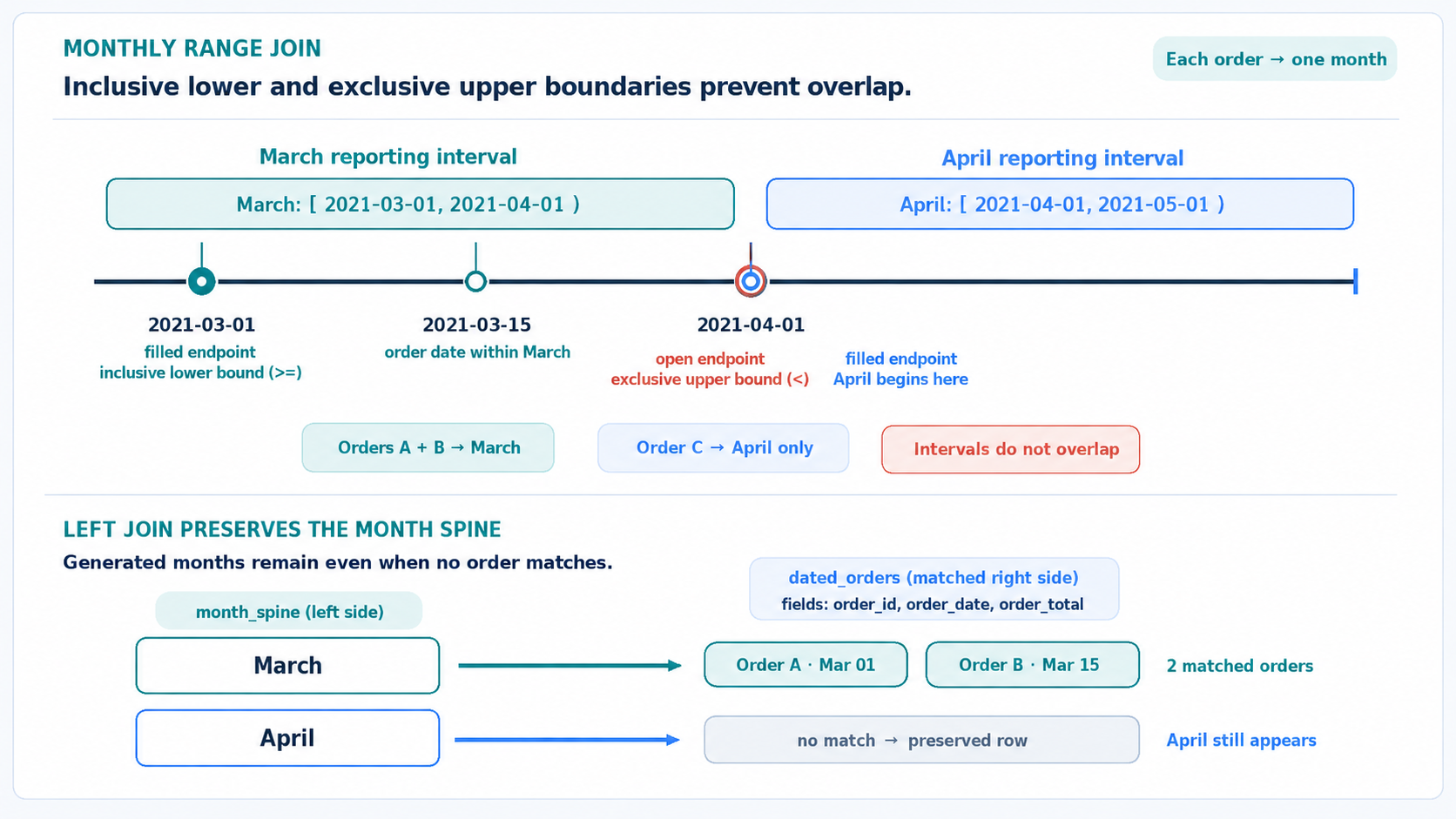
The join direction controls whether empty months survive. We place month_spine on the left side of a LEFT JOIN, then match each order to the month containing its order_date.
The lower boundary is inclusive, so an order on the first day of a month is included. The upper boundary is exclusive, so an order on the first day of the next month is not included in the earlier month. These conditions create nonoverlapping monthly ranges, which assign each order to exactly one month. If no order matches, the LEFT JOIN still preserves the generated month_spine row.
Aggregate the Completed Monthly Report
Using the month-to-order association we just established, we can now produce one summary row for each generated month.
COUNT(d.order_id) counts only matched order IDs. For an empty month, the preserved row contains NULL for the order columns, so the count correctly becomes 0. This is why COUNT(*) would be incorrect here: it would count the preserved placeholder row.
SUM(d.order_total) adds the prepared order totals, and ROUND keeps monthly order value at two decimal places. We intentionally do not use COALESCE, so monthly order value remains NULL when no order matches. Because every order contributes regardless of status, monthly_order_value is gross order value for the month rather than recognized revenue. Grouping by the unique month_start produces 36 monthly rows, and the final ordering lists them from January 2021 through December 2023.
Conclusion and Next Steps
We have completed the final lesson in this course. A recursive CTE generated the 36 month starts, stopping cleanly at a validated upper boundary. order_totals calculated one order total per order, while dated_orders carried each order date into the reporting pipeline. The inclusive lower boundary and exclusive next-month boundary assigned orders to exactly one period. Starting with month_spine in a LEFT JOIN preserved months without orders, and COUNT(d.order_id) displayed zero counts for those periods.
In the practice section, we will:
- Inspect the reporting data.
- Generate the month spine.
- Associate orders with generated months.
- Complete the monthly report.
The next exercises will turn this pattern into working SQL, so let’s finish the course by building and verifying the full report step by step.
