Updating Array Values Without Reassigning the Variable
Introduction
Welcome back to Storing and Updating Lists with JavaScript Arrays. We’ve learned how to create an array and read its values by position. In this lesson, we’ll use those positions to update a list, see why a const array can still change, and explore what happens when two variables refer to the same array.
Replacing a Value by Position
A route can stay in the same order even when one stop changes. As we saw earlier, square brackets let us work with a value at a zero-based position. We can also put a new value into an existing position by assigning to it.
This program prints the array, replaces the value at position 1, and prints it again. The output shows the array before and after the change.
The assignment stops[1] = "Library" replaces "Museum" at position 1. The values at positions 0 and 2 stay the same. The observed output shows the array before and after the update:
Updating Within a const Array
Here’s an important distinction: const prevents us from assigning a different value to the variable, but it does not prevent us from changing an existing value inside the array. So, replacing stops with a different array is not allowed, while updating one of its valid positions is allowed.
The commented-out assignment is the error case: if we run it, JavaScript raises a TypeError because stops was declared with const. The active line changes an array element without assigning a new array to stops. We keep the variable binding and update the value at position 1.
Two Names, One Array
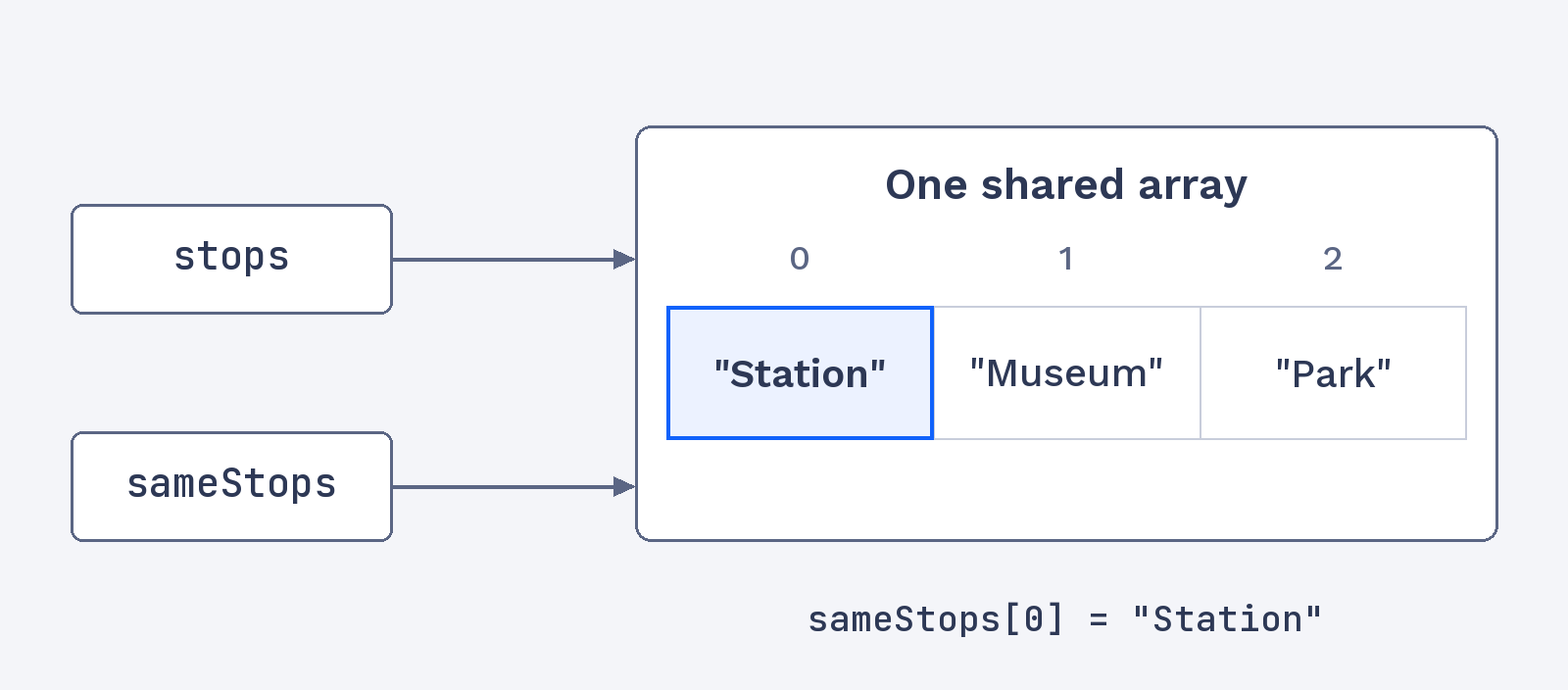
We can assign an array to another variable and use that second name to reach the same array. This does not create a separate list. A change made through either name is visible through both, as the next example demonstrates.
This program creates a second name for the same array and updates position 0 through that name. The output shows the same change through both names.
sameStops is another name for the array that stops refers to. Updating position 0 through sameStops changes that array, so printing through either name shows "Station" in the first position.
Both names point to one array, as shown below after the update.