Selecting First Customer Orders
Introduction
Welcome to the first lesson of Ranking with RANK, DENSE_RANK, and ROW_NUMBER. We are beginning Unit 1, where we will move from calculating metrics beside rows to selecting specific rows from each group.
Our business question is simple but useful: Which order was each customer’s first order? To answer it reliably, we need to keep the order details, number the orders within each customer’s history, select position one, and then add the customer’s name. As you may recall from the earlier Window Functions Fundamentals course, window functions preserve row detail, while CTEs help us organize multistep queries. We will combine both ideas here.
Establishing the Order Grain and Chronological Keys
Before applying a window function, we need to identify the row grain. The Orders table is the correct starting point because each row represents one complete order. We do not need to aggregate order items or summarize customers first.
For this report, each field has a specific role:
customer_iddefines each customer’s order history.order_dateestablishes the chronological order.order_iduniquely identifies an order and resolves situations in which a customer has multiple orders on the same date.
We will add customer names later. First, we should number the order rows while they are still at the order grain.
Numbering Orders Within Each Customer
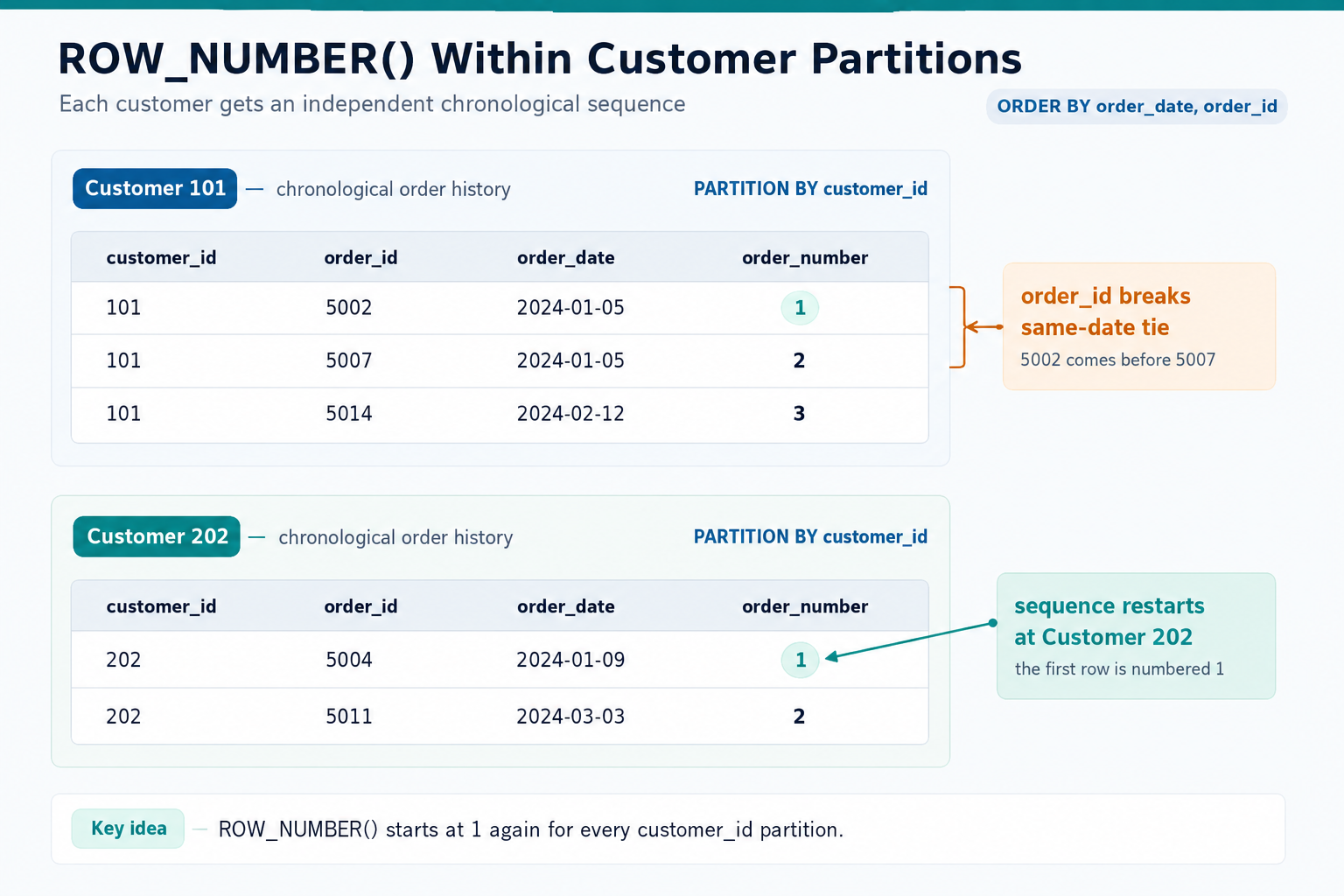
ROW_NUMBER() adds a distinct sequence number to every row in a window. By partitioning on customer_id, we create a separate sequence for each customer instead of one sequence for the entire Orders table.
The numbering restarts at 1 whenever the customer changes. Within each customer’s partition, the earliest order date comes first, followed by later dates. If two orders share a date, the smaller order_id comes first. At this stage, every order remains in the result, and order_number simply labels its position in the customer’s history.
The following schematic illustrates how each customer receives an independent chronological sequence.
Making the Sequence Deterministic
Ordering by order_date alone is not enough. If two orders have the same date, they are tied in the window ordering, so ROW_NUMBER() could assign their positions inconsistently.
The safer version adds the unique order identifier:
Now every customer’s orders have one clear sequence. The first order is the earliest date, with the lowest order ID winning any same-date tie. For a most recent order report, we would reverse both directions: ORDER BY o.order_date DESC, o.order_id DESC.
Filtering Numbered Rows Through a CTE
After calculating the sequence, we can retain only the row whose number is 1. The window calculation belongs in a CTE because MySQL does not allow us to filter a window result directly in the same query block that creates it.
The numbered_orders CTE creates the intermediate order history with sequence values. The outer query then filters that prepared result. Because each customer has one row numbered 1, this pattern selects exactly one earliest order from every customer’s history.
Joining Customer Details and Finalizing the Report
Once we have selected the earliest order rows, we can enrich them with customer information. The final query keeps the CTE structure, joins to Customers, selects the required fields, and orders the report by the unique customer identifier.
The CTE performs the order sequencing, while the outer query performs selection and presentation. Joining after filtering keeps the logic focused: first, choose one order per customer; then, add customer_name. The final report has one row per customer and the columns customer_id, customer_name, order_id, order_date, and order_status. Because all 50 customers participate in the dataset, the completed report should contain 50 rows.
Conclusion and Next Steps
In this lesson, we built a reusable pattern for selecting one representative row from each customer group:
- Partition orders by
customer_idso every customer gets an independent history. - Order by
order_dateandorder_idso the sequence is deterministic. - Calculate
ROW_NUMBER()in a CTE, then filter toorder_number = 1. - Join the selected rows to
Customersand apply a deterministic outer ordering.
In the upcoming practices, we will inspect the source data, number complete customer histories, reverse the ordering to explore the most recent orders, and complete the first-order report step by step.
