In our previous lessons, we explored how to use specialized AI agents to handle complex tasks with high precision. We learned that by delegating work to subagents, we avoid context decay and keep code quality high. Now that you understand how to manage a single stream of work, it's time to look at how we can scale this process.
In a production environment, we often have multiple features waiting to be built. If Feature A and Feature B do not rely on each other, we do not have to wait for Feature A to finish before starting Feature B. This is called Parallel Development. By running these workflows at the same time, we significantly reduce calendar time — the actual days or hours it takes to deliver the project — even if the total amount of work remains the same.
In this lesson, you will learn how to identify when features can be built in parallel and how to coordinate them so they do not clash when they are merged back together.
Not every task can be done in parallel. If two features require changing the same line of code in the same file, they will cause a "conflict." To work in parallel, features must be independent.
We use a simple checklist to verify independence:
- No shared files: Aside from basic configuration or test setup, the features should live in different files.
- No integration dependencies:
Feature Ashould not need code fromFeature Bto function. - Different database tables: They should not modify the same data structures.
- Different API endpoints: They should provide different routes for the user.
Let's look at our target features: Task Tags and Task Reminders.
Since these use different tables and files, they are perfect candidates for parallel development. We can document this in a file called to ensure our AI agents understand the boundaries.
With our features confirmed as independent, we can now apply a structured approach to building them in parallel. The diagram below illustrates the full workflow: a shared foundation is set first, two separate AI sessions then run concurrently, and a final integration phase ties everything together.
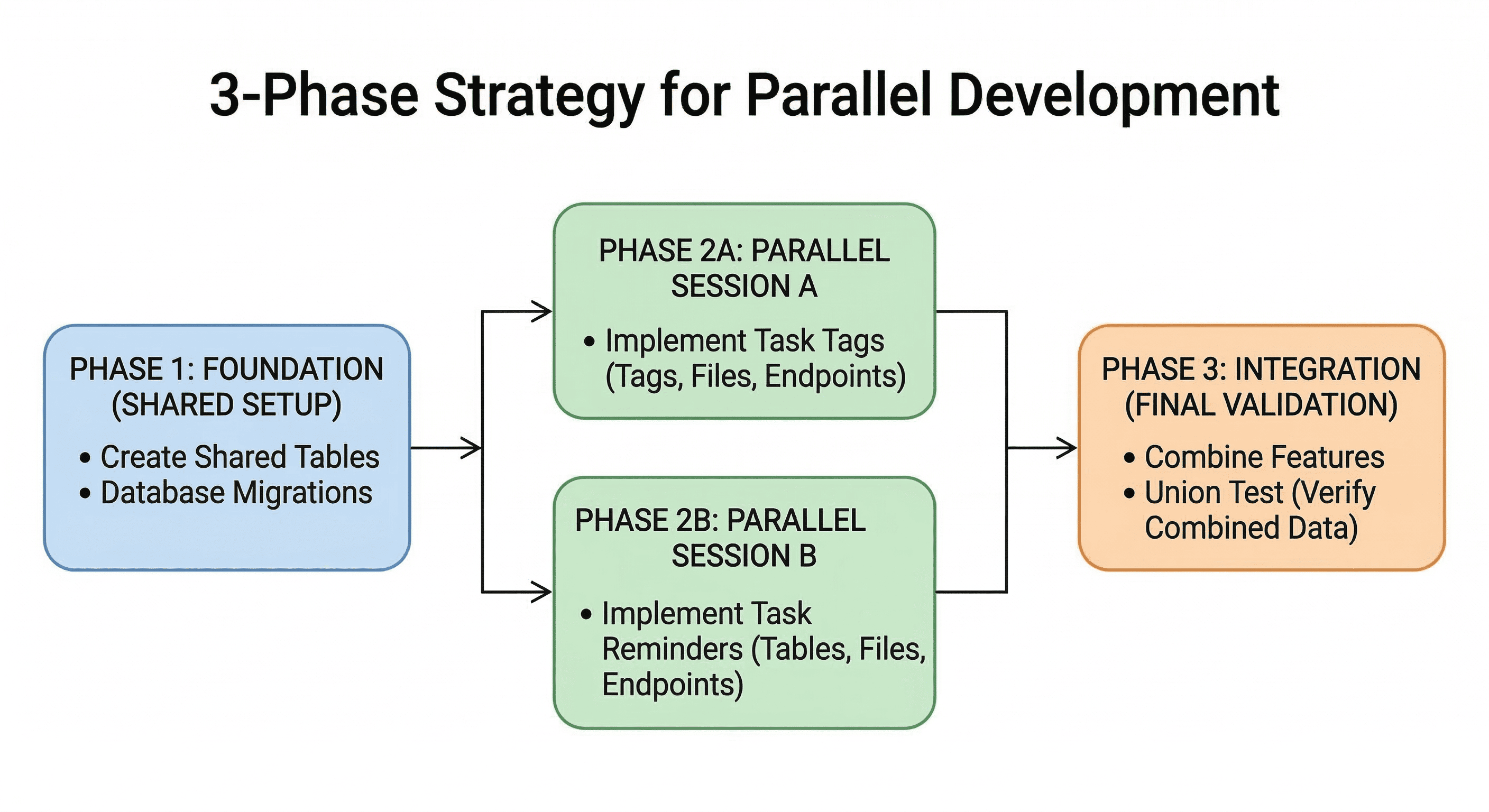
The sections below walk through each phase in detail.
Even though the features are independent, they usually share a common starting point, such as the database. If two agents try to create a database migration at the same time, they might generate conflicting version numbers. To prevent this, we use Phase 1: Foundation.
In this phase, we perform a single session to set up the infrastructure that both features will use.
First, we create a database migration that defines the tables for both features. This ensures the "ground" is ready for both tracks.
Next, we verify that the foundation is solid by running the migration and checking if the models can be loaded. In your CodeSignal environment, these tools are already set up for you.
Output:
By completing this small shared step first, we create a "safe zone" where the two parallel tracks can now run without stepping on each other's toes.
Now that the foundation is ready, we can start two separate AI sessions. The key here is context separation. We want the Tags Agent to focus only on tags, and the Reminders Agent to focus only on reminders.
If we give one agent too much information about the other feature, it creates "noise" that can lead to mistakes. We provide each agent with its own specific task list.
Session A (Task Tags) Prompt:
Session B (Task Reminders) Prompt:
You will notice that both sessions use the same task labels — T001, T002, and T003. This is intentional: the labels describe a pattern (Repository → Service → Endpoints), not shared work. Session A's T001 writes to tag_repository.py, while Session B's T001 writes to reminder_repository.py. Because every file each session touches belongs exclusively to its own feature, the two sessions have no overlapping writes. When their results are combined, there is nothing to conflict — the codebase simply gains two new, independent feature trees side by side.
While these sessions run, we can track the time. Because they are independent, the total calendar time is only as long as the slowest session. If both take , the features are finished in total, rather than .
Once both sessions are complete, we enter the Integration Phase. This is a single session where we verify that both features work together on the same data.
To test this, we can perform a Union Test. We will create a single task and attempt to add both a tag and a reminder to it.
First, let's create a task and capture its ID.
Output:
Now, we use that ID (101) to add a tag and a reminder using the new endpoints created in the parallel sessions.
Finally, we fetch the task to ensure both pieces of data exist in the same object.
Output:
If the output shows both the tags and the reminders, we have successfully integrated two independent workflows!
In this lesson, we covered the strategy for Two-Track Parallel Development. We learned that:
- Independence is key: Features must use different files, tables, and endpoints to be developed simultaneously.
- The 3-Phase Strategy keeps work organized:
- Foundation: Set up shared tables and models.
- Parallel: Run separate AI sessions with focused context.
- Integration: Verify that both features work together in a single environment.
- Context Separation prevents AI confusion and reduces errors.
In the upcoming practice exercises, you will apply this knowledge in the CodeSignal IDE. You will analyze two features for independence, set up their shared foundation, and simulate the execution of parallel tracks to build a robust, multi-featured API. You're doing great — let's get to the practice!
