Presenting Your Business Case
Presenting Your Business Case
After all your research and analysis, how you present your findings can determine whether your business case is approved or rejected. The HBR Guide to Building Your Business Case by Raymond Sheen stresses that your document must tell a clear, compelling story that stakeholders can grasp immediately—whether you’re presenting in person or they’re reviewing it on their own. This is crucial in today’s environment, where decision makers are often distracted or remote.
Your document serves as your roadmap, a reference for stakeholders, and sometimes your only chance to make your case. It must stand on its own, since you can’t assume you’ll have everyone’s full attention. Whether it’s a Word doc, Excel file, or slide deck, make sure the content is clear without your explanation.
Your document is the culmination of your business case. Keep ROI and alignment with strategic objectives front and center, as these are what stakeholders care about most.
Crafting Executive Summaries That "Hook" Your Audience
Your executive summary represents arguably the most important part of your entire presentation. Your hook is a concise, compelling story that captures a business need, your solution, and its impact in just a few sentences. This isn't merely an introduction; rather, it's your one chance to grab stakeholders' attention and convince them your case is worth their time.
Consider that many executives receive dozens of proposals monthly and make split-second decisions about which ones deserve attention. Your executive summary needs to work like a movie trailer, giving them everything they need to know to be intrigued while leaving them wanting to learn more. Use a clear template that starts with the problem or opportunity, then describes your solution, and finally highlights the compelling returns.
For instance, rather than beginning with background information or methodology, you might write:
"We're losing 15% market share annually to competitors with faster delivery times (the need). I'm proposing a $2M investment in automated fulfillment technology (the solution). This will cut delivery times by 60% and generate $8M in recovered revenue with a 2.3-year payback (the impact)."
Notice how this immediately answers the three questions every stakeholder has: What's wrong? What are you proposing? What's in it for us?
Let's look at how two managers discuss refining an executive summary:
Jessica: Ryan, I just reviewed your executive summary, and I'm concerned it won't grab the board's attention. You've started with three paragraphs of background about our industry.
Ryan: But don't they need context to understand why this matters?
Jessica: They already know the industry. What's your main message?
Ryan: Well, our customer service response times are terrible, and we need a new system to fix them.
Jessica: OK, but where's the ROI? How much will this cost and what's the return?
Ryan: It's in the financial section on slide seven.
Jessica: That's too late! Try this instead: "48-hour response times are causing 28% customer churn, costing us $7.2M annually. A $2M AI system investment will cut response time to 2 hours and deliver 2.8x ROI in 3 years." See how that hits all three elements immediately?
Ryan: Oh, I see – problem, solution, and payback right upfront. The board knows in seconds whether to keep listening.
This exchange demonstrates how executive summaries must deliver immediate clarity rather than building up to the main point. Do not bury the lead with too much context or explanation. Your stakeholders are extremely busy with competing demands on their time and attention, so if they have to search for the main point, you've already lost them. Instead, state your ROI prominently using whatever metric your organization values most – whether that's NPV, payback period, or revenue growth. As Sheen experienced firsthand at GE, when time was cut short and he had only five minutes instead of thirty, his executive summary slide alone was enough to secure approval because it contained the complete story in miniature.
Structuring Powerful Executive Summary Presentations
Once you've hooked your audience with a powerful executive summary, you need a logical structure that builds your case systematically. The following chart contains an eight-slide framework that has proven effective across industries and company sizes. This isn't about limiting yourself to exactly eight slides, but rather ensuring you cover eight essential elements in a sequence that makes sense to decision makers.
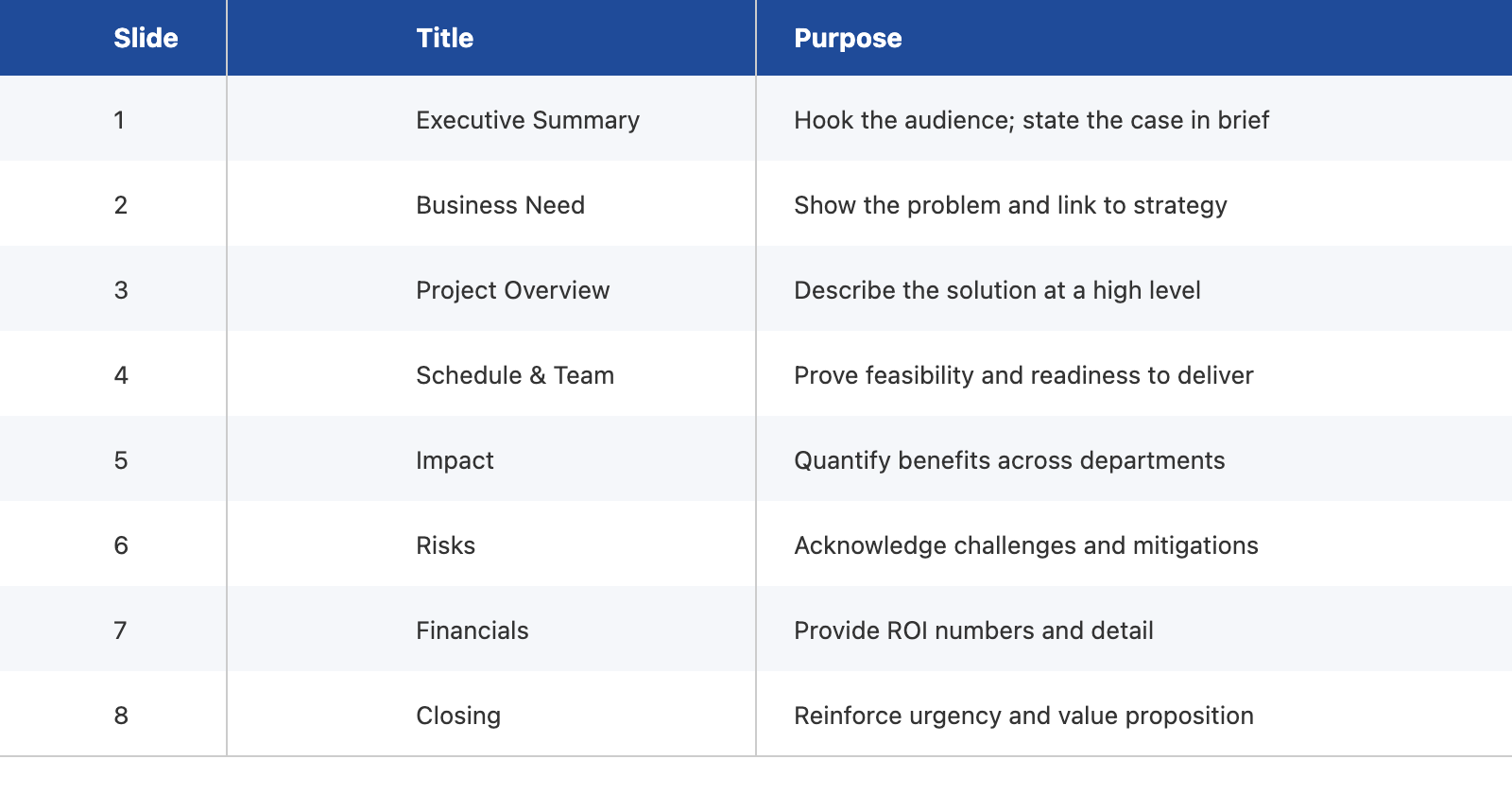
This framework works because it anticipates and answers stakeholders' questions in the order they typically think of them. When you say "We have a problem," they immediately wonder "What's your solution?" When you propose a solution, they think "Who will do this and when?" As you describe benefits, they're calculating risks. Each section should provide enough detail to be credible without overwhelming your audience. For example, in your risk section, you might note: "Primary risk: vendor delivery delays (30% probability based on industry data). Mitigation: parallel workstreams with internal backup option. Secondary risk: 20% cost overrun possibility. Mitigation: phased implementation with gates at 25%, 50%, and 75% completion."
Furthermore, different stakeholders focus on different sections throughout your presentation. Your CFO will scrutinize the financials while your COO examines the implementation plan. By following this proven structure, you ensure everyone finds the information they need to make an informed decision. Having this standard structure helps stakeholders compare multiple proposals fairly, which becomes especially important when your case is being evaluated against competing projects for limited resources.
Create Slides That Stand Alone for Conference Calls and Multitasking Audiences
In today’s business environment, you can’t count on having your audience’s full attention. Decisions are often made over video calls, with stakeholders multitasking or joining from different locations. This means your slides must stand alone.
Each slide should communicate a complete idea without needing your explanation. Avoid vague bullets like “Significant improvements.” Instead, use clear, specific statements: “Reduces order processing time from 48 to 12 hours” or “Cuts error rates by 75%, saving $1.2M annually.” Someone skimming your slides should grasp your point instantly.
Apply this to every element: use chart titles that state conclusions (“New Product Line Projected to Generate $15M by Year 3”), add brief explanations to diagrams, and spell out risk implications directly on the slide.
You may want to try treating your slides as a document that can be read and understood independently. Keep slides visually clean, but make every key point explicit. Use the notes field for your script, but ensure the slide itself delivers the essential message.
Now that you understand how to craft compelling executive summaries, structure your presentation effectively, and create self-explanatory slides, you're ready to put these principles into practice. In the upcoming role-play sessions, you'll have the opportunity to draft an executive summary that hooks your audience, build a complete eight-slide presentation following the HBR Guide's framework, and practice making slides that work for distracted or remote audiences.
