Using Default Arguments
Introduction: Making an Argument Optional
Welcome to the final unit of Passing Data into Python Functions! Our journey so far has been a steady climb: parameters turned rigid functions into adaptable ones, several parameters let one call carry a whole record of data, and keyword arguments let the caller state exactly where each value belongs.
There is one more comfort to add. Sometimes a value is usually the same: prices are usually in dollars, orders usually ship in boxes, and greetings usually start with "Hello". Typing that value at every single call is noise. Python lets us write it once, in the def header, as a default value, so callers may simply stay silent about it.
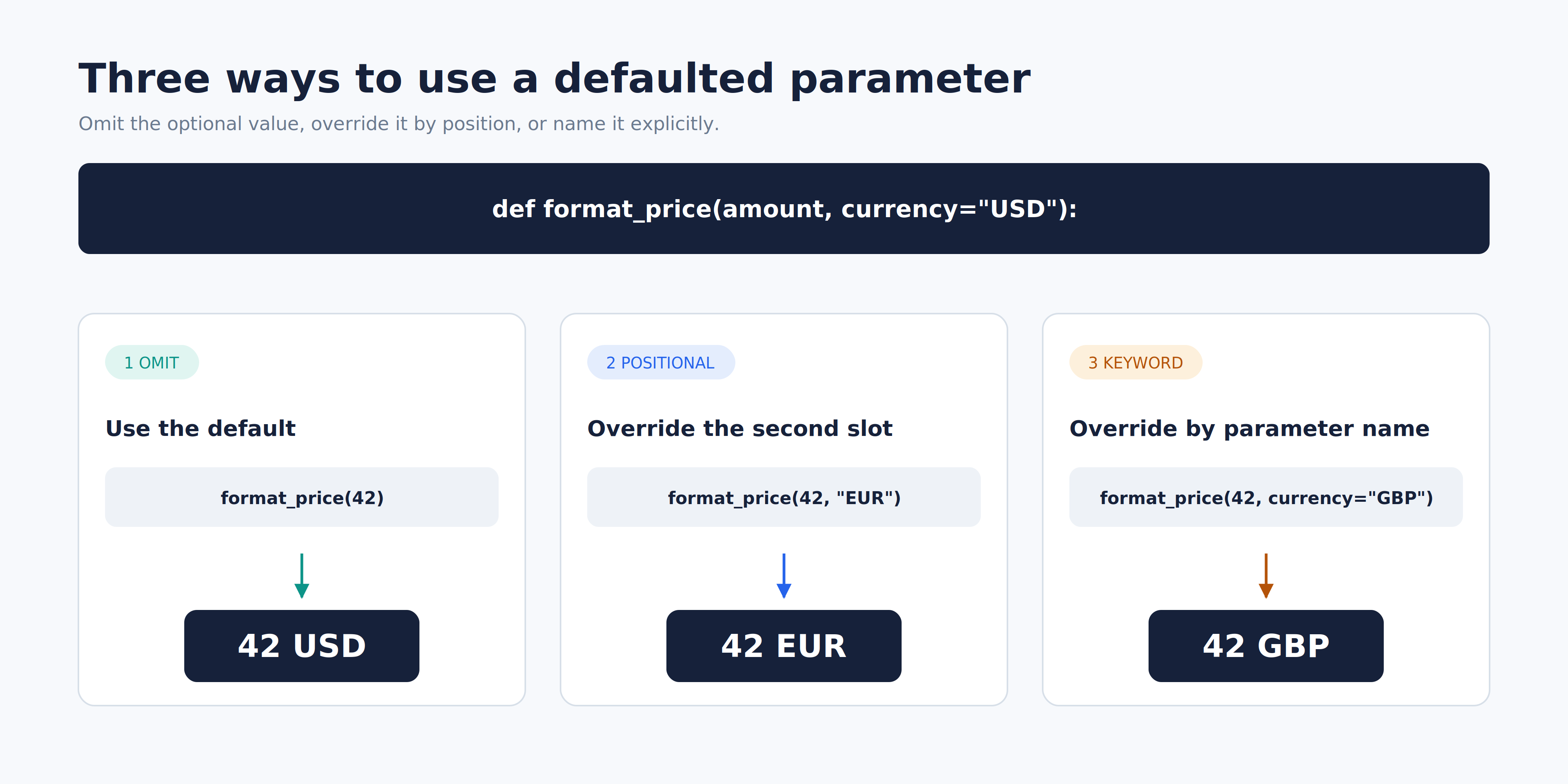
Our running example is a small function called format_price, defined once and called three ways. Here is exactly what the finished script prints:
One unchanged header, three different calls; let us see how.
Writing a Default in the def Header
In earlier units, every parameter we wrote was required. A default changes that with a single addition to the header:
The header now has two halves with different rules:
amountis required: it has no default, so every caller must supply a value for it.currencyis optional:="USD"gives Python a value to fall back on when the caller supplies nothing.
Three details are worth noticing right away. First, the default lives in the definition, written once, and is never repeated at a call site. Second, the conventional style is to use no spaces around = in a header, so we write currency="USD", not currency = "USD". Third, the body does not change at all: a default affects how a value arrives, not how it is used. And as in the previous unit with str(year), we need str(amount) here because + refuses to join a string to an integer.
Calling Without the Optional Argument
Now for the payoff. The first call passes only the amount:
Python binds this call in two steps: 42 fills amount positionally, and since no second argument was supplied, currency is filled from the header default. The body then runs with both names in place:
Look carefully at that line: the text USD appears in the output even though the word USD is nowhere in the call. It came from the header. Contrast this with the required parameter: writing format_price() with no arguments raises TypeError: format_price() missing 1 required positional argument: 'amount', because amount has nothing to fall back on. This is why adding a default is a friendly change: calls that already pass the value keep working untouched, while calls that do not need it get shorter.
Overriding the Default: Positionally and by Keyword
A default is only a fallback. The moment the caller supplies a value, that value wins:
Both calls reach exactly the same parameter through the two routes we already know: positional binding counts from the left, so "EUR" lands in the second slot; keyword binding matches by name, so currency="GBP" lands in currency. Nothing from the previous unit changes because a parameter has a default.
Two closing notes. The override applies to that call only; the header default is untouched and still serves every other call. The styles cannot be combined for one parameter: format_price(42, "EUR", currency="GBP") raises TypeError: format_price() got multiple values for argument 'currency'. Prefer the keyword form when the bare value would not be self-explanatory to a reader.
The Definition-Side Rule: Required Before Defaulted
Defaults come with one firm rule, and it applies to the header, not the call. Among ordinary positional-or-keyword parameters, required parameters must come before parameters with defaults:
The message is SyntaxError: non-default argument follows default argument. That is a signature rule, not a runtime puzzle: ordinary positional-or-keyword parameters are filled from left to right, and Python requires every required one of those parameters to precede every defaulted one in the header. A definition such as def format_price(currency="USD", amount) is rejected at parse time for breaking that grammar — before any call, including format_price(42), ever runs.
Advanced keyword-only parameters (those written after a bare * in the header) follow different rules and sit outside this course; we stay focused on the ordinary parameters used here.
Note how severe this is. Just like positional argument follows keyword argument in the previous unit, this failure happens before any line runs, so nothing at all prints, not even correct code written above it. That is precisely why we keep the broken header commented out in our file: it can be read as a warning without stopping the program. The fix is one sentence: among ordinary parameters, declare every required one first, then all defaulted ones.
The Complete Script and Its Output
Here is the finished script: a comment recording the ordering rule, one definition, three bare calls at module level, and the invalid header parked safely in comments at the bottom.
Python stores the definition, then runs the three calls from top to bottom, so one body produces three lines:
Three call shapes, one unchanged header, and a default that shows up in the output only when the caller stays silent.
Conclusion and Next Steps
Let us gather the rules of this unit:
- A default written in the header makes that parameter optional at the call site.
- A supplied argument overrides the default for that call only.
- Overriding works positionally or by keyword, exactly as before.
- Among ordinary positional-or-keyword parameters, required parameters must come before parameters with defaults.
In the practices ahead, we will read the finished example and add calls of our own, give an existing parameter a default so its calls get shorter, override one default in both styles, deliberately write and then repair an illegal parameter order, and finally build a defaulted greeting function from scratch.
That also completes Passing Data into Python Functions: congratulations! We can now send any data into a function using positional arguments, keyword arguments, and defaults. The next course flips the direction of the flow, teaching functions to return values instead of only printing them. For now, let us head into the practices and make these defaults our own!
