Organizing Nested Data
Introduction
Welcome to the fourth and final unit of Organizing Data with Dictionaries in Python! We have created dictionaries and read from them safely, modified their entries with assignment and update(), and swept through them end to end with keys(), values(), and items(). That is a complete toolkit for one level of data.
And "one level" is exactly the limitation we are about to remove. Every dictionary we have built so far stored flat values: a single number or a single string. Real data is rarely that shallow. A user has a name and a list of roles. A team has a label and a list of members. Squeezing that into a flat dictionary means losing information.
The answer is nesting: placing collections inside other collections. In this lesson, we will work with the two shapes that appear most often in practice:
- A list of dictionaries, which holds many records of the same kind;
- A dictionary of lists, which groups many items under one label.
Everything we use here is already familiar: indices, keys, append(), len(), and for loops. Only the combination is new.
A List of Dictionaries: Modeling Many Records
Let us start with the shape you will meet most often when data comes from a file, a database, or an API: a list where every item is a dictionary describing one thing.
There are three layers stacked here, so let us name them out loud:
usersis a list holding two items, which is whylen(users)is2and not4; the outer list only counts its direct members.- Each item is a dictionary with the same two keys,
"name"and"roles". Sharing keys across records is what makes the collection easy to process later. - The value stored under
"roles"is itself a list of strings, so one user can hold any number of roles.
Notice the formatting: one record per line, with a trailing comma. Python does not require it, but it keeps records readable and makes adding another one a one-line change. As you may recall from the lists course, nested lists and chained indexing are not brand new; mixing lists with dictionaries is the fresh part.
Reaching Nested Data with Chained Indices and Keys
To pull a value out of a nested structure, we peel one layer at a time and read the expression left to right.
In the first line, users[0] hands us the first dictionary, and ["name"] then pulls the string "Ada" out of it. The second line goes one step further: users[0] gives us the dictionary, ["roles"] gives us the list ["admin", "editor"], and [0] grabs its first element.
The rule of thumb is short: lists use integer indices or slices, while dictionaries use hashable keys. Keys are often strings, but integers and tuples of hashable values are valid too. A missing dictionary key—including a missing integer key—raises KeyError; a list position that does not exist raises IndexError; and TypeError can occur for an unsupported list index or an unhashable dictionary key such as a list or dictionary. Those errors are useful hints, not mysteries.
A Dictionary of Lists: Grouping Under Labels
Now let us flip the arrangement. Instead of many records sitting in a list, we can use a dictionary whose values are lists, which is ideal when several items belong under one shared label.
We read this as follows: the key "backend" maps to a list of two names, and the key "frontend" maps to a list of one name. Access works the same way as before, one layer at a time: team["backend"] gives us the list, so team["backend"][1] gives us "Sam".
The diagram below lays both shapes next to each other, with their layers labeled:
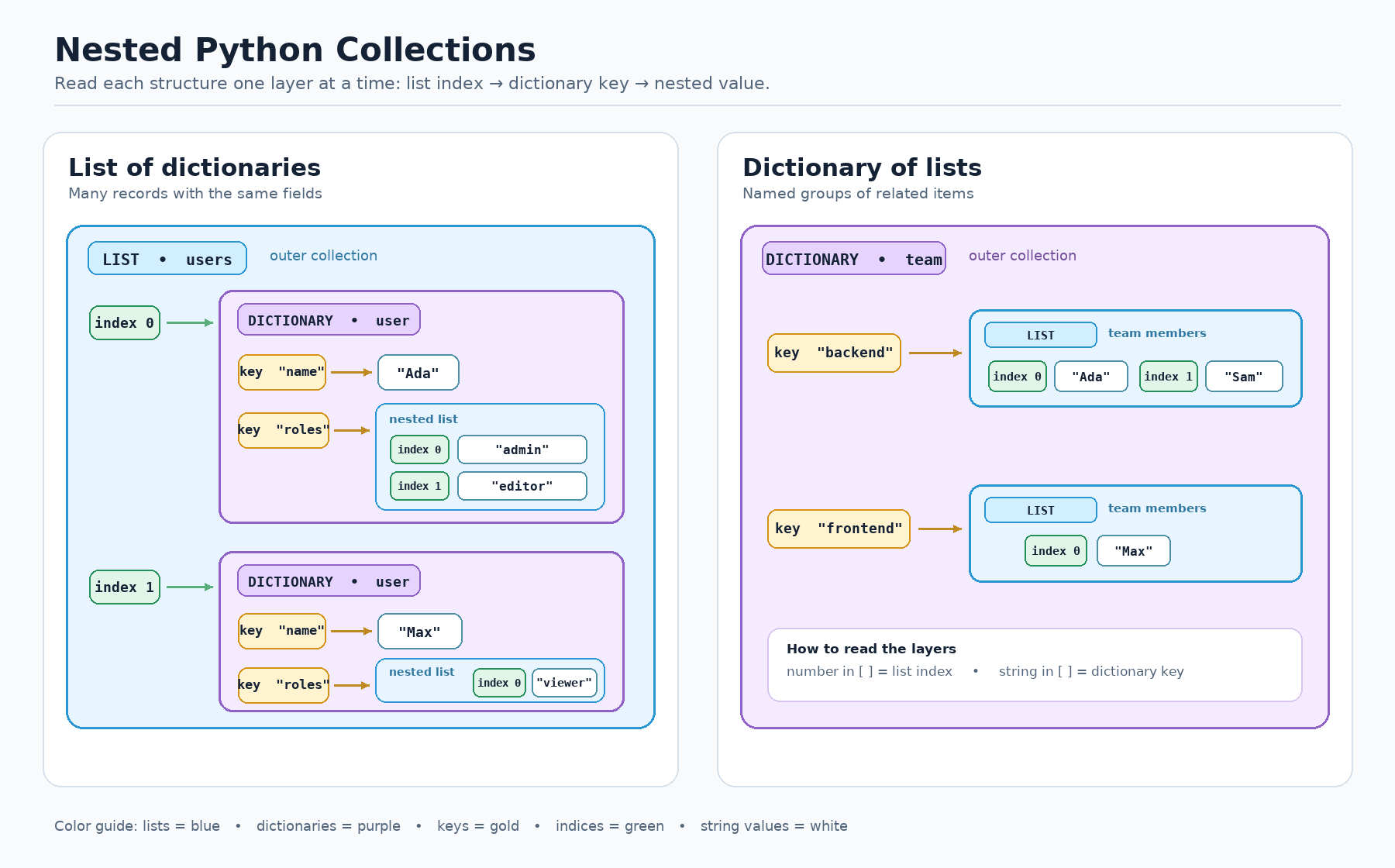
Choosing between them is a design decision, and this table sums up the trade-off:
| Shape | Looks like | Reach for it when |
|---|---|---|
| List of dictionaries | [{...}, {...}] | Many records that share the same fields |
| Dictionary of lists | {"label": [...]} | Items grouped under named categories |
Modifying a Nested Collection In Place
A nested list is not a special read-only object; it is an ordinary list that happens to live inside a dictionary. Once we have reached it, every method from the lists course is available.
Think of this as two steps happening in order. First, team["backend"] retrieves the actual list stored in the dictionary, not a copy of it. Second, .append("Lee") mutates that very list, so the new name is visible through team from then on.
A common slip is writing team.append("Lee"), which raises an AttributeError because dictionaries have no append() method. The list is one layer deeper, so the key lookup has to come first. The same pattern works on our other structure, too: users[1]["roles"].append("editor") would give Max a second role.
Looping Through Records and Their Nested Lists
Iteration and nesting combine naturally: we loop over the outer list, and inside the loop, we use keys to read fields from whichever record we are holding.
On each pass, the loop variable user is bound to one whole dictionary, so user["name"] and user["roles"] read that single record. Because user['roles'] is a list, len() counts the roles of that user alone: 2 for Ada, then 1 for Max.
One practical detail about the f-string: it is wrapped in double quotes, so the keys inside it use single quotes. Reusing double quotes there would end the string early. If we wanted to print each role on its own line, a second for role in user["roles"]: loop nested inside this one would do it.
Putting It All Together
Here is the complete program, with each piece in the order we built it: the records, the chained access, the grouped dictionary, the in-place append, and the record loop.
Every printed line traces back to one statement: the first two come from chained access into users, the third shows team["backend"] after its append, and the last two come from the loop over records.
Conclusion and Next Steps
Excellent work: our data can now have real depth. We met two nesting shapes — a list of dictionaries for many records that share fields and a dictionary of lists for items grouped under labels — and one access rule unlocks both: peel a single layer at a time, choosing the bracket that matches the collection currently in your hands. We also saw that nested values are ordinary objects, so a list reached through a key can be appended to in place, and a list of records can be looped over exactly like any other list, with keys reading the fields inside each pass.
With that, you have finished Organizing Data with Dictionaries in Python, moving from a first key-value pair all the way to structured records that mirror real systems. The practices ahead let you drive: reaching a nested value through a chain, appending a name to a role list, looping through records to count their nested items, and building a list of dictionaries from scratch. Next up, the following course brings strings, lists, and dictionaries together for genuine data processing work: turning lines of raw text into a list of records like the ones we built here, counting and grouping what they contain, and summarizing the result into a report. So let us go nest some data and finish this course strong!
