Iterating Through Dictionaries
Introduction
Welcome back to Organizing Data with Dictionaries in Python! With two units behind us, we are now at the third of four, and our toolkit is growing nicely.
So far, every operation we have performed has targeted a single key: we read one value, overwrote one field, and removed one entry. That is fine when we know exactly which key we care about, but plenty of everyday tasks are not like that. Printing a full inventory report, adding up every quantity in a warehouse, or picking out the products that need reordering all require visiting every entry, one after another.
That is exactly what dictionary iteration gives us. In this lesson, we will learn three closely related methods:
keys(), to walk through the labels;values(), to walk through the data;items(), to walk through both halves at the same time.
Our running example will be a small shop inventory holding four items. By the end, we will have printed a tidy report of it and built a list of everything that is out of stock.
The Inventory We Will Loop Over
Every section that follows works on the same dictionary, so let us fix it in our minds first. It maps four fruit names to the number of units currently on the shelf.
A few things are worth noticing about the shape of this data:
- The keys are strings naming a product, and the values are integers counting units, so every entry answers the question "How many of this do we have?"
"bananas"deliberately has a value of0. It is a perfectly valid entry, not a missing one, and it will become the star of our filtering example later on.
Also recall that dictionaries preserve insertion order: our loops will visit "apples" first and "dates" last, matching the order in which we wrote them.
Looping Over Keys with keys()
The most natural place to start is with the labels. The keys() method hands us the dictionary's keys, one at a time, and a for loop consumes them just as it consumed list elements in the earlier course.
On each pass, the loop variable item is bound to a single key: first the string "apples", then "bananas", and so on. Two details deserve attention:
- Writing
for item in inventory:produces the exact same result because plain iteration over a dictionary yields its keys. Many programmers still spell outkeys()to make that intent obvious to a reader. - A common expectation is that looping over a dictionary gives us the values. It does not; we get the keys, and if we want a value, we must ask for it.
Summing Values with values()
When the labels are irrelevant and only the numbers matter, values() is the view we want. It yields the values alone, in the same order as their keys, which makes it a perfect input for a built-in function like sum().
Notice that no for loop appears here at all. sum() walks through the values on our behalf and adds them up: . We could certainly write the loop by hand, starting a total variable at 0 and adding each value to it, and the answer would be identical; sum() simply says the same thing in one line.
One practical note: values() gives back a view object rather than a list, so printing it directly shows a wrapper. To inspect the raw numbers, we would write list(inventory.values()).
Looping Over Pairs with items()
Most reports need the label and the number together, and that is where items() shines. Each pass through the loop yields one key-value pair, and two loop variables unpack that pair in a single step.
On the first iteration, item becomes "apples" and count becomes 12, with no extra lookup required. The alternative would be to loop over keys and write inventory[item] inside the body; that works, but it repeats the dictionary name and performs a second search for data we already had in hand.
The three dictionary views expose different parts of the same ordered entries:
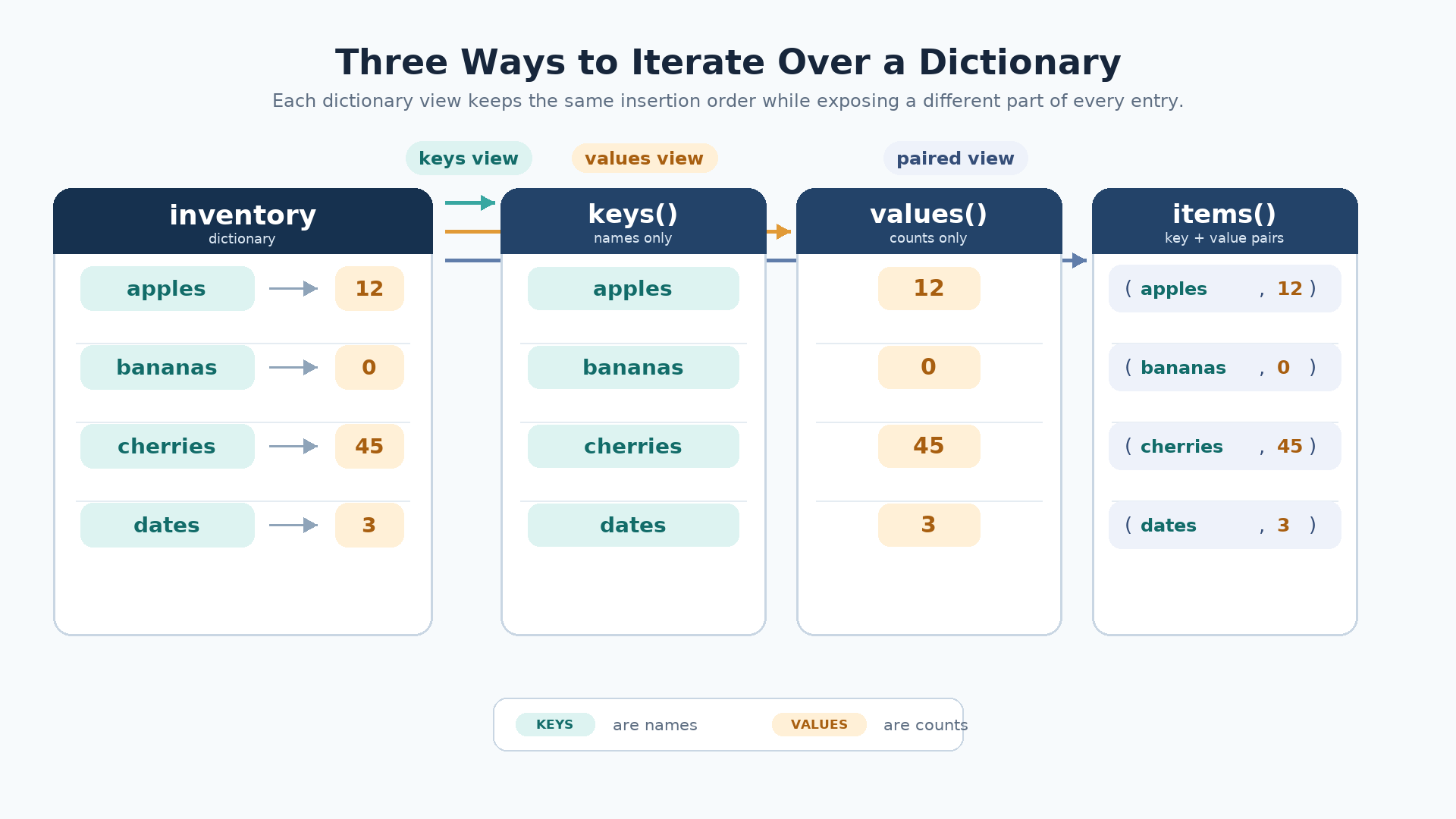
This table sums up which view to reach for:
| Method | Yields on each pass | Reach for it when |
|---|---|---|
keys() | A single key | We only need the names |
values() | A single value | We only need the data |
items() | A key and a value | We need both halves |
Here is the report our items() loop prints:
Filtering Entries While Iterating
Now let us answer a real question: Which products have run out? This calls for the accumulator pattern, where we start with an empty list and add to it only when a condition holds.
Tracing the four passes shows why only one name survives: 12 is not 0, so "apples" is skipped; 0 passes the test, so "bananas" is appended; 45 and 3 both fail. The key idea is that we decide based on the value but collect the key, which is only possible because items() gave us both.
One safety habit: adding or deleting keys while a loop over a dictionary is running raises a RuntimeError. Collecting the interesting keys first and modifying the dictionary afterward avoids the problem entirely.
Putting It All Together
Let us see all four techniques as a single flow: list the items, total the units, print the report, then flag what needs restocking.
Each block of output traces back to one view: the four Item: lines come from keys(), the total comes from values(), the formatted report comes from items(), and the final list comes from items() paired with a condition.
Conclusion and Next Steps
Nicely done: our dictionaries are now something we can sweep through from end to end. We have three views to choose from, and the decision rule is refreshingly simple: keys() when we only need the names, values() when we only need the data, and items() when we need both together. We also layered two patterns on top of them: aggregating, where sum() consumes values() in a single line, and filtering, where a loop over items() tests each value and appends the matching key to an accumulator list. Along the way, we saw that plain iteration over a dictionary already yields keys, that views are not lists until we convert them, and that changing a dictionary's set of keys mid-loop is a habit to avoid.
The practices coming up put all of this in your hands: you will print item names from an inventory, total its values, format each pair into a report line, and filter entries into a list of your own. After that, the final unit takes a bigger step, nesting lists and dictionaries inside one another to model records with real depth. Let us go loop through some data!
