Introduction

Welcome back! In this lesson, we will dive into another powerful feature of Redis: Publish/Subscribe (Pub/Sub) messaging. This topic builds on our understanding of Redis and introduces a dynamic way to enable real-time communication within your applications.

What You'll Learn

In this lesson, you will learn how to set up and use Redis Pub/Sub messaging to send and receive messages using C++ and Boost.Redis. We'll create a single program that demonstrates both subscribing to and publishing messages on a channel.

Important notes:

  • Dedicated connection for subscribers: The subscriber uses a separate Redis connection that operates in subscription mode.
  • Asynchronous event-driven model: We use Boost.Asio's io_context to handle asynchronous operations.
  • RESP3 push messages: Redis sends Pub/Sub messages as push events that we receive through async_receive.
  • Two connections: One for subscribing (enters special subscriber mode) and one for regular commands like PUBLISH.
Setting Up the Connections

Let's start by setting up our includes and creating two Redis connections:

What's happening here:

  • We create an io_context, which is the event loop that drives all asynchronous operations.
  • We create two separate connections: sub_conn for subscribing and pub_conn for publishing.
  • Why two connections? Once a connection enters subscriber mode (after SUBSCRIBE), it can only receive push messages and cannot execute regular commands. That's why we need a separate connection for PUBLISH.
  • Both connections are started with async_run(), which establishes the connection asynchronously.
Two-Connection Pub/Sub Architecture

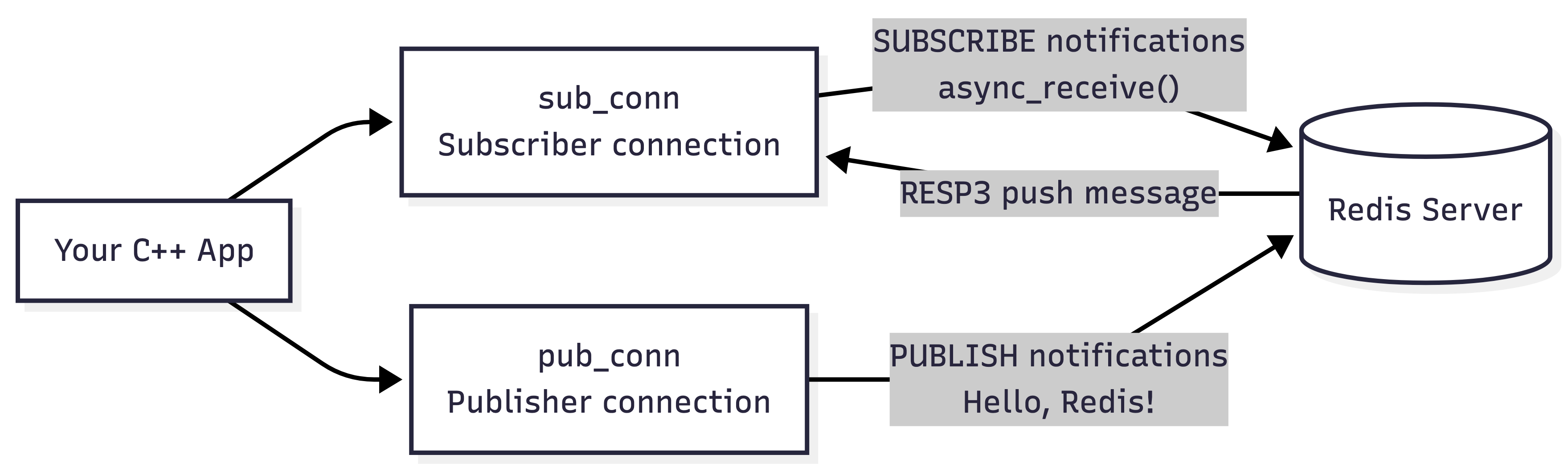
Before moving on, it helps to visualize why this example uses two Redis connections instead of one:

This diagram highlights the key Pub/Sub design in our program:

  • sub_conn is dedicated to subscribing and receiving Pub/Sub messages.
  • pub_conn is used for regular Redis commands such as PUBLISH.
  • Redis sends subscribed messages back to sub_conn as RESP3 push messages.
  • We use two connections because the subscribed connection is dedicated to Pub/Sub message handling.

With that architecture in mind, let's build the receive loop that listens for incoming Pub/Sub messages.

The Message Receive Loop

Before subscribing, we need to set up a loop that continuously listens for incoming messages:

Breaking it down:

  • generic_response can parse any Redis response, including push messages.
  • set_receive_response() tells the connection where to store the next incoming message.
  • async_receive() waits asynchronously for Redis to push a message to us.
  • When a message arrives, we parse the RESP3 format:
    • nodes[1].value: The message type ("message", "subscribe", "unsubscribe", etc.)
    • nodes[2].value: The channel name
Subscribing to a Channel

Now we can subscribe to the "notifications" channel. Add this to your main() function:

Key points:

  • We call start_receive_loop() before subscribing to ensure we don't miss any messages.
  • We use request::push() to build the SUBSCRIBE command with the channel name "notifications".
  • The response uses boost::redis::ignore_t because we don't need to process the subscription confirmation here—it arrives as a push message handled by our receive loop.
  • async_exec() sends the command asynchronously.
Publishing Messages

Now let's publish a message after a short delay to ensure the subscription is active:

What's happening:

  • We use steady_timer to wait 1 second before publishing. This ensures the subscription is fully active.
  • We create a PUBLISH command with the channel name "notifications" and payload "Hello, Redis!".
  • The response type is int because PUBLISH returns the number of subscribers who received the message.
  • We use std::get<0>(*pub_resp).value() to extract the integer count from the response.
  • After publishing, we cancel the publisher connection since we're done.
  • ioc.run() blocks and processes all asynchronous events until all work is complete.
Running the Program

Compilation:

Execution:

Example output:

Key Pub/Sub Concepts

Let's recap the important Pub/Sub concepts:

  1. Dedicated subscriber connection: Once you subscribe, that connection enters a special mode and can only receive push messages. That's why we use two separate connections.

  2. RESP3 push messages: Redis uses RESP3 protocol to push messages to subscribers. The format is: ["message", "<channel>", "<payload>"]. We parse this using generic_response.

  3. Asynchronous receive loop: We continuously call async_receive() to listen for push messages. Each message triggers our callback, which processes it and calls async_receive() again to keep listening.

  4. Channel-based routing: Publishers send messages to channels (like "notifications"). All subscribers listening to that channel receive the message.

  5. Delivery count: PUBLISH returns the number of current subscribers who received the message, but it doesn't guarantee delivery if a subscriber disconnects.

Why Pub/Sub Messaging Matters

The Pub/Sub messaging model is essential for enabling real-time communication in modern applications. Whether it's sending notifications to users, building chat systems, or updating dashboards live, Pub/Sub makes these patterns straightforward.

Here's why mastering Pub/Sub in Redis is important:

  • Real-Time Communication: Update parts of your application as events occur for a seamless user experience.
  • Decoupled Architecture: Publishers and subscribers are independent, making systems more modular and maintainable.
  • Scalability: Add more subscribers or publishers without restructuring core logic.
  • Event-Driven Design: Build responsive systems that react to events as they happen.

With Pub/Sub and Boost.Redis's asynchronous API, you can build responsive, scalable, and maintainable real-time features. The asynchronous model allows your applications to handle many concurrent operations efficiently without blocking threads.

Sign up
Join the 1M+ learners on CodeSignal
Be a part of our community of 1M+ users who develop and demonstrate their skills on CodeSignal