Making Decisions with If
Introduction: Programs That Choose
Welcome to Making Decisions in Python! This lesson marks an important shift in how our programs behave.
Up to now, every program we have written has run every single line, from top to bottom, no matter what. That works well for calculations and printed messages, but real programs need to react to their data. A weather app should only warn us about heat when it is actually hot. A shopping cart should only mention free shipping when the total is high enough.
In this lesson, we will learn the if statement: the tool that lets Python run certain lines only sometimes. Along the way, we will see why the colon and the indentation matter so much, and how a simple flowchart helps us plan a decision before we write a single line of code.
The Shape of an if Statement
An if statement always follows the same shape. Here it is as a template:
Three pieces work together here:
- The keyword
if, which tells Python that a decision is coming. - A condition: an expression whose truth value Python tests. In this course, our conditions will usually be comparisons or logical expressions, which produce
TrueorFalse, or Boolean variables that store one of those values. More generally, Python can test the truth value of many kinds of expressions. - A colon (
:) at the end of the line, which opens the block of code that belongs to theif.
The core rule is short enough to memorize: if Python considers the condition true, the indented block runs; otherwise, Python skips the entire block and moves on.
A First Working Example
Let's put that template to work with a temperature reading:
Python walks through this in three steps. First, it stores 32 in temperature. Next, it evaluates the condition temperature > 30, which is 32 > 30, so the result is True. Because the condition is True, Python runs the indented line and we see:
Now imagine we change the first line to temperature = 18. The condition becomes 18 > 30, which is False, so Python skips the indented print() completely. The program still runs without any errors; it simply produces no output at all.
Indentation Defines the Block
In Python, indentation is not just for looks: it is how Python knows which lines belong to the if. Everything indented under the if line forms one block, and the block ends as soon as the indentation goes back out.
A few practical rules to keep in mind:
- Use
four spacesfor each level of indentation; this is the standard style in Python. - Indent every line of the block by the same amount.
- A block may contain as many statements as we need, not just one.
Let's add a second line to our block:
Both print() calls sit at the same indentation level, so they belong to the same block. That means they run together when temperature > 30 is True, and neither of them runs when it is False. There is no way for just one of them to run.
What Happens After the Block
So what about the lines that come after the block? Let's complete our program with an unindented statement at the end:
The final print() starts at the left margin, so it is outside the if and always runs. With temperature = 32, the condition is True, so all three messages appear:
If we set temperature = 18 instead, Python skips the whole block but still reaches that last line, and the output shrinks to:
Common Syntax Mistakes
Two small slips account for most broken if statements. The first is forgetting the colon:
The fix is simply to end the condition line with :. The second is forgetting to indent the body:
Here, Python opens a block with the :, then finds nothing inside it. Indenting the print() by four spaces resolves the error.
One more thing worth watching: every line in a single block must share the same indentation. Indenting one line by four spaces and the next by six raises an IndentationError, so we should stay consistent.
Picturing the Decision as a Flowchart
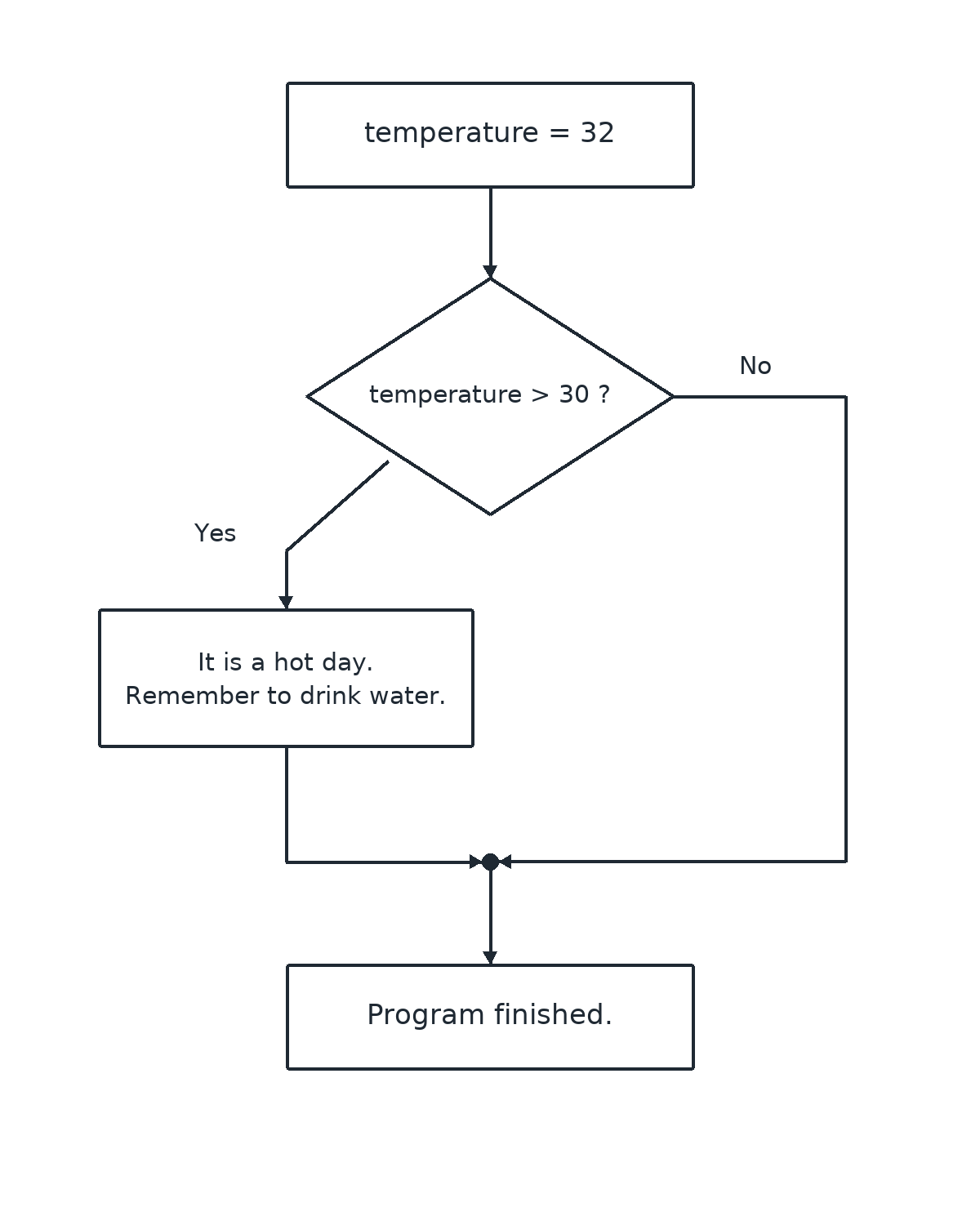
Each shape maps onto one part of our code: the diamond is the if temperature > 30: line; the "Yes" box holds the two indented print() calls; the "No" arrow is the skipped block; and the final box is the unindented print("Program finished.") that both paths reach.
Conclusion and Next Steps
Let's gather the four takeaways from this lesson: write if, then a condition, then a :; indent the statements that belong to the block; that block runs only when Python considers the condition true; and unindented lines after the block run either way. Notice that in our flowchart, the "No" path does nothing at all: it just skips ahead. Filling that empty path with an alternative action is exactly what else does, and we will explore it next.
Time to make some decisions of your own: in the practices ahead, you will write if statements from scratch, group several lines into one block, check what still runs after the block ends, and turn a flowchart into working Python code.
