Branching with If Else
Introduction: Filling the Empty "No" Path
Welcome back to Making Decisions in Python! We can already guard a block of code behind a condition.
We ended that lesson with an observation worth revisiting: in our flowchart, the "No" arrow led nowhere. When the condition was False, Python simply skipped ahead and said nothing. That is fine for an optional warning, but many decisions require a response either way. Think of a doorman checking an age at the entrance: if the visitor is old enough, they hear "You may enter."; if not, they still deserve an answer instead of silence.
In this lesson, we will fill that empty path with the else keyword, so our program always takes exactly one of two routes. Then we will change the tested value and watch the other route light up.
The Shape of an if/else Statement
Adding a second path means extending the template we already know with one more keyword:
Compared with Unit 1, three details are new, and all of them matter:
elsesits at the same indentation level asif; it is a partner to theif, not a statement inside it.elseends with its own colon (:) and owns its own indented block.elsetakes no condition of its own. It simply means "in every other case."
The core rule is pleasantly strict: exactly one of the two blocks runs. Never both, never neither.
A First Working Example: The Age Check
Let's turn that doorman scenario into code, starting with a visitor who is 15:
Python works through this in four steps. First, it stores 15 in age. Next, it evaluates the condition age >= 18, which is 15 >= 18, so the result is False. Because the condition is False, Python skips the entire if block without running it. Finally, it runs the else block instead, giving us a single line:
Notice what is missing: the message "You may enter." never appears. Python did not merely postpone that line; it passed over it entirely.
Switching Paths by Changing the Tested Value
The best way to prove that both paths work is to feed the same code different data. Let's change only the first line and leave everything else untouched:
Now the condition reads 20 >= 18, which is True, so Python runs the if block and skips the else block completely:
Placing the two runs side by side makes the pattern clear: with age = 15, we see only "Sorry, you are too young.", and with age = 20, we see only "You may enter." One block of code, two possible outcomes, decided entirely by the data. Flipping a value and confirming that the output flips with it is a habit worth building.
Lines After the if/else Always Run
Our doorman should probably be polite to everyone, regardless of the decision. Let's complete the program with a farewell that belongs to neither branch:
The final print() starts at the left margin, so it is outside both blocks, and both paths reach it. Think of it as the point where the two routes merge back into one. With age = 15, the else branch runs, and then execution continues to that last line:
Had we set age = 20, the first line would read You may enter. instead, while Have a nice day. would stay exactly where it is.
Common Mistakes with else
Three small slips account for most broken else blocks. The first is giving else a condition of its own:
The fix is to write plain else:, since else already means "in every other case." The second slip is indenting else as if it lived inside the if block:
Here else must be pulled back to align with if. The third is forgetting the colon after else, which raises SyntaxError: expected ':'; ending the line with : resolves it.
Picturing the Two-Way Decision as a Flowchart
Sketching the decision before coding keeps the two branches straight in our heads. Here is the age check as a flowchart:
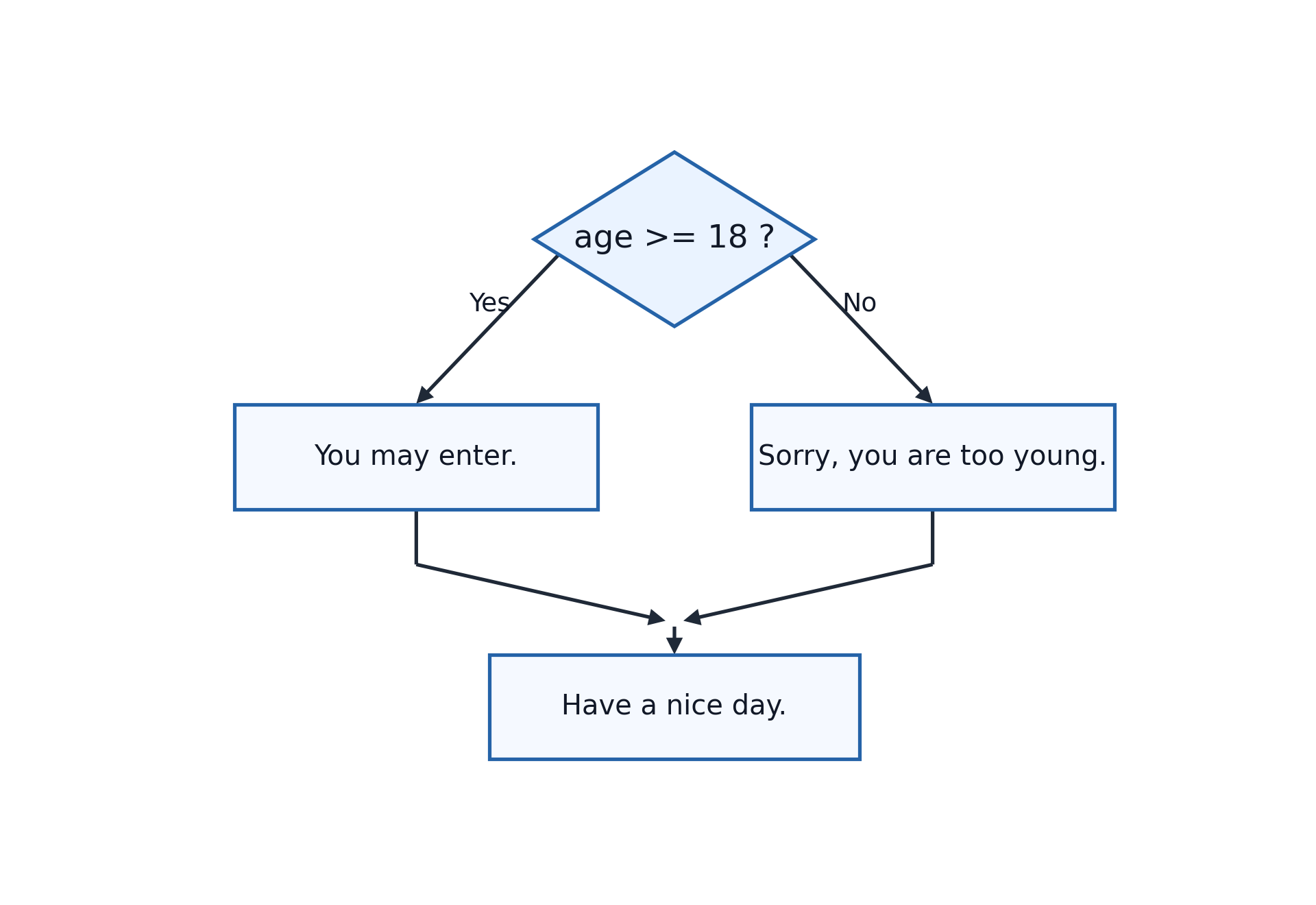
Each shape maps onto one line of our code: the diamond is if age >= 18:; the "Yes" box is the indented print("You may enter."); the "No" box is the else block; and the bottom box is the unindented print("Have a nice day."). Unlike a single-path decision, both arrows now lead to real work before merging.
Conclusion and Next Steps
Let's collect the takeaways: else aligns with if, carries its own colon, takes no condition, and guarantees that exactly one of the two blocks runs. Anything unindented after the blocks runs either way because that is where the two paths merge. And because the choice depends on the data, changing the tested value is the quickest way to confirm both branches work.
Of course, real decisions are not always two-sided; sometimes there are three, four, or more possible outcomes, and that is exactly what elif handles next.
Your turn to be the doorman: in the practices ahead, you will add an else to an existing if, trace in a comment which branch runs and why, flip the tested value to send the program down the other path, and translate a two-path flowchart into working Python.
