Mastering Python Range Loops
Introduction: When There Is No Existing Collection to Loop Over
Welcome back to Iterating with For Loops in Python!
In Unit 1, we looped over lists and strings. More generally, a Python for loop works with an iterable. An iterable is something that can provide items one at a time. Lists and strings are two beginner-friendly examples of iterables.
Plenty of everyday tasks do not begin with an existing list or string:
- retry an operation three times;
- print every second number up to ten;
- count down from five to one.
We could write the numbers ourselves:
That works for three repetitions, but writing hundreds of numbers by hand would be impractical.
Python solves this problem with range(). It provides a progression of integers that a loop can visit. By the end of this lesson, we will be able to repeat an action a fixed number of times, control where counting starts and stops, change the size and direction of each step, and use generated integers as list indices.
Meeting range() Conceptually
Think of range() as a set of instructions for producing integers in a particular pattern.
range() accepts up to three integer arguments:
- start: the first integer produced, defaulting to
0; - stop: the boundary where the range ends, which is not produced;
- step: the amount added each time, defaulting to
1.
The step must not be 0.
The rule that surprises many beginners is that stop is exclusive. In other words, the stop value itself does not appear.
For example:
represents the integers 0, 1, and 2, but not 3.
Values such as 2.5 cannot be used as ordinary range() arguments:
For this course, use integers for start, stop, and step.
range(stop): Repeating an Action a Fixed Number of Times
When we care about how many times something happens, one argument is enough:
With one argument, counting starts at 0 and stops before 3. Therefore, range(3) provides 0, 1, and 2: three values and three iterations.
| Iteration | Value of i | Line printed |
|---|---|---|
| 1 | 0 | Attempt 1 |
| 2 | 1 | Attempt 2 |
| 3 | 2 | Attempt 3 |
Because i starts at 0, we print i + 1 to create the human-friendly labels 1, 2, and 3.
When the Generated Value Is Not Needed
Sometimes we use range() only to repeat an action, and the generated integer does not matter:
The underscore _ is a conventional name for a value we deliberately do not plan to use. It still receives 0, 1, and 2, but the loop body ignores those values.
Use a descriptive name such as i, number, or countdown when the value matters. Use _ when only the repetition matters.
range(start, stop) and range(start, stop, step)
Two arguments let us choose where counting begins. A third argument lets us choose how large each jump is.
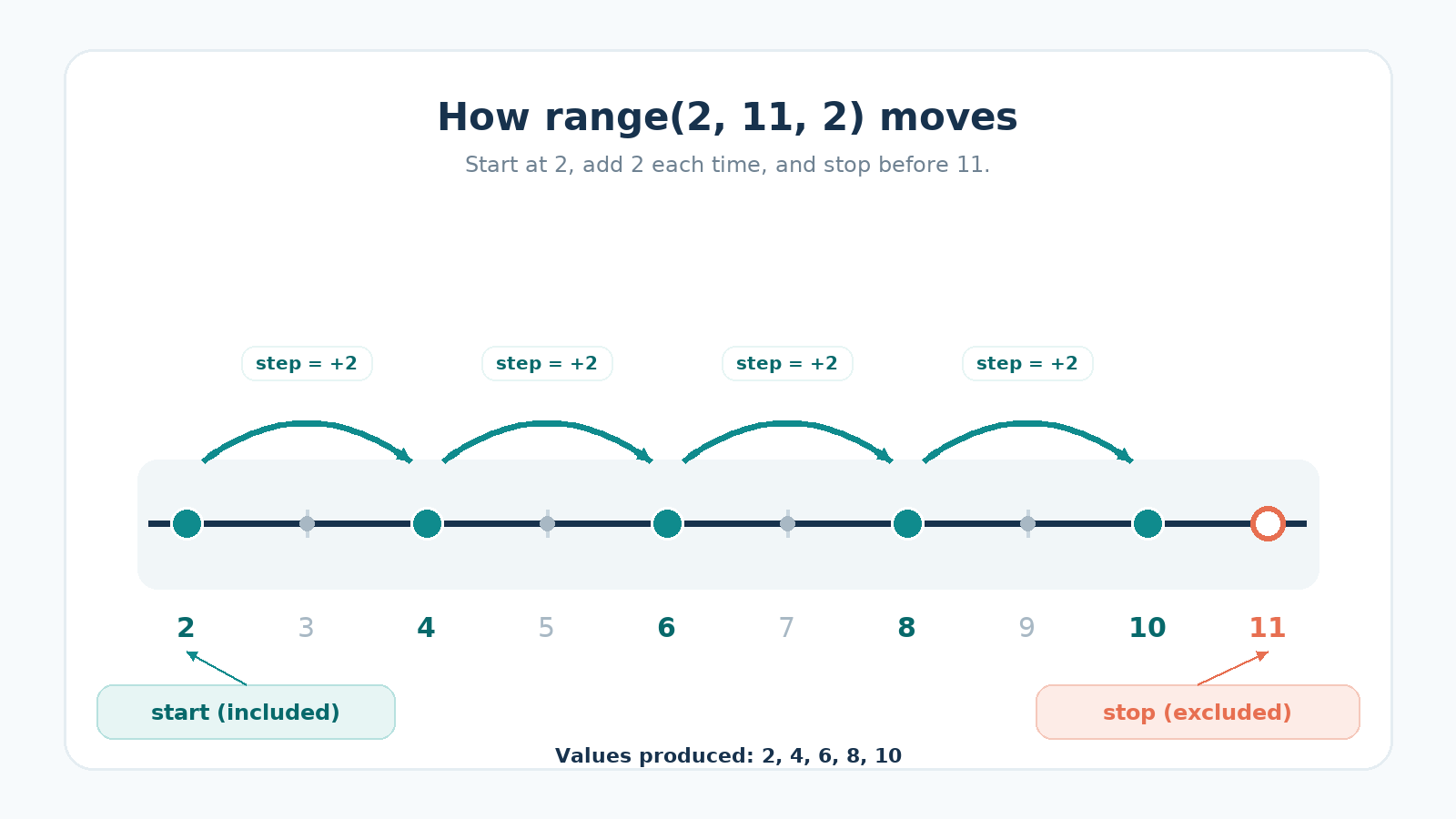
Let's print the even numbers up to ten:
Here:
startis2, so2is the first value;stopis11, so counting ends before11;stepis2, so each value is two larger than the previous one.
The values are 2, 4, 6, 8, and 10.
The stop must be 11 rather than 10. Because 10 is a value we want to include, the exclusive boundary has to be placed after it.
The table below compares range() with one, two, and three arguments:
| Call | Integers provided |
|---|---|
range(4) | 0, 1, 2, 3 |
range(2, 6) | 2, 3, 4, 5 |
range(2, 11, 2) | 2, 4, 6, 8, 10 |
Counting Backward with a Negative Step
A negative step subtracts instead of adding, which turns range() into a countdown:
Two details make this work:
- When the step is negative, the start must be greater than the stop for this countdown to contain values.
- The exclusive stop rule still applies. The stop is
0, so the final produced value is1.
The last print() is not indented, so it runs once after the countdown finishes.
Using Generated Indices to Reach List Positions
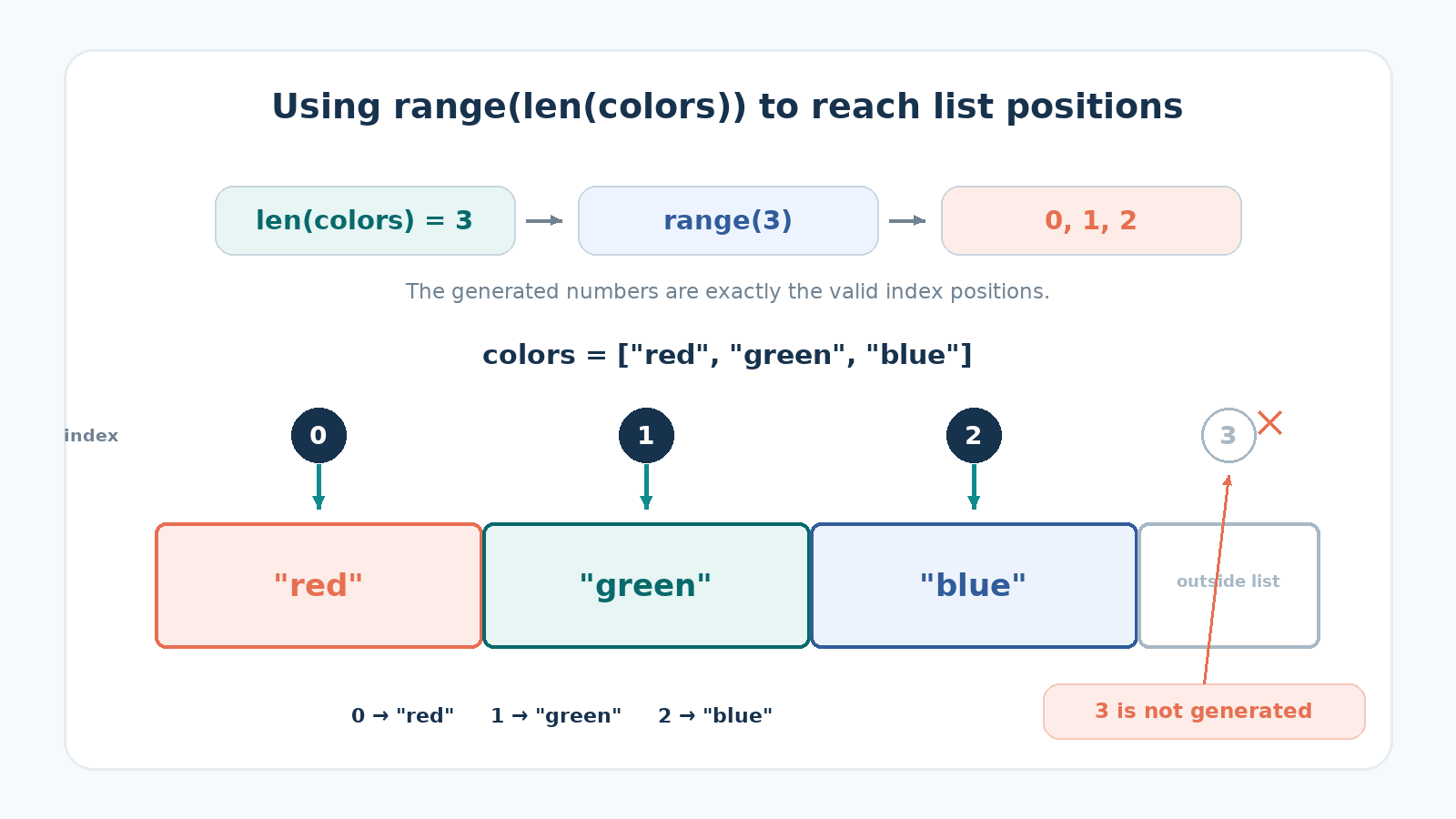
range() can also generate the valid index positions of a list:
Follow the steps:
len(colors)returns3.range(len(colors))becomesrange(3).range(3)provides0,1, and2.- Those integers are the valid indices of the three-element list.
colors[index]retrieves the value at the current position.
Direct iteration is cleaner when we need only the values:
When both the index and value are needed, Python commonly uses enumerate():
Both indexing examples produce the same result. We use range(len(colors)) in this unit specifically to practice generating integers and using list indices. In typical Python code, enumerate() is usually preferred when the only goal is to pair each position with its value.
range(len(...)) remains useful when we need the actual index for tasks such as changing a list position, accessing a nearby position, or coordinating positions across collections.
Direct iteration cannot modify the list. Reassigning the loop variable only rebinds that local name, leaving the original elements untouched:
Assigning through an index writes back into the list itself:
Putting It All Together
Here are all four loops in a single program:
Every block uses the same for structure. Only the arguments given to range() change.
Common Pitfalls with range()
A few range() mistakes catch nearly everyone at least once:
- Off-by-one errors:
range(1, 5)provides1,2,3, and4, but never5. - Silently empty loops:
range(5, 0)andrange(0, 5, -1)provide no values, so their loop bodies do not run. - A step of
0:range(0, 5, 0)raises aValueError. - Non-integer arguments: values such as
2.5raise aTypeErrorwhen used as ordinaryrange()arguments. - Unnecessary indices: use direct iteration when only the values matter.
- Reading past the end:
colors[index + 1]fails on the final iteration because index3does not exist in a three-element list.
When a counted loop behaves unexpectedly, write out the integers that its range() call represents and check the start, stop, and step.
Conclusion and Next Steps
Three ideas to carry forward:
range(stop)begins at0and ends beforestop.start,stop, andstepshape an integer progression, including backward progressions with a negative step.range(len(...))can generate list indices, althoughenumerate()is usually the clearer choice when we simply need each index and value together.
Next, we will use loops to accumulate results such as totals, counts, averages, and products. First, the practice tasks are waiting: we will print a numbered message a fixed number of times, step through checkpoints, build a countdown, and pair each list index with its element.
