Mastering Python For Loops
Introduction: Why Repeat Work Automatically?
Welcome to the first lesson of Iterating with For Loops in Python! Programs often need to perform the same small action for every item in a collection: greeting every customer, converting every price, or checking every character. Writing that action out by hand works for three items:
Now imagine a shopping list with 100 items or a product catalog with 10,000. Copying and pasting is no longer a good option, and every edit would have to be repeated everywhere.
Python gives us the for loop for exactly this situation. By the end of this lesson, we will be able to visit every element of a list or every character of a string in order, act on each one, and predict how many times the loop body begins for the examples we use.
for loops are the backbone of every unit that follows, so this is the perfect place to start.
The Anatomy of a For Loop
Let's replace those three repeated lines with a single loop:
Every for loop has the same six parts:
for: the keyword that starts the loop;fruit: the loop variable, which holds one element at a time;in: the keyword that connects the variable to the collection;fruits: the collection we are walking through;:: the colon that ends the loop header;- the indented body, which is the work to repeat.
Two mechanical rules matter most: the header must end with a colon, and the body must be indented consistently. Four spaces is the Python convention.
Python uses indentation, not braces, to decide which lines belong inside the loop. Here is the output:
Tracing the Loop Iteration by Iteration
The best way to build confidence with loops is to trace one by hand. Each pass through the body is called an iteration:
| Iteration | Value of fruit | Line printed |
|---|---|---|
| 1 | "apple" | I like apple |
| 2 | "banana" | I like banana |
| 3 | "cherry" | I like cherry |
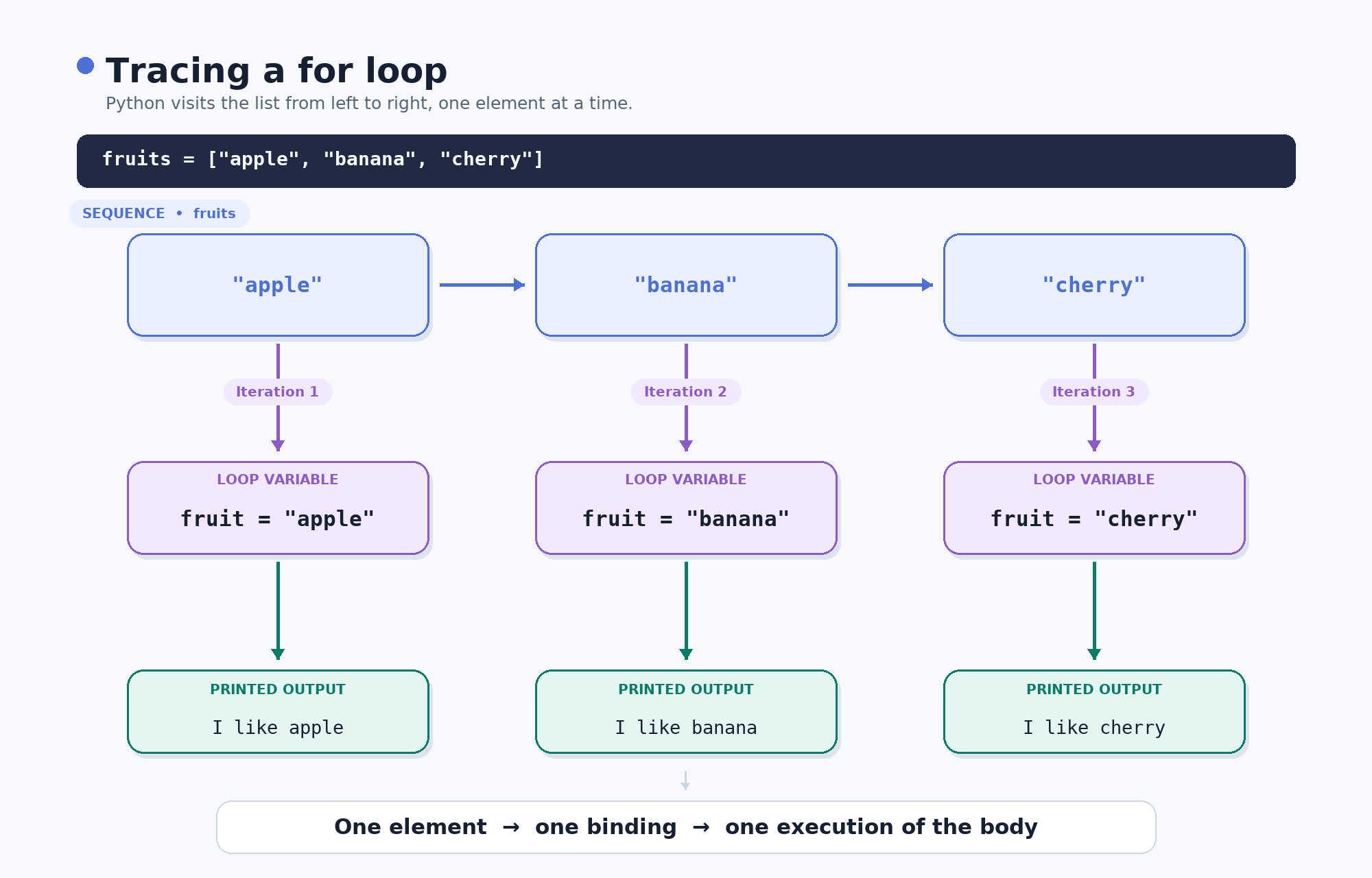
The mental model to remember is this: the loop variable is rebound to the next element at the start of every pass.
For the unchanged lists and strings in this lesson, when a loop completes normally, its body begins once for each element. Our list has three elements, so the body begins three times.
The loop variable's name is our choice. fruit, item, or f would all work, but a descriptive singular name makes the loop read more like plain English.
Doing Real Work Inside the Loop Body
Printing an element as-is is only the beginning. The loop variable is an ordinary variable, so we can compute with it. Here, we convert prices from dollars to cents:
On each pass, price holds one number from the list, and price * 100 is calculated for that number. 3 becomes 300, 5 becomes 500, and 2 becomes 200.
Each printed line maps directly to one element of prices, in the same order:
One detail worth knowing: assigning a new value to price inside the body would not replace the corresponding element in the original list. On the next iteration, the loop variable would simply be rebound to the following element.
Strings Can Be Looped Over Too
A for loop is not limited to lists. A string provides its characters one at a time, from left to right:
Here, letter is bound to "l", then "o", then "o", and finally "p". The expression letter.upper() returns the uppercase version of the current character.
For this unchanged string, the loop completes normally and the body begins once per character. A four-character word therefore produces four iterations.
The variable word is not modified. We only print transformed versions of its individual characters.
Putting It All Together
Here are all three loops in one program:
The loops run one after another, so the output arrives in three blocks: three lines from fruits, three lines from prices, and four lines from "loop", for ten lines total.
Notice the shared shape of all three loops: choose something to loop over, name each item, and act on it.
Inside the Loop and Outside the Loop
Indentation decides whether a statement runs during every iteration or only after the loop finishes:
Because both print() calls are indented, each one runs during every iteration. "Greeting complete" appears three times.
Compare that with this version:
The final print() is not indented, so it runs once after the loop has finished.
This distinction will matter throughout the course. An indented statement belongs to the loop body. A statement aligned with the for keyword is outside the loop.
Common Pitfalls to Avoid
A few mistakes trip up almost everyone at first:
- Forgetting the colon after the loop header causes a syntax error.
- Forgetting to indent the body causes an indentation error.
- Inconsistent indentation can make Python misunderstand the intended structure.
- Placing a statement inside the loop by mistake makes it run once per iteration.
- Placing a statement outside the loop by mistake makes it run only after all iterations finish.
for letter in "loop"visits four characters, whilefor word in ["loop"]visits one list element.- After a nonempty loop finishes, the loop variable still holds the last item it received. It is usually clearer not to depend on that value later.
When a loop produces too many or too few lines, check the indentation first.
Conclusion and Next Steps
Three ideas to carry forward:
for ... in ...can visit the elements of a list or the characters of a string in order.- The loop variable is rebound to the next item at the start of every iteration.
- For the unchanged lists and strings in this lesson, when a loop completes normally, the body begins once per element.
In the upcoming practice tasks, we will write loops that greet each name in a list, convert numeric values into another unit, transform the characters of a string, and distinguish code inside a loop from code that runs once afterward.
In the next unit, we will meet range(), which provides integers for counted loops when there is no existing list or string to process. For now, let's head into the exercises and get these loops running!
