Introduction to GCP
Introduction and Learning Goals
Welcome to your first lesson in the "Introduction to GCP" course! This foundational unit will establish the core concepts you need to understand before diving into specific Google Cloud Platform (GCP) services and hands-on activities.
In this lesson, you'll learn what cloud computing actually means, explore the different ways cloud services are delivered, and understand how businesses choose between various cloud deployment options. We'll keep everything grounded with real-world examples and practical scenarios that you might encounter in your career.
Throughout this course, we'll be using the CodeSignal environment, which comes with all the necessary tools and libraries pre-installed. While you'll still learn the concepts and commands that you can apply on your own devices and environments, you won't need to worry about installation or setup issues here on CodeSignal. This allows us to focus on understanding the fundamental concepts and building your cloud expertise.
By the end of this lesson, you'll be able to identify different cloud service models, choose appropriate deployment strategies for various business needs, and understand the shared responsibility model that governs cloud security. These concepts form the foundation for everything else you'll learn about GCP.
What is Cloud Computing?
Cloud computing is essentially renting computing resources over the internet instead of buying and maintaining your own physical servers and infrastructure. Think of it like using electricity from the power grid rather than generating your own power with a personal generator.
The key benefits of cloud computing include pay-as-you-go pricing, the ability to scale resources up or down based on demand, global reach through data centers worldwide, and built-in reliability through redundant systems. These advantages have transformed how businesses approach technology infrastructure.
Let's consider a practical example: imagine you want to launch a website for your new business. In the traditional approach, you would need to purchase servers, set up networking equipment, install operating systems, configure security, and maintain everything yourself. With cloud computing, you can have a website running in minutes by renting the necessary computing power from a cloud provider like GCP.
The website example demonstrates how cloud computing removes the complexity and upfront costs of managing physical infrastructure. Instead of worrying about hardware failures or capacity planning, you can focus on building your application and serving your customers.
Service Models: IaaS vs PaaS vs SaaS
Cloud services are delivered through three main models, each offering different levels of management and control. Understanding these models helps you choose the right approach for your specific needs.
Infrastructure as a Service (IaaS) provides you with virtual machines, storage, and networking resources, but you manage everything else, including the operating system, runtime, and applications. GCP's Compute Engine is a perfect example of IaaS — you get a virtual server, but you're responsible for installing the operating system, configuring security, and managing updates. Persistent Disk provides storage that you can attach to your Compute Engine instances.
Platform as a Service (PaaS) manages the underlying infrastructure and runtime environment for you, allowing you to focus solely on your application code. GCP's App Engine exemplifies PaaS by providing a platform where you can deploy web applications without worrying about the underlying infrastructure configuration — you simply upload your code, and App Engine handles the deployment, monitoring, and scaling. Cloud Functions represents serverless computing (Function as a Service), which runs your code without requiring you to manage servers at all.
Software as a Service (SaaS) delivers complete applications that are ready to use through a web browser or API. Google Workspace is a familiar SaaS example — you simply log in and use the email, document, and collaboration services without installing or managing any software. In the business world, Looker Studio offers business intelligence and data visualization capabilities as a complete service.
When choosing between these models, consider how much control you need versus how much management overhead you want to handle. IaaS gives you maximum control but requires more technical expertise, PaaS balances control with convenience, and SaaS offers the least control but requires minimal technical management.
Deployment Models: Public, Private, Hybrid
Cloud deployment models describe where and how your cloud resources are hosted, each offering different trade-offs between cost, control, and security.
Public cloud uses shared infrastructure provided by cloud vendors like GCP, where multiple customers share the same physical hardware through virtualization. This model offers the fastest time to market and lowest upfront costs because you're sharing the infrastructure costs with other users. GCP's standard offerings represent public cloud deployment, where you can launch resources quickly without any hardware procurement.
Private cloud provides dedicated resources exclusively for your organization in your own data centers or specific locations you control. While traditional cloud providers may offer dedicated hosted environments, Google Cloud's approach focuses on bringing cloud capabilities to your infrastructure through Google Distributed Cloud, which extends GCP services to customer sites and edge locations. This model offers greater control over security and compliance but comes with higher costs and longer setup times. Organizations in highly regulated industries often choose private cloud to meet specific compliance requirements.
Hybrid cloud combines both public and private cloud resources, allowing you to keep sensitive data in private environments while leveraging public cloud for less critical workloads. This approach is particularly useful for organizations gradually migrating to the cloud or those with data residency requirements that prevent storing certain information in public cloud regions. GCP offers solutions like Cloud Interconnect for secure connectivity between on-premises and cloud resources, and Anthos for managing applications consistently across hybrid and multi-cloud environments, including those running on Google Distributed Cloud infrastructure.
The choice between deployment models often depends on your organization's regulatory requirements, budget constraints, and risk tolerance. Many companies start with public cloud for new projects while maintaining existing systems in private environments, gradually moving toward a hybrid approach.
Shared Responsibility Model
The shared responsibility model defines which security and management tasks the cloud provider handles versus what remains your responsibility. This model varies significantly across the different service models and is crucial for understanding your security obligations.
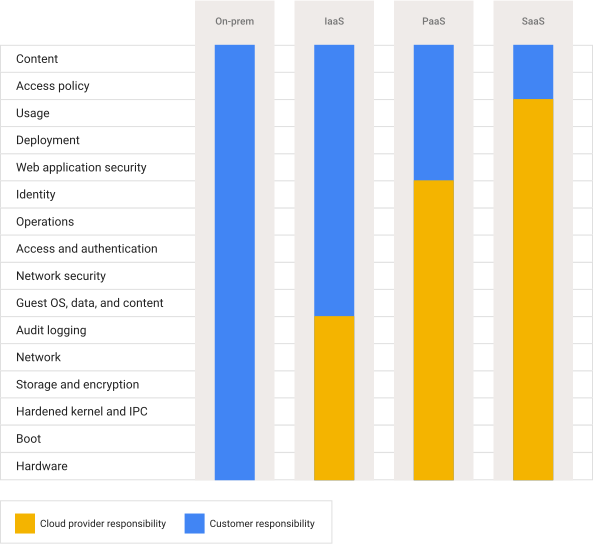 Diagram © Google Cloud, used under CC BY 4.0.
In the shared responsibility model, the cloud provider is always responsible for securing the underlying infrastructure, including the physical security of data centers, network controls, and host operating system patching for the services they manage. Your responsibilities include securing your data, managing user access, and configuring security settings for the services you use.
The responsibility split varies by service model:
With IaaS services like Compute Engine, you manage more components, including the guest operating system, security patches, firewall configuration, and network access controls. GCP secures the physical server and hypervisor, but you must install security updates on your operating system and configure your firewall rules properly.
PaaS services like App Engine shift more responsibility to the provider. GCP manages the operating system, runtime patching, and platform security, while you focus on securing your application code and managing user permissions. You don't need to worry about server maintenance or runtime updates.
SaaS applications have the smallest customer responsibility footprint. With services like Google Workspace or Looker Studio, GCP handles almost all security aspects, and you primarily manage user access and data classification. You configure who can access the service and what data they can see, but GCP manages all the underlying security infrastructure.
Understanding shared responsibility helps you plan your security strategy and avoid gaps where you assume the provider is handling something that's actually your responsibility.
Real-World Application Scenarios
Let's explore how different organizations choose cloud models based on their specific needs and constraints, demonstrating the practical application of these concepts.
A startup launching a web application typically chooses public cloud IaaS or PaaS because they need to move quickly with limited upfront capital. They might use Compute Engine instances for their web servers and Cloud SQL for their database, scaling resources as their user base grows. The pay-as-you-go model allows them to start small and expand without large infrastructure investments.
A regulated financial institution might opt for a hybrid approach, keeping customer financial data in a private cloud environment to meet compliance requirements while using public cloud services for their marketing website and internal productivity tools. They could use Cloud Interconnect to securely link their private infrastructure with GCP services.
A seasonal retail business benefits from cloud elasticity by automatically scaling its infrastructure during peak shopping periods. They might use Managed Instance Groups with autoscaling for Compute Engine instances that automatically add capacity during high-traffic events like Black Friday, then scale back down during quieter periods to control costs.
An enterprise modernizing legacy applications often follows a lift-and-shift pattern, initially moving existing applications to IaaS with minimal changes, then gradually refactoring them to take advantage of PaaS services like Cloud Functions for better scalability and cost efficiency.
These scenarios demonstrate how cloud model selection depends on factors like budget, compliance requirements, technical expertise, and business objectives rather than following a one-size-fits-all approach.
Cost Optimization and Global Infrastructure
Cloud computing transforms how you think about infrastructure costs by replacing large upfront capital expenses with operational expenses that scale with usage. This pay-as-you-go model allows you to align your infrastructure costs directly with your business activity.
Right-sizing involves matching your resource allocation to your actual needs, avoiding the traditional approach of over-provisioning to handle peak loads. Cloud services provide detailed monitoring and cost analysis tools that help you identify underutilized resources and optimize your spending.
Elasticity enables your infrastructure to automatically respond to changing demand. For example, an online store can configure Managed Instance Groups with autoscaling to add web servers when traffic increases during a promotional sale, then automatically remove those servers when traffic returns to normal levels.
GCP organizes its infrastructure into Regions and Zones to provide both reliability and performance optimization. Regions are separate geographic areas, each containing multiple Zones, which are isolated data centers within a region. This structure allows you to deploy applications close to your users for better performance while maintaining high availability through redundancy across multiple data centers.
When planning your cloud architecture, consider how these geographic options affect both latency and compliance. Deploying resources in multiple Zones within a region provides protection against individual data center failures, while choosing regions close to your users reduces network latency and can help meet data residency requirements.
Summary and What's Next
In this foundational lesson, you've learned that cloud computing is essentially renting computing resources over the internet, offering benefits like pay-as-you-go pricing, scalability, and global reach. You now understand the three service models: IaaS gives you infrastructure control with services like Compute Engine, PaaS provides managed platforms like App Engine, and SaaS delivers complete applications like Looker Studio or Google Workspace.
You've also explored deployment models, from public cloud's shared infrastructure to private cloud's dedicated resources, and hybrid approaches that combine both. The shared responsibility model clarifies that while cloud providers secure the underlying infrastructure, your responsibilities vary based on the service model you choose.
These concepts directly map to the GCP services you'll encounter throughout this course. Understanding these fundamental models will help you make informed decisions as you learn to architect solutions on GCP. In the upcoming practice exercises, you'll apply this knowledge through scenarios that test your ability to identify service models and choose appropriate deployment strategies.
The next lessons will build on these foundations by introducing specific GCP services and hands-on activities, but the conceptual framework you've learned here will guide your understanding throughout the entire course.
