RGB To Grayscale Conversion
Introduction
Welcome to Image Processing with CUDA. We are beginning the course with lesson 1, so this is our first step into GPU-based image work. In this lesson, we will take a small RGB image, convert it into grayscale with a CUDA kernel, check the result against known values, and save both the input and output as raw byte data.
The goal is practical from the start: by the end, we will understand not just what the program does, but how each part supports the full grayscale pipeline on the GPU.
Why Grayscale Matters
Before we write or examine kernel code, it helps to build a clear picture of the task. An RGB image stores three values per pixel: red, green, and blue. A grayscale image stores only one value per pixel, which represents brightness or intensity.
Converting to grayscale is a fundamental preprocessing step in image processing for several reasons:
- Data Reduction: You immediately reduce the memory footprint and computational load by a factor of three. This is critical when processing high-resolution video streams in real-time.
- Algorithm Simplification: Many fundamental filters, like the Sobel operator for edge detection, rely on intensity gradients. It is much more efficient to calculate how brightness changes across an image than to track color changes across three separate channels.
- Preparation for Convolutions: Operations like Gaussian blurring or noise reduction are often performed on grayscale images first. By removing color, we focus the mathematical operations on the structural and geometric information of the scene, which is primarily contained in the brightness channel.
The Luminosity Formula
A common way to compute brightness is the luminosity formula:
You might wonder why we don't just use a simple average, such as . The weights in the luminosity formula are not arbitrary; they reflect human physiology. The human eye contains three types of color-sensing cones, but they are not distributed equally. We are much more sensitive to green light than to blue or red light.
Specifically:
- Green dominates our perception of brightness.
- Red provides a moderate contribution.
- Blue contributes the least; it often appears "darker" to us even at high intensities.
The weighted formula compensates for these biological differences. If we used a simple average, a bright blue object would appear much lighter in grayscale than it looks to our eyes in color, making the resulting image look "flat" or "off." The luminosity formula ensures the grayscale version preserves the perceived contrast of the original scene.
These specific weights are part of the Rec. 601 standard, which was developed for older SDTV systems. It is important to note that these constants can vary by standard; for instance, modern high-definition video often uses the Rec. 709 standard, which uses weights of .
Setting Up Input Data Safely
Now that the goal is clear, we can prepare the data on the CPU side. This part includes the headers we need, a small CUDA error-checking helper, the test image, and a binary export of the original RGB bytes.
The input image uses four easy-to-recognize pixels, so we can predict the grayscale result ahead of time. We also create h_expected, which gives us a known answer for validation later.
The before.raw export writes the original RGB bytes exactly as they are in memory. There is no image header here, just raw channel data, which makes the memory layout easy to reason about.
Mapping Threads To Pixels
With the input ready, we can move to the kernel. The first job of the kernel is not the color math, but the mapping from CUDA threads to image coordinates. Each thread will handle one pixel.
The values x and y give the 2D pixel position for the current thread. Because images are stored in linear memory, we turn that 2D position into a 1D index with grayOffset = y * width + x. For the RGB input, each pixel uses three bytes, so its starting position is grayOffset * 3.
The bounds check is important. Even if our grid has more threads than pixels, only valid (x, y) positions will continue. That keeps the kernel safe for images whose sizes do not match the block shape exactly.
Applying The Luminosity Formula
Once a thread knows which pixel it owns, it can read the red, green, and blue bytes, then compute the grayscale value. This is the core image processing step.
This code reads three neighboring bytes from the RGB array and combines them using the weighted brightness formula. The f suffix keeps the constants in floating-point form, which matches the calculation we want. After the weighted sum is computed, we cast the result back to unsigned char, because grayscale output stores one byte per pixel.
For our test image, the results are easy to check mentally: red becomes 76, green becomes 149, blue becomes 29, and white stays 255. Those exact values appear later in the validation step.
Allocating Device Memory And Launching The Kernel
After defining the kernel, we need to place data on the GPU, choose a launch shape, run the kernel, and make sure it finished correctly. This is the bridge between host code and device code.
Here, d_rgb and d_gray are device pointers, meaning memory that lives on the GPU. We allocate enough space for the RGB input and grayscale output, then copy the RGB bytes from the host vector into device memory.
The launch configuration uses 16 x 16 threads per block. That is much larger than our 2 x 2 image, but that is fine because the kernel already checks bounds. The expression used for numBlocks rounds up, which is the standard way to cover the full image. After launch, cudaGetLastError() checks for launch problems, and cudaDeviceSynchronize() waits until the GPU has finished.
Copying Back And Saving The Grayscale Output
Once the kernel is done, we bring the computed grayscale image back to the CPU. Then we save it as raw output so the result is available outside the running program.
The cudaMemcpy call copies graySize bytes from device memory into the h_gray vector. At this point, the CPU has the final grayscale values and can inspect or store them like any normal array.
The file export mirrors what we did for the input. after.raw contains one byte per pixel, in row-major order. Since this is raw data, there is no width or height stored in the file itself; the meaning comes from how we interpret the bytes.
Verifying The Result
A short verification step makes this lesson much more useful. Instead of assuming the kernel worked, we compare every output byte against the expected values, print the final status, and release GPU memory before returning.
This loop checks the computed grayscale bytes against {76, 149, 29, 255}. If even one pixel is wrong, the success flag is set to false and the program reports failure. That makes the example easy to trust and easy to debug. The cudaFree calls are also important; they clean up device memory explicitly before the program ends.
This output tells us the kernel, memory transfers, and validation all worked together correctly. For such a small image, that clear success message is exactly what we want before moving on to larger inputs later in the course.
Visualizing the Transformation
To better understand the effect of the luminosity formula, we can compare the raw input data against our processed results.
The original RGB image consists of high-contrast primary colors and a white pixel: 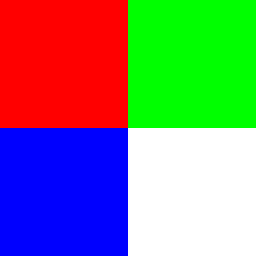
After the CUDA kernel runs, these colors are converted into their respective grayscale intensities: 
Notice how the green pixel results in a much brighter gray than the blue pixel, even though both were at full intensity in the original image. This visual difference confirms that our kernel correctly applied the physiological weights of the luminosity formula.
Conclusion and Next Steps
In this lesson, we built a complete CUDA grayscale workflow: we prepared RGB data on the host, mapped GPU threads to pixels, applied the luminosity formula, copied the result back, saved raw files, and verified the output against expected values. That is a strong first example because it connects image representation, CUDA execution, and correctness checking in one small program.
Next, we will use this foundation more actively in practice, where we will implement key pieces ourselves and turn this understanding into hands-on GPU problem-solving.
