Combining NumPy Masks
Introduction
Welcome to Filtering and Replacing with Masks and np.where. We’re starting the first lesson in this course, and we’ll build on the 2D array and Boolean masking skills from earlier in the learning path. A single condition is useful, but real questions often need more: for example, a temperature is mild if it is at least 18 and below 22. We’ll learn to combine conditions with & and |, and flip a mask with ~. We’ll also practice a key habit: putting parentheses around each comparison.
Combining Masks with &: Both Conditions Must Hold
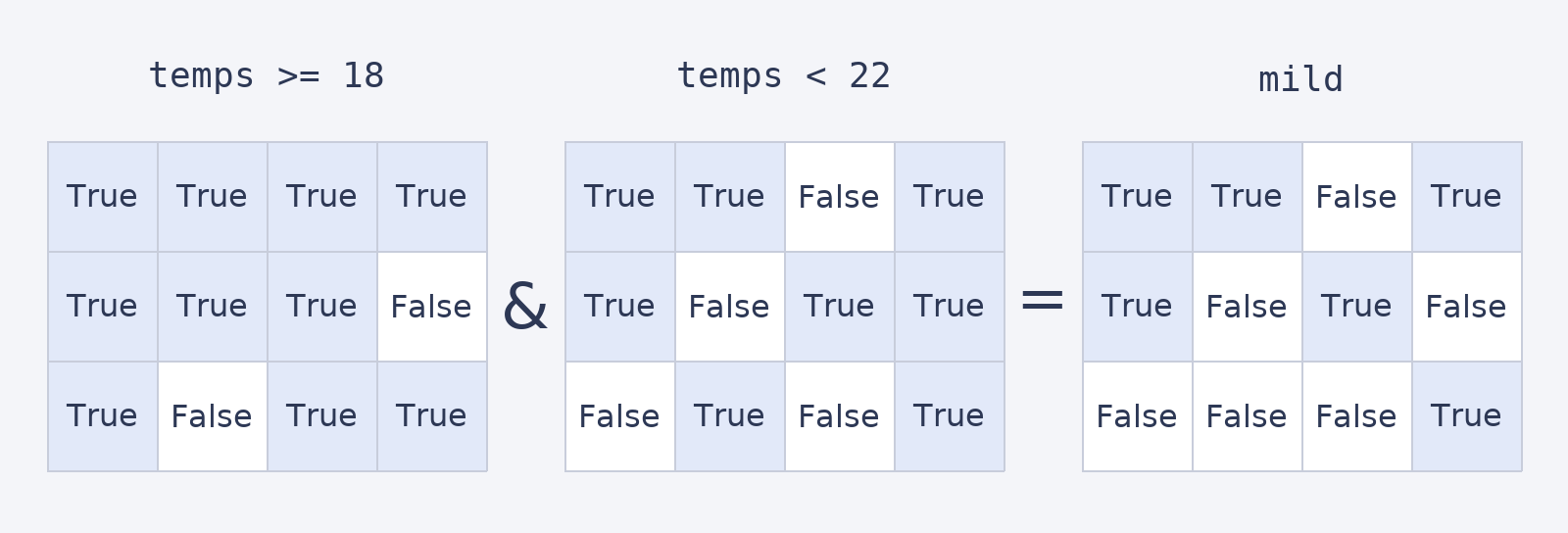
A comparison such as temps >= 18 creates a Boolean mask with the same shape as temps. The & operator combines two masks cell by cell: a cell is True only when both comparisons are True. In this table, a mild reading is at least 18 and below 22.
Each comparison has its own parentheses. The printed mask has the same 3-by-4 shape as temps, so we can compare corresponding cells directly. For example, 21 is marked True, while 24 is marked False.
The aligned masks show how & keeps only cells that are True in both comparisons.
Selecting Values with a Combined Mask
Once we have a mask, we can use it to select the values marked True, just as we did with a mask built from one condition. Here, temps[mild] selects the readings that meet both parts of the mild-temperature rule. The mask is 2D, but this selection is a flat 1D array of matching values in row-by-row order.
The result contains the six mild readings. NumPy gathers the selected cells into one sequence rather than keeping their original row and column positions. In the next lesson, we’ll use a different kind of mask to select whole rows and preserve records.
