Understanding Event Driven Architecture
Event-Driven Architecture ⚡
With asynchronous event delivery, a system records something that has happened and lets follow-on work happen without making checkout wait for it. At Tutor Bright, you will use this pattern to keep enrolments moving when the email provider is slow or unavailable.
In this lesson, you will learn to:
- Explain events, publishers, subscribers, queues, and topics as ways for systems to react to things that happen
- Distinguish event-driven communication from direct request-and-response calls, including what happens when the receiving system is unavailable
- Identify workloads that benefit from queues and events, including order confirmations, inventory or availability updates, and sudden traffic spikes
Name the five parts, then use one sentence per part 🧩
- Event — a past-tense record that something happened, such as “enrolment completed,” “payment received,” or “photo uploaded”; it announces a fact rather than instructing another system.
- Publisher — the system that creates and publishes the event without needing to call each downstream service directly.
- Subscriber — a system that receives an event from a topic and reacts to it, such as an email, reporting, or availability service.
- Queue — a holding line for work: one consumer processes each message, while multiple consumers can share the work.
- Topic — a publish-and-subscribe channel that sends a copy of an event to separate subscriptions, so several services can react independently.
For example, checkout can publish one ‘enrolment completed’ event to a topic. The email service and availability service each receive their own copy. Within the email service, a queue holds email work so several workers can share the sending load.
The booking system announces what happened. It does not phone around telling other systems what to do, and it does not wait for each downstream system to finish.
Lead with what happens when the other system is down 🚨
With a direct request-and-response call, the caller waits for an answer. If the receiving system is unavailable, the caller must handle a timeout or failure. If checkout treats email delivery as required, checkout can become slow or fail even though the enrolment and payment could otherwise succeed.
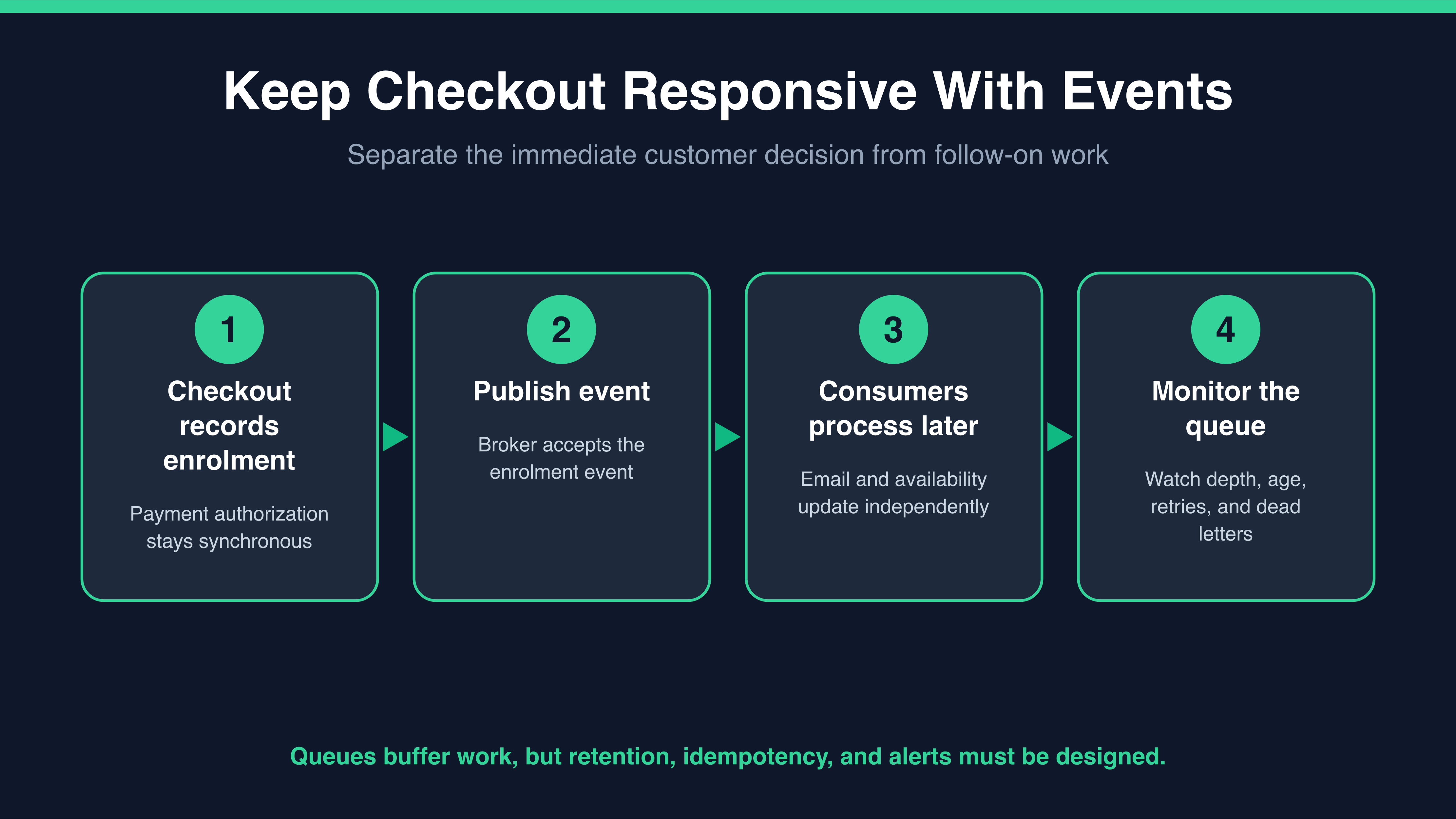
With asynchronous delivery, checkout publishes an “enrolment completed” event to a message broker—a service that accepts, retains, and routes messages to queues or topic subscriptions—and waits only for confirmation that the broker accepted it. The email consumer can process the event later. If that consumer is down, the broker can retain the message according to its configured retention policy and deliver it when the consumer returns.
That resilience has to be designed: configure retry limits and backoff, send messages that still cannot be processed to a separate dead-letter queue, and alert on them. A message can be delivered more than once, so the email handler must be idempotent—safe to run again without sending duplicate confirmations. This prevents an email-provider failure from blocking an enrolment after checkout has recorded it; it does not guarantee that nothing can ever be lost.
At Tutor Bright, Chris plans to merge a direct email call into checkout this week, two weeks before the term-start surge. As the junior cloud engineer, your goal is to agree which result checkout needs immediately and which follow-on work can happen asynchronously.
Chris: It is one direct call to the email provider. They have 99.9% uptime. Why over-engineer this?
Simone: Consider the slow case, not only an outage. At term start, suppose the provider completes 10 sends a minute while 100 enrolments a minute arrive. If checkout waits for every send, its request workers spend their time waiting, and page latency and timeouts rise.
Chris: So a parent could have paid but still see checkout time out because the email was slow.
Simone: Right. Keep the payment-authorisation result synchronous because the parent needs that answer immediately. After checkout records the enrolment, publish the confirmation-email event and the availability-update event so those can be processed separately.
Chris: Fine, but now I am debugging a queue at nine on a Monday night.
Simone: Fair. Define “processed” as the consumer successfully completing the action and recording that result. During the surge, monitor queue depth, age of the oldest message, consumer success rate, retries or failures, and messages sent to the dead-letter queue. Set alerts on thresholds rather than assuming a flat queue is healthy.
Notice what moved the conversation. Not "events are best practice," but a specific slow-case walkthrough and an honest answer to the complexity objection.
