Relational Databases and Transactions
Relational Databases and Transactions 🗃️
This lesson introduces the relational database: the common cloud default when records need a dependable structure and related changes must succeed together.
In this lesson, you will learn to:
- Explain how tables, rows, columns, schemas, and SQL work together in a relational database.
- Identify what a managed relational service takes off your team's operational workload.
- Distinguish workloads that benefit from strict structure and reliable transactions.
Tables, Rows, Columns, and SQL 🧾
A relational database stores data in tables. If you've ever used a spreadsheet, you already have most of the mental model. A table has columns, which are the named fields every record must fit into, and rows, which are the individual records themselves. A "Patients" table might have columns for patient identifier, first name, last name, and date of birth, and each row is one patient.
What makes it relational is that tables refer to one another. An "Appointments" table doesn't repeat the patient's name; it stores the patient identifier and points at the row in the Patients table. That pointing is called a relationship, and it's why the data stays consistent. Change a patient's surname in one place and every appointment linked to them is automatically correct, because the surname was only ever stored once. The column that uniquely identifies each row (that patient identifier) is called the primary key. A foreign key is the matching field in another table, such as patient_id in Appointments, that points back to that primary key.
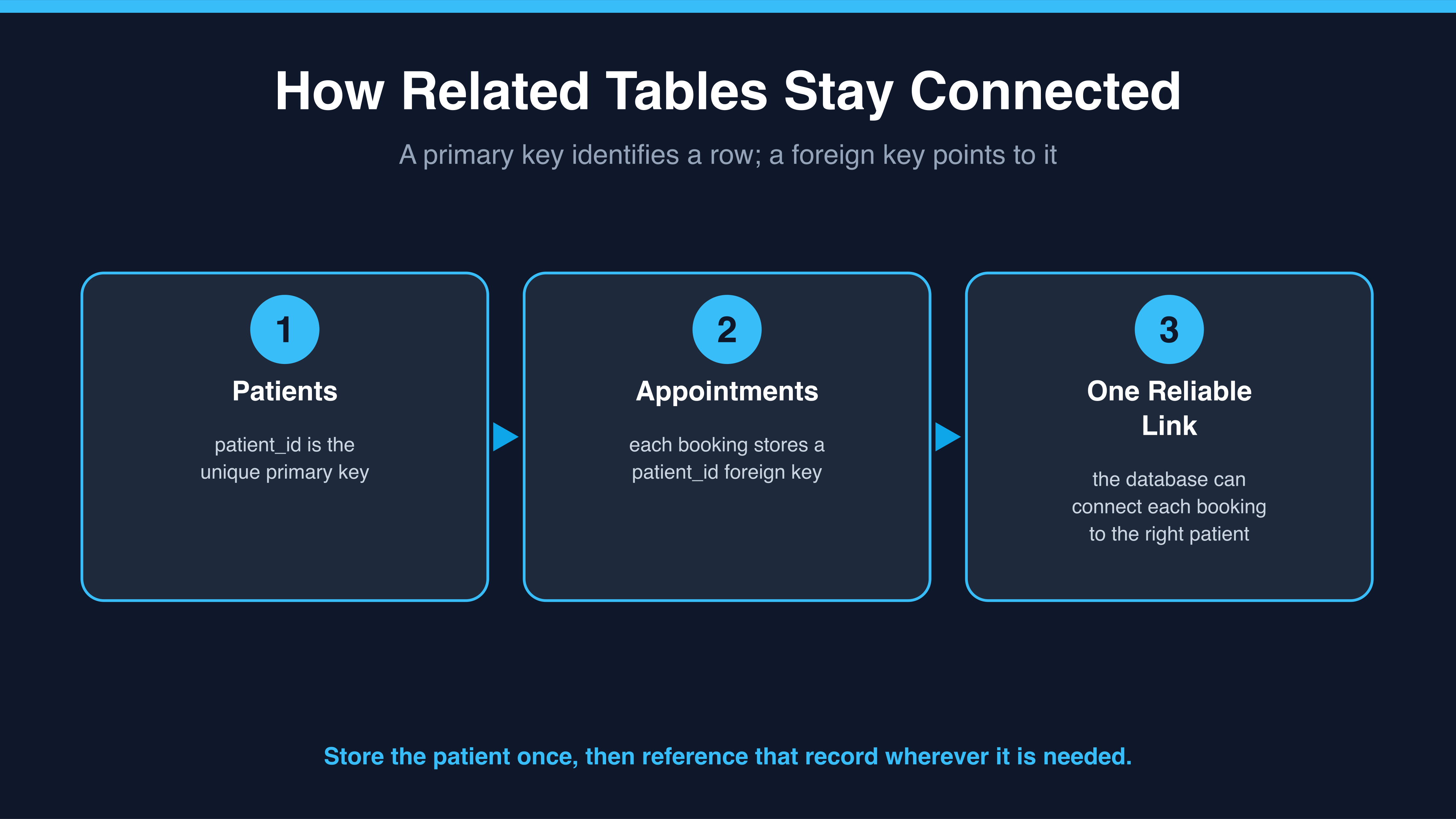
The diagram captures the practical payoff: you store a patient's details once, then use the identifier to connect every appointment to the right record.
The rules about which tables exist, which columns they have, and what type of data each column accepts are called the schema. The schema is defined up front and enforced by the database. If someone tries to save a payment record with no amount, or types text into a date column, the database refuses it. That strictness sounds inconvenient until you consider the alternative, which is discovering three months later that half your records are missing a field nobody noticed.
You ask questions of a relational database using SQL, which stands for Structured Query Language. It's a readable, English-like language for retrieving, adding, changing, and deleting data, and it has been the standard for decades. Being able to read basic SQL is a useful skill for a new cloud engineer, because it's the common language between engineers, analysts, and reporting tools.
What a Managed Database Service Does for You 🛠️
You could run a relational database yourself by launching a virtual machine, installing the database software, and looking after it forever. In practice, most teams now use a managed relational service: Amazon RDS on Amazon Web Services, Azure SQL Database on Microsoft Azure, or Google Cloud SQL on Google Cloud. You choose a database engine and a size, and the provider hands you a running database with a connection address.
The value is in what disappears from your calendar. The provider patches the operating system and the database software underneath, takes automated backups on a schedule you choose, lets you restore to a point in time, and (if you enable it) keeps a standby copy in a second availability zone that takes over automatically if the primary fails. Monitoring and basic scaling are built in. That's real work you no longer own.
What does not disappear is everything above the engine. The quality of your data is yours. The schema design is yours. Badly written queries that scan millions of rows are yours. Who has permission to connect is yours. Deciding how long backups are retained is yours. "Managed" means managed infrastructure, not managed decisions.
When Structure and Transactions Are Non-Negotiable ✅
The strongest argument for a relational database is the transaction: a group of changes that either all succeed or all fail together. Taking a payment involves several steps, such as recording the charge, marking the invoice paid, and reducing an outstanding balance. If the system crashes halfway through, you must not be left with a charge recorded and an invoice still marked unpaid. A transaction guarantees the whole group is applied, or none of it is.
Here, Jessica, a finance stakeholder at Brightpath Clinics, asks Dan, the cloud engineer, how the system can keep a customer-facing payment promise.
- Jessica: Finance has one rule for the new system: a patient must never be double-charged. Is that a database question or an application question?
- Dan: Both, but the database does the heavy lifting. If the payment steps run inside one transaction, either all of them commit or the database rolls the whole thing back.
- Jessica: So there's no state where we've taken the money but lost the record of it?
- Dan: Right. And the schema helps too, because a payment row can't be saved at all without an amount and an invoice reference.
- Jessica: So the transaction is what guarantees we never double-charge?
- Dan: Not on its own. A transaction stops a partial charge, money taken but no record, or a record with no money. But if the same payment is submitted twice, say the request is retried after a timeout, the database sees two complete, valid transactions and commits both. Stopping that duplicate is the application's job: an idempotency key or a unique constraint on the payment reference, so the second attempt is recognized and rejected. The database can't tell a retry from a genuine new charge.
- Jessica: Understood, so the database keeps each charge whole and the application makes sure a repeat never becomes a second charge. That's the sentence I'll take to the finance lead.
Notice that Dan tied the guarantee to a business promise rather than describing a feature. That's the move worth copying. Orders, payments, inventory, and appointments often share the same profile: the shape of the data is stable, the records reference each other, and being partly correct is worse than failing outright. Relational databases are the common default for this work, though some managed NoSQL services also offer multi-item transactions. Always check the guarantees of the specific service rather than assuming all databases behave alike.
The takeaway is that a relational database provides enforced structure and all-or-nothing transactions, while a managed service returns operational maintenance time to your team. Next, you will check the core vocabulary, test what a managed service covers, and explain how transactions protect a business rule in a short written response.
