Building the Game Interface
Introduction: What Are We Building?
Welcome to the first lesson of the course, where we begin building the frontend for the LLM Prediction Game. In this course, you will create a web-based game in which players try to predict the next word generated by a large language model (LLM). The frontend is the part of the application that users see and interact with in their web browsers.
In this lesson, we will focus on creating the main HTML structure for the game. HTML (HyperText Markup Language) is the standard language used to create web pages. By the end of this lesson, you will understand how the HTML template for our game is organized and how it connects to the rest of the application.
Recall: Project Structure
Let’s quickly look at how the main files and folders are organized for the parts of the project we’ll focus on in this course:
public/: Contains files served directly to the browser.index.html: The main page for the game.style.css: Stylesheet for the game.script.js: JavaScript file for interactivity.
routes.js: Contains the server-side code for routing requests. We already coded this in a previous courseserver.js: The main entry point for running the web application. We already coded this in a previous course
How Static HTML Files Are Served in Node.js
Before we dive into the HTML itself, let’s talk about how a JavaScript/Node.js backend (for example, using Express) serves static HTML files. In a Node.js application, you typically use the Express framework to handle HTTP requests and serve files.
When a user visits a certain page (like the homepage), Express can send the correct HTML file to the browser using the res.sendFile function. For example, to serve the main page of our game, you might have this code in your routes.js file:
Here’s what’s happening:
- The
router.get('/', ...)line tells Express to run this function when someone visits the root URL (/). - Inside the function,
res.sendFile(...)tells Express to send theindex.htmlfile from thepublicfolder to the user’s browser.
This is how your Node.js backend connects your server code to the HTML that users see.
Breaking Down the `index.html` Structure
Now, let’s look at how the index.html file is built, step by step. We’ll focus on the main parts that make up the game’s interface.
1. The Basic HTML Layout
Every HTML file starts with a basic structure:
- The
<!DOCTYPE html>line tells the browser this is an HTML5 document. - The
<head>section contains information about the page, such as its title and a link to a CSS file for styling. - The
<body>section is where all the visible content goes. - The stylesheet is included using a direct file path:
<link rel="stylesheet" href="/static/style.css" />.
2. The Main Container
Inside the <body>, we use a <div> with the class container to group all the game elements together:
This helps with layout and styling.
3. Headings and Instructions
At the top of the container, we add a heading and a short description:
<h1>is the main title of the page.<p>withid="description"gives a short instruction to the player.
4. Start Button
We want the user to start the game by clicking a button:
- The button with
id="start-button"will be used to begin the game.
5. Game Information
Once the game starts, we show some information about the LLM and the prompts:
- This section is hidden at first (using the
hiddenclass via CSS, which we'll see in later units). - It will display the model name, system prompt, and user question.
6. Response and Guess Table
We need a place to show the LLM’s response and a table to track guesses:
- The
#responsediv will show the LLM’s output. - The
#guess-tablewill list each guess, the correct word, and the score for that round.
7. Guess Input
Players need a way to enter their guesses:
- This section is also hidden at first.
- It contains a text input and a submit button for the player’s guess.
8. Result and Leaderboard
At the end of the game, we show the final score and a leaderboard:
- The result section lets the player see their score and enter their name.
- The leaderboard shows the top scores.
9. Including JavaScript
At the end of the file, we include a JavaScript file for interactivity:
- This line loads a JavaScript file that will handle user actions and update the page.
In Express, static files like CSS and JavaScript are often served from a directory (such as public/) using the express.static middleware. This middleware maps a URL path (like /static/) to a folder on disk. For example, in your server.js or main app file, you might see:
This line tells Express to serve files from the public/ directory whenever a request starts with /static/. So, a file at public/script.js is accessible in the browser at /static/script.js, and public/style.css is accessible at /static/style.css.
This setup keeps your static files organized and makes them easy to reference in your HTML.
Connecting HTML Elements to Game Features
Let’s connect what we see in the HTML to the features of the game:
- The start button begins the game.
- The info section shows which LLM is being used and what the prompts are.
- The response area displays the LLM’s output as the game progresses.
- The guess input lets the player type in their prediction for the next word.
- The guess table keeps track of each guess, the correct answer, and the score for that round.
- The result section shows the player’s final score and lets them submit it.
- The leaderboard displays the top scores from all players.
Each of these elements will be made interactive with JavaScript and connected to the backend using Node.js or another JavaScript backend. For now, our focus is on understanding and building the HTML structure.
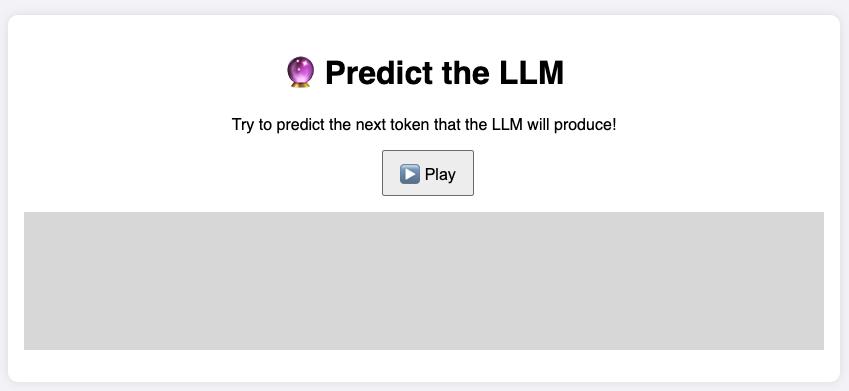
At the end, we are aiming for a page similar to this:
Summary And What’s Next
In this lesson, you learned how the main HTML template for the LLM Prediction Game is organized. We covered how a Node.js backend serves HTML files, broke down the structure of index.html, and explained how each part of the page supports the game’s features.
In the practice exercises that follow, you’ll get hands-on experience working with this HTML file. You’ll identify and edit different elements, preparing you for the next steps, where we’ll add interactivity and connect the frontend to the backend. Great job getting started — let’s move on to practicing what you’ve learned!
